Type text, add images, blackout confidential details, add comments, highlights and more.
02. Sign it in a few clicks
Draw your signature, type it, upload its image, or use your mobile device as a signature pad.
03. Share your form with others
Send it via email, link, or fax. You can also download it, export it or print it out.
How to use or fill out authority settle with our platform
Ease of Setup
DocHub User Ratings on G2
Ease of Use
DocHub User Ratings on G2
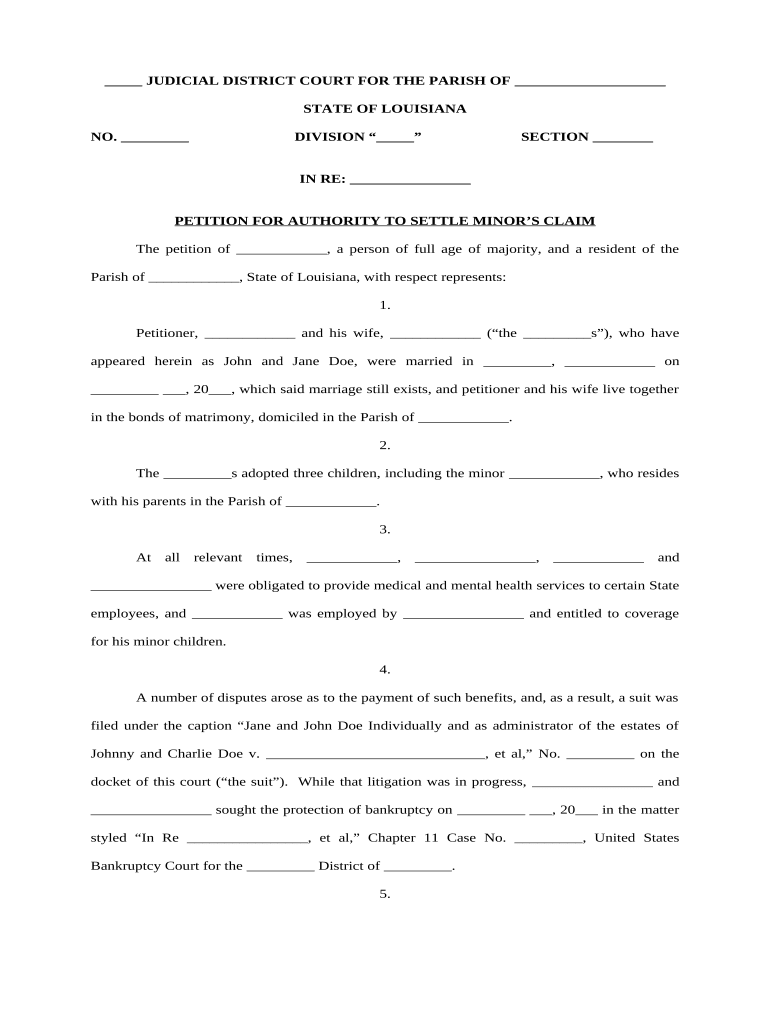
Click ‘Get Form’ to open the authority settle document in the editor.
Begin by filling in the judicial district court details, including the parish and case number at the top of the form.
In section one, provide your name as the petitioner along with your spouse's name, ensuring to include marriage details and residence information.
Section two requires you to list any adopted children, specifically mentioning the minor involved in this claim.
Proceed to section three where you will detail any relevant medical and mental health service obligations related to state employees.
In section five, summarize any disputes regarding payment of benefits and outline any claims filed in relation to these disputes.
Complete sections six through eight by detailing settlement amounts, justifications for allocations, and appointing an under-tutrix ad hoc if necessary.
Start using our platform today for free to streamline your authority settle process!
Unique Hebrew Inscription Showing Existence of a Jewish
Dec 21, 2015 The existence of an ancient settlement at the site, on the northeast shore of the Sea of Galilee, has been known since the 1960s, when MendelRead more
The Secretary of Defense shall settle (A). claims involving uniformed service members pay, allowances, travel, transportation, payments for unused accruedRead more
(3) The Administrator of General Services shall settle claims involving expenses incurred by Federal civilian employees for official travel and transportation,Read more
Cookie consent notice
This site uses cookies to enhance site navigation and personalize your experience.
By using this site you agree to our use of cookies as described in our Privacy Notice.
You can modify your selections by visiting our Cookie and Advertising Notice.