Type text, add images, blackout confidential details, add comments, highlights and more.
02. Sign it in a few clicks
Draw your signature, type it, upload its image, or use your mobile device as a signature pad.
03. Share your form with others
Send it via email, link, or fax. You can also download it, export it or print it out.
How to use or fill out agreement between two partners with our platform
Ease of Setup
DocHub User Ratings on G2
Ease of Use
DocHub User Ratings on G2
Click ‘Get Form’ to open the agreement in the editor.
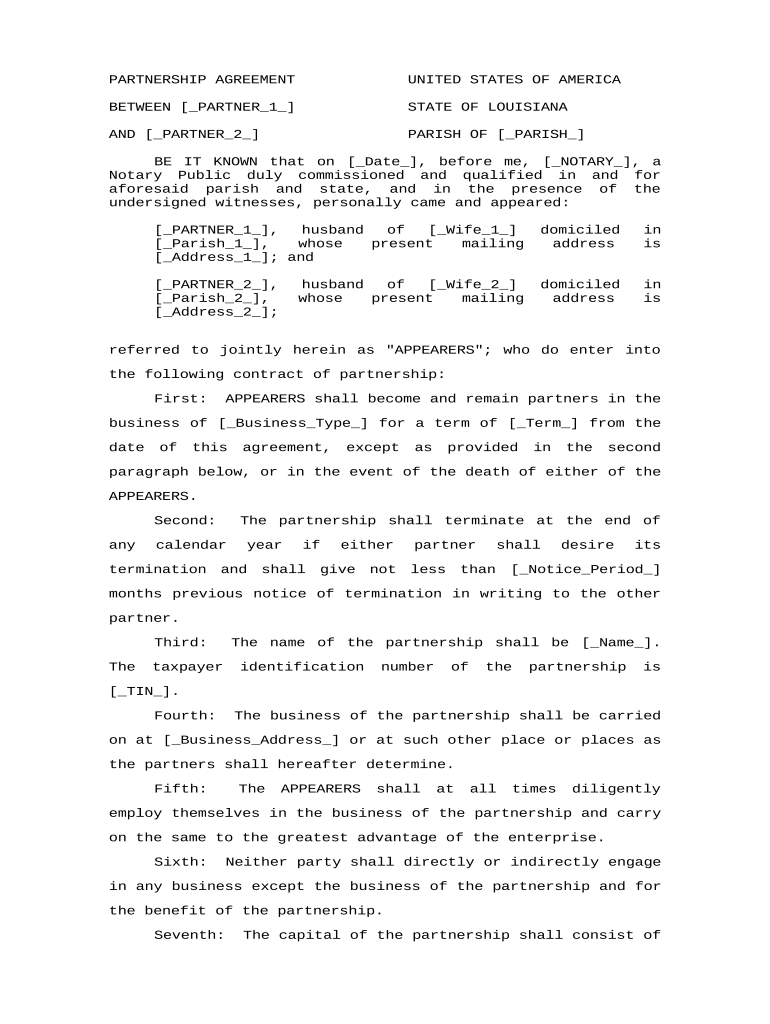
Begin by filling in the names of both partners in the designated fields [_PARTNER_1_] and [_PARTNER_2_]. Ensure accuracy as these names will be used throughout the document.
Next, specify the parish and mailing addresses for each partner. This information is crucial for legal identification and should be entered in [_PARISH_], [_Address_1_], and [_Address_2_].
Indicate the type of business being established under this partnership in the field labeled [_Business_Type_] and set the term of partnership in [_Term_].
Fill out financial details including capital contributions, loans, and interest rates as outlined in sections seven through fourteen. Use placeholders like [_$Capital_] and [_$Draw_] to ensure clarity.
Review all entries for accuracy before saving your document. Utilize our platform’s features to sign electronically or share with a notary if required.
Start using our platform today to streamline your partnership agreement process for free!
Fill out agreement between two partners online It's free
Agreement between two partners sampleAgreement between two partners templateSample Partnership Agreement PDFSmall business partnership agreement PDFSample partnership Agreement PDF free downloadAgreement between two partners template wordAgreement between two partners exampleAgreement between two partners pdf
Security and compliance
At DocHub, your data security is our priority. We follow HIPAA, SOC2, GDPR, and other standards, so you can work on your documents with confidence.
If two (2) or more Partners of the Partnership desire to accept the Offer to purchase the Offered Interest, then, in the absence of an agreement between them,.Read more
Difference between Joint Venture and Partnership - diff.wiki
Aug 30, 2020 A joint venture is a contractual agreement between two companies or parties to join together in order to accomplish a particular project or businessRead more
Cookie consent notice
This site uses cookies to enhance site navigation and personalize your experience.
By using this site you agree to our use of cookies as described in our Privacy Notice.
You can modify your selections by visiting our Cookie and Advertising Notice.