Type text, add images, blackout confidential details, add comments, highlights and more.
02. Sign it in a few clicks
Draw your signature, type it, upload its image, or use your mobile device as a signature pad.
03. Share your form with others
Send it via email, link, or fax. You can also download it, export it or print it out.
How to use or fill out shareholders changing with our platform
Ease of Setup
DocHub User Ratings on G2
Ease of Use
DocHub User Ratings on G2
Click ‘Get Form’ to open the Shareholders Changing document in the editor.
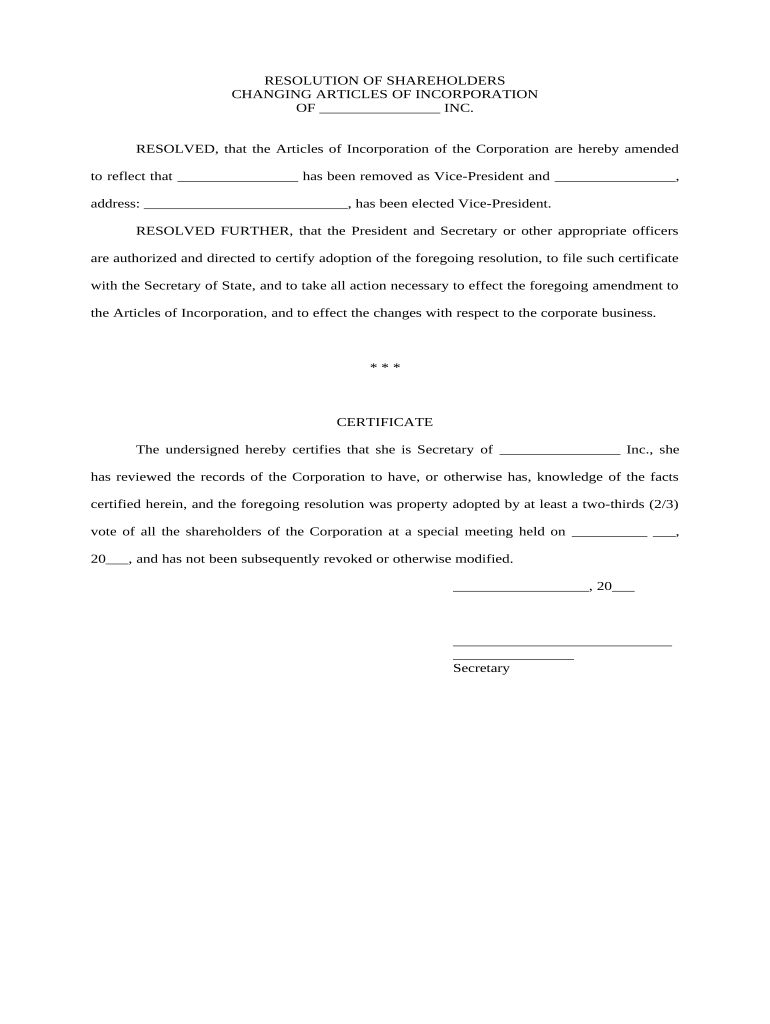
Begin by filling in the name of your corporation in the designated space at the top of the form. This ensures that all amendments are accurately attributed.
In the first resolution section, specify the name of the Vice-President being removed and then enter the name and address of the new Vice-President. Make sure all details are correct for legal compliance.
Proceed to certify adoption by entering the date of the special meeting where this resolution was voted on. Ensure that you have a record of at least a two-thirds vote from shareholders.
Complete the Articles of Amendment section by listing all officers' names and addresses as required. This is crucial for maintaining updated corporate records.
Finally, ensure that both President and Secretary sign and date where indicated, confirming their agreement to these changes.
Start editing your Shareholders Changing document online for free today!
Shareholders changing redditChange in beneficial ownership of sharesChange of shareholders formChange of share structure sampleHolding shares in trust for someone elseShareholder detailsHow to change company ownershipHow to remove shareholder from company
Security and compliance
At DocHub, your data security is our priority. We follow HIPAA, SOC2, GDPR, and other standards, so you can work on your documents with confidence.
The Recent Evolution of Shareholder Activism in the United
Dec 24, 2025 The US shareholder activism environment is maturing and increasingly complex, characterized by new players, evolving tactics, and shifting
SHAREHOLDER CHANGE (CHANGE IN SHAREHOLDERS) Use one block per person -. To REMOVE a shareholder - list the name AND title of the shareholder being removedRead more
Shareholders use strategies like private and public engagement, proposals, and voting to drive change. Networks among activists amplify influence, and spilloverRead more
Cookie consent notice
This site uses cookies to enhance site navigation and personalize your experience.
By using this site you agree to our use of cookies as described in our Privacy Notice.
You can modify your selections by visiting our Cookie and Advertising Notice.