Warranty Deed from Husband to Himself and Wife - Louisiana 2026

Get Form
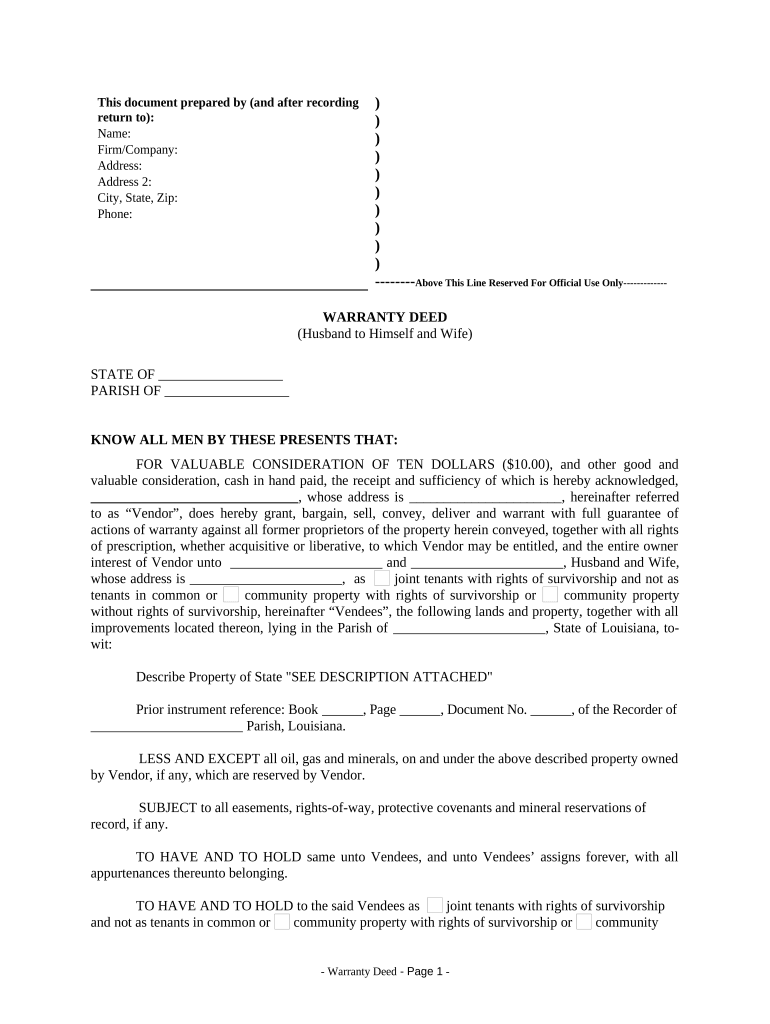
Warranty Deed from Husband to Himself and Wife - Louisiana Preview on Page 1

Here's how it works

01. Edit your form online
Type text, add images, blackout confidential details, add comments, highlights and more.
02. Sign it in a few clicks
Draw your signature, type it, upload its image, or use your mobile device as a signature pad.
03. Share your form with others
Send it via email, link, or fax. You can also download it, export it or print it out.

How to use or fill out Warranty Deed from Husband to Himself and Wife - Louisiana with our platform

Form edit decoration
9.5
Ease of Setup
DocHub User Ratings on G2
9.0
Ease of Use
DocHub User Ratings on G2
  1. Click ‘Get Form’ to open the Warranty Deed in the editor.
  2. Begin by filling in the Vendor's name, firm/company, address, and contact information at the top of the document. This identifies who is transferring the property.
  3. In the 'STATE OF' and 'PARISH OF' sections, enter the relevant state and parish where the property is located.
  4. Fill in the Vendor's name and address again in the designated fields, ensuring accuracy for legal purposes.
  5. Specify the Vendees' names (Husband and Wife) along with their address. Choose whether they will hold title as joint tenants with rights of survivorship or under another arrangement.
  6. Describe the property being transferred clearly, referencing any attached descriptions if necessary.
  7. Complete any additional sections regarding easements or mineral rights as applicable to your situation.
  8. Finally, ensure all parties sign in front of witnesses and a notary public to validate the deed.

Start using our platform today to easily complete your Warranty Deed online for free!

be ready to get more

Complete this form in 5 minutes or less

Get form

Got questions?

We have answers to the most popular questions from our customers. If you can't find an answer to your question, please contact us.
Contact us

Yes, it is possible with DocHub. This safe and compliant online solution features a phone-based signing option. After you log in to your DocHub account and add your Warranty Deed from Husband to Himself and Wife - Louisiana to our editor, complete all necessary areas and use the Sign feature on the upper barf. Click on Create your signature and select Phone from the available choices. Here, you scan a QR code with your smartphone and draw your signature on your phone screen, as you usually do when approving physical papers. If you access DocHub right from your mobile device, you can eSign your form by drawing your eSignature, adding its image, or simply with a typed name.

You need only an internet connection and a browser to complete your Warranty Deed from Husband to Himself and Wife - Louisiana by using an iOS phone. Open the DocHub website and authenticate. Then, add your file or select it from the list in your dashboard. Then use our editing instruments to complete your form and save all your modifications. You can also send it to a dedicated recipient immediately.

Security and compliance

At DocHub, your data security is our priority. We follow HIPAA, SOC2, GDPR, and other standards, so you can work on your documents with confidence.

Learn more
ccpa2
pci-dss
gdpr-compliance
hipaa
soc-compliance