Type text, add images, blackout confidential details, add comments, highlights and more.
02. Sign it in a few clicks
Draw your signature, type it, upload its image, or use your mobile device as a signature pad.
03. Share your form with others
Send it via email, link, or fax. You can also download it, export it or print it out.
How to use or fill out ky seller with our platform
Ease of Setup
DocHub User Ratings on G2
Ease of Use
DocHub User Ratings on G2
Click ‘Get Form’ to open the ky seller document in the editor.
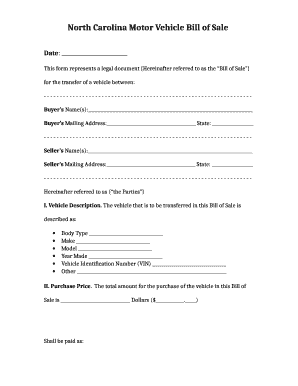
Begin by entering the names of the SELLER and PURCHASER in the designated fields. Ensure that both parties' names are spelled correctly for legal accuracy.
Next, fill in the property address where indicated. This is crucial as it identifies the specific property involved in the contract.
Review the disclosure statement carefully. It outlines important information regarding forfeiture rights, so make sure you understand its implications.
Finally, both PURCHASERS should print their names and sign at the bottom of the form. This step finalizes your acknowledgment of the terms outlined in this document.
Start using our platform today to easily complete your ky seller form online for free!
Sellers disclosure KentuckyKY Real Estate CommissionHow long are you liable after selling a house in KentuckyKY Real Estate AuthorityKentucky com homesKentucky commissionLead-based paint Disclosure KentuckyKREC forms
Security and compliance
At DocHub, your data security is our priority. We follow HIPAA, SOC2, GDPR, and other standards, so you can work on your documents with confidence.
40 KAR 2:120 - Business opportunity forms | State Regulations
(1) A seller of business opportunities shall register with the Attorney General pursuant to KRS 367.805 if the sellers proposed activity meets the definitionRead more
Alpha Metallurgical Resources - Global Energy Monitor
May 13, 2025 Alpha Metallurgical Resources (AMR) is Americas tenth-largest coal producer, with production capacity of nearly 126 million tons of thermal and metallurgicalRead more
Sales Use Tax - Department of Revenue - Kentucky.gov
Kentucky Sales and Use Tax is imposed at the rate of 6 percent of gross receipts or purchase price. There are no local sales and use taxes in Kentucky.Read more
Cookie consent notice
This site uses cookies to enhance site navigation and personalize your experience.
By using this site you agree to our use of cookies as described in our Privacy Notice.
You can modify your selections by visiting our Cookie and Advertising Notice.