Type text, add images, blackout confidential details, add comments, highlights and more.
02. Sign it in a few clicks
Draw your signature, type it, upload its image, or use your mobile device as a signature pad.
03. Share your form with others
Send it via email, link, or fax. You can also download it, export it or print it out.
How to use or fill out ks sale contract with our platform
Ease of Setup
DocHub User Ratings on G2
Ease of Use
DocHub User Ratings on G2
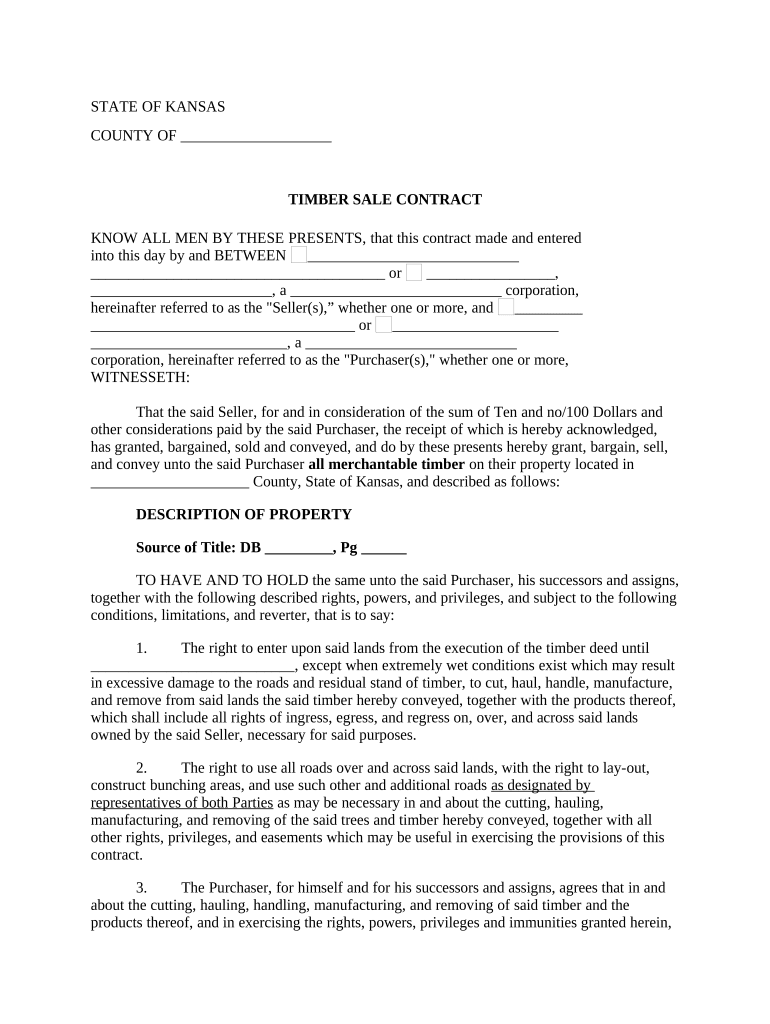
Click ‘Get Form’ to open the ks sale contract in the editor.
Begin by filling in the Seller's and Purchaser's names in the designated fields. Ensure that you include any corporate designations if applicable.
In the 'Description of Property' section, accurately describe the property location and provide details such as Source of Title, DB number, and Page number.
Proceed to fill out the rights and privileges granted to the Purchaser, ensuring clarity on access rights and responsibilities regarding timber management practices.
Complete financial sections including deposit amounts and payment terms for any timber not sold according to this contract. Be precise with figures to avoid confusion.
Finally, ensure all parties sign where indicated. Use our platform’s signature feature for a seamless signing experience.
Start using our platform today for free to streamline your ks sale contract process!
Ks sale contract templateKs sale contract pdfKs sale contract template freeKansas real estate contract PDFKs sale contract sampleKansas real estate purchase contractFree ks sale contractKs sale contract sample pdf
Security and compliance
At DocHub, your data security is our priority. We follow HIPAA, SOC2, GDPR, and other standards, so you can work on your documents with confidence.
Cookie consent notice
This site uses cookies to enhance site navigation and personalize your experience.
By using this site you agree to our use of cookies as described in our Privacy Notice.
You can modify your selections by visiting our Cookie and Advertising Notice.