




Here's how it works

01. Edit your how to transfer property title to family member online
Type text, add images, blackout confidential details, add comments, highlights and more.

02. Sign it in a few clicks
Draw your signature, type it, upload its image, or use your mobile device as a signature pad.

03. Share your form with others
Send deed land to family member via email, link, or fax. You can also download it, export it or print it out.
How to use or fill out form tennessee deed with our platform

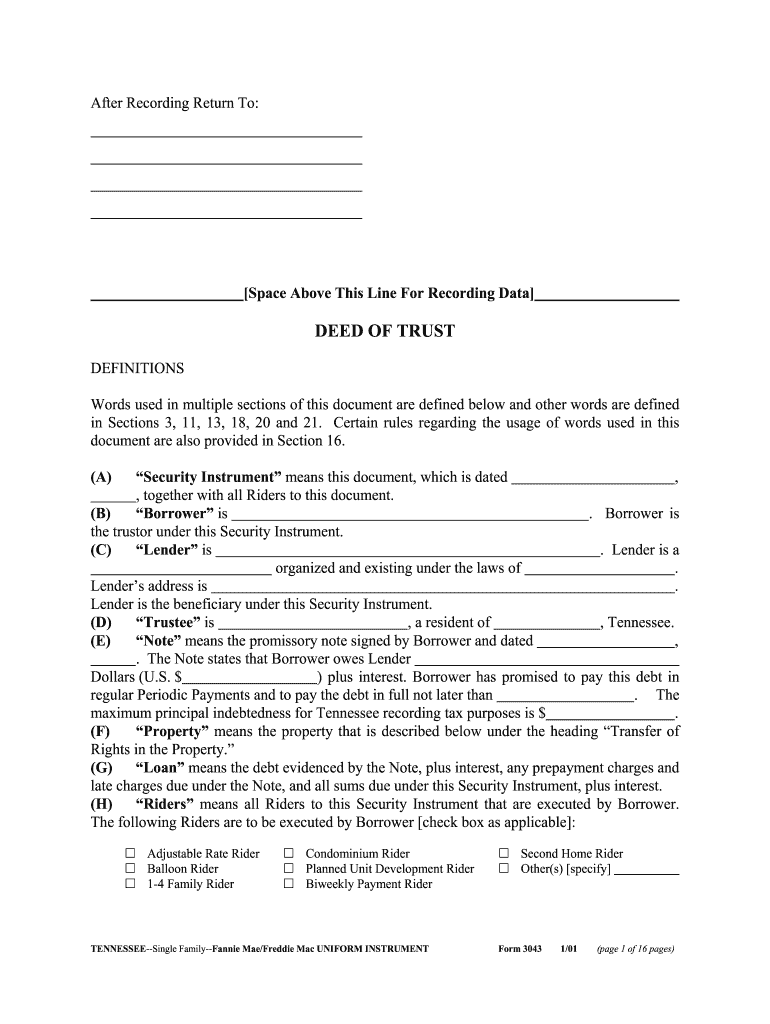
- Click ‘Get Form’ to open the Tennessee Deed in the editor.
- Begin by filling in the date at the top of the form. This is crucial as it establishes when the deed is effective.
- In Section (B), enter the name of the Borrower, who is also referred to as the trustor under this Security Instrument.
- Next, in Section (C), provide details about the Lender, including their name and address. Ensure accuracy as this information is vital for legal purposes.
- Proceed to Section (E) where you will need to specify the amount owed under the Note, including interest and payment terms.
- In Section (F), describe the Property being secured by this deed. Include complete address details for clarity.
- If applicable, check any Riders that are relevant to your agreement in Section (H). This may include options like Adjustable Rate Rider or Balloon Rider.
- Finally, review all entries for accuracy before signing. Use our platform’s features to save and share your completed document securely.
Start using our platform today for free and streamline your document editing process!
Fill out form tennessee deed online
It's free
It's free
See more form tennessee deed versions
We've got more versions of the form tennessee deed form. Select the right form tennessee deed version from the list and start editing it straight away!
| Versions | Form popularity | Fillable & printable |
|---|---|---|
| 2001 | 4.8 Satisfied (41 Votes) |
Security and compliance
At DocHub, your data security is our priority. We follow HIPAA, SOC2, GDPR, and other standards, so you can work on your documents with confidence.
Learn more


Related forms

Proof of remittance bdo sample
The document is a remittance application form for BDO Remit (USA), Inc., allowing users to send money to BDO Unibank, In ...

Lung VQ ScanNational Heart, Lung, and Blood Institute
The document is a fact sheet about lung scans, specifically ventilation perfusion (VQ) lung scans, which are nuclear med ...

Appendix 3: Medical declaration for entrylevel certificate divers
The document is a medical declaration form for participants enrolling in entry-level recreational diving certificate tra ...

Flexsave Claim Form-final ab mb sk
The document is a claim form for FlexSaveTM, intended for employees in Alberta, Manitoba, and Saskatchewan. It outlines ...

Form 5 declaration of last supply
The document is a declaration form under the Construction Lien Act, where a supplier of services or materials confirms t ...

Adult Continuing Education (ACE) Mitigation Application Form Waiver of
The document outlines the Adult Continuing Education (ACE) Mitigation Application Form, which allows students to apply f ...

NRBC Foal Enrollment Form
The document outlines the enrollment process for foals in the NRBC program, detailing requirements for registration, dea ...

Application to Discontinue Enforcement of Ongoing Support Application to Discontinue Enforcement of
Application to Discontinue Enforcement of Ongoing Support Application to Discontinue Enforcement of
The document is an application form for the Ministry of Children, Community and Social Services' Family Responsibility O ...