Ks limited company 2026

Get Form
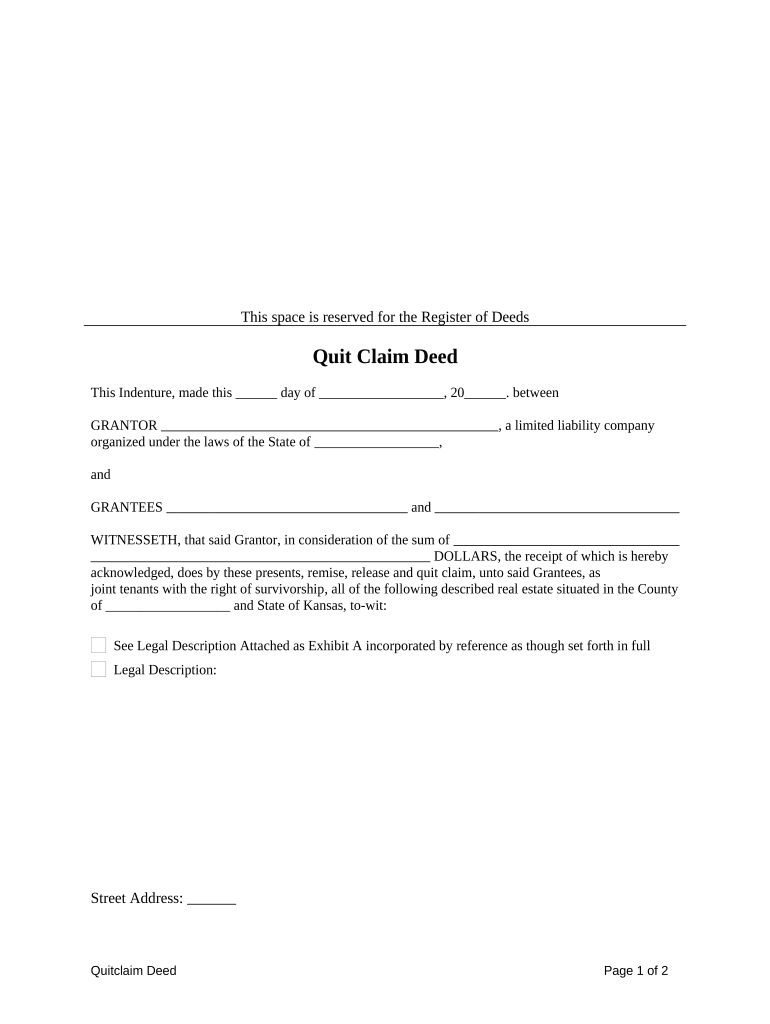
ks limited company Preview on Page 1

Here's how it works

01. Edit your form online
Type text, add images, blackout confidential details, add comments, highlights and more.
02. Sign it in a few clicks
Draw your signature, type it, upload its image, or use your mobile device as a signature pad.
03. Share your form with others
Send it via email, link, or fax. You can also download it, export it or print it out.

How to use or fill out ks limited company with our platform

Form edit decoration
9.5
Ease of Setup
DocHub User Ratings on G2
9.0
Ease of Use
DocHub User Ratings on G2
  1. Click ‘Get Form’ to open the ks limited company document in the editor.
  2. Begin by filling in the date at the top of the form. This is crucial for legal documentation.
  3. In the 'GRANTOR' section, enter the name of your limited liability company and its state of organization.
  4. Next, move to the 'GRANTEES' section and list all individuals or entities receiving the property.
  5. Specify the consideration amount in dollars that is being exchanged for the property.
  6. Attach a legal description of the property as Exhibit A. Ensure this is accurate for proper identification.
  7. In the signature area, have an authorized member of your LLC sign and print their name clearly.
  8. Finally, complete the notary section by having a notary public acknowledge your signatures.

Start using our platform today to streamline your document editing and signing process for free!

be ready to get more

Complete this form in 5 minutes or less

Get form

Got questions?

We have answers to the most popular questions from our customers. If you can't find an answer to your question, please contact us.
Contact us

Based on eSignature laws, forms approved electronically have the same validity as traditionally approved ones. You can eSign almost any business and private paperwork. Four types of documents still call for handwritten signatures only - wills and testamentary trusts, court orders and other court forms, state statutes governing divorce, adoption, or other family law, and notice of cancellation of utility services. If you follow the regulations and utilize a secure and compliant software solution, like DocHub, you can eSign your ks limited company without printing it.

As a comprehensive document modifying service, DocHub is accessible on mobile phones. Open DocHub in your choice of mobile browser and use our smart mobile-friendly toolset to complete your ks limited company.

State LLC Formation Costs 2025 State LLC Filing Costs StateLLC Formation Filing FeesOngoing LLC Fees California $70 $20 for initial and biennial Statement of Information + minimum $800 standard tax Colorado $50 $25 Connecticut $120 $8050 more rows
The document shows the name of the business as it appears on record with the Kansas Secretary of State, the business as being in good standing, the date the business filed the formation document, and contains a certification from the Kansas Secretary of State indicating the date the certificate was issued.
Starting an LLC in Kansas in 7 steps Decide on a name for your business. Assign a resident agent. File the articles of organization. Create an operating agreement. Get an employer identification number (EIN) from the IRS. Open a business bank account. Register for state taxes and business licenses.

Security and compliance

At DocHub, your data security is our priority. We follow HIPAA, SOC2, GDPR, and other standards, so you can work on your documents with confidence.

Learn more
ccpa2
pci-dss
gdpr-compliance
hipaa
soc-compliance

People also ask

A Kansas LLC is a business entity that offers limited liability protection and a flexible management structure.
Kansas LLC Approval Times Mail filings: In total, mail filing approvals for Kansas LLCs take about 1 week. This accounts for the 2-3 business day processing time, plus the time your documents are in the mail. Online filings: Online filings for Kansas LLCs are approved immediately.

Related links