Type text, add images, blackout confidential details, add comments, highlights and more.
02. Sign it in a few clicks
Draw your signature, type it, upload its image, or use your mobile device as a signature pad.
03. Share your form with others
Send it via email, link, or fax. You can also download it, export it or print it out.
How to use or fill out kansas lien with our platform
Ease of Setup
DocHub User Ratings on G2
Ease of Use
DocHub User Ratings on G2
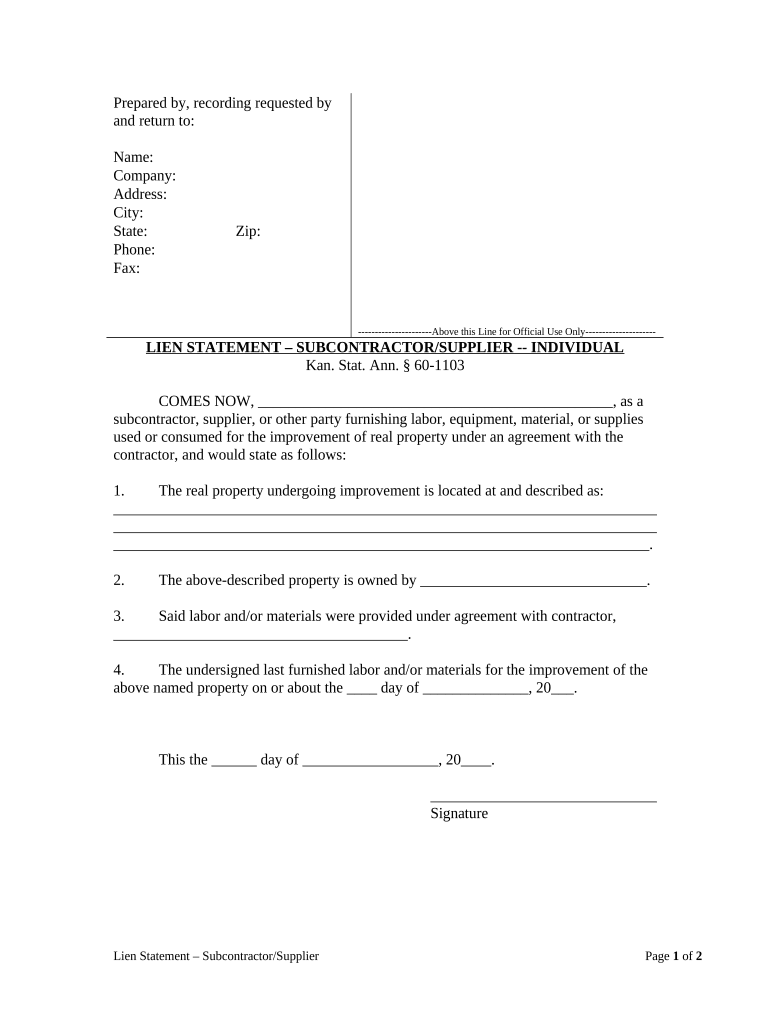
Click ‘Get Form’ to open the Kansas lien document in the editor.
Begin by filling in the 'Prepared by, recording requested by and return to' section. Enter your name, company, address, city, state, phone, fax, and zip code.
In the Lien Statement section, identify yourself as a subcontractor or supplier. Clearly state your name in the blank provided.
Describe the real property undergoing improvement. Provide a detailed description of the location in the designated space.
Indicate the owner of the property by filling in their name where prompted.
Specify the contractor's name with whom you have an agreement for labor or materials.
Record the last date you furnished labor or materials for this property by filling in the date fields.
Sign and date at the bottom of the form to complete your statement.
Complete the verification section by having it notarized. Ensure that all required signatures are obtained.
Start using our platform today to easily fill out your Kansas lien form for free!
Kansas lien release formKs e Lien loginKansas lien formKansas electronic title lookupKS lien releaseState of Kansas lien searchKansas electronic title releaseKansas lien waiver form
Security and compliance
At DocHub, your data security is our priority. We follow HIPAA, SOC2, GDPR, and other standards, so you can work on your documents with confidence.
Aug 11, 2019 Thus, the Kansas tax process, like the overpaid unemployment benefits lien process, allows for the ability to appeal within a certain time frameRead more
Cookie consent notice
This site uses cookies to enhance site navigation and personalize your experience.
By using this site you agree to our use of cookies as described in our Privacy Notice.
You can modify your selections by visiting our Cookie and Advertising Notice.