Type text, add images, blackout confidential details, add comments, highlights and more.
02. Sign it in a few clicks
Draw your signature, type it, upload its image, or use your mobile device as a signature pad.
03. Share your form with others
Send bmspaf application via email, link, or fax. You can also download it, export it or print it out.
How to use or fill out bmspaf application with our platform
Ease of Setup
DocHub User Ratings on G2
Ease of Use
DocHub User Ratings on G2
Click ‘Get Form’ to open the bmspaf application in the editor.
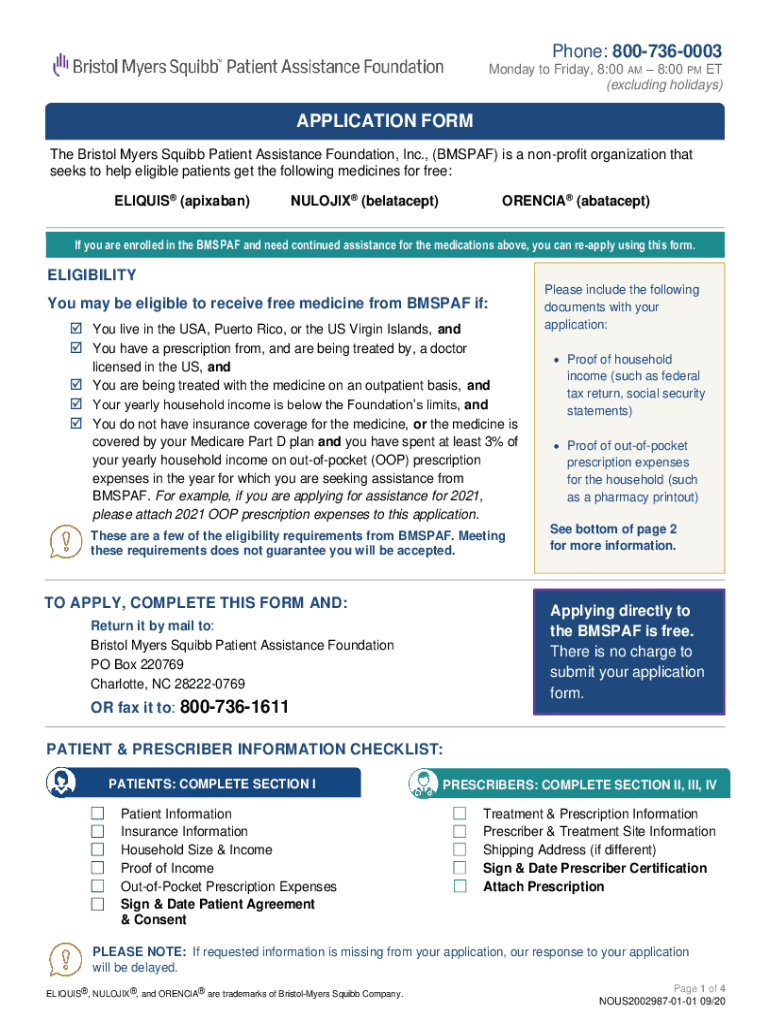
Begin with Section I: Patient Information. Fill in all required fields, including your name, date of birth, and contact information. Ensure you provide accurate details about your insurance coverage.
Next, complete the Household Size & Income section. Enter your total yearly or monthly household income and attach proof of income as specified.
Proceed to the Out-of-Pocket Prescription Expenses section. If applicable, include documentation of your expenses for the year you are applying for assistance.
Sign and date the Patient Agreement & Consent at the end of Section I to confirm your understanding and agreement.
For prescribers, move to Sections II, III, and IV. The prescriber must fill out treatment information, sign, and date their certification.
Review all sections for completeness before submitting your application by mail or fax as instructed.
Start using our platform today to easily fill out your bmspaf application online for free!
Florida Master Resource Sheet - UF Diabetes Institute
Prescription Supplies a) Diabetic Solutions Inc. 10301 W Sample Rd Coral Springs, FL 33065. (954) 346-7759. Call for more detailed information aboutRead more
Cookie consent notice
This site uses cookies to enhance site navigation and personalize your experience.
By using this site you agree to our use of cookies as described in our Privacy Notice.
You can modify your selections by visiting our Cookie and Advertising Notice.