Type text, add images, blackout confidential details, add comments, highlights and more.
02. Sign it in a few clicks
Draw your signature, type it, upload its image, or use your mobile device as a signature pad.
03. Share your form with others
Send it via email, link, or fax. You can also download it, export it or print it out.
How to use or fill out Idaho Incorporation with our platform
Ease of Setup
DocHub User Ratings on G2
Ease of Use
DocHub User Ratings on G2
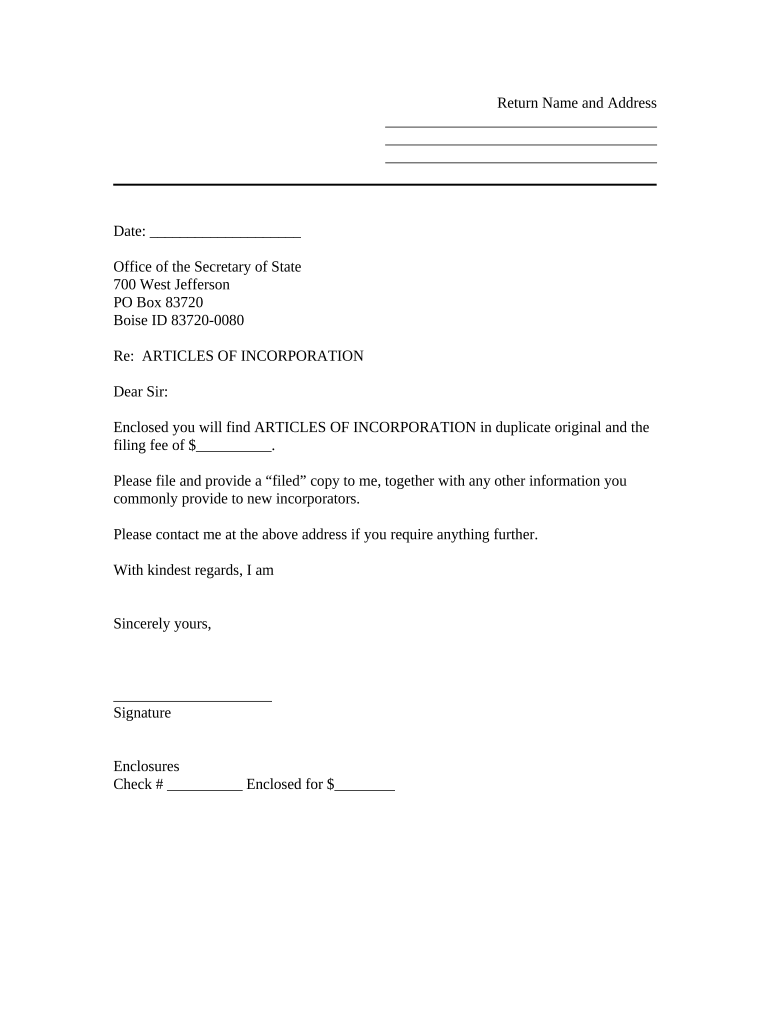
Click ‘Get Form’ to open the Idaho Incorporation document in the editor.
Begin by entering your name and address in the designated fields at the top of the form. Ensure that all information is accurate, as this will be used for official correspondence.
Next, fill in the date on which you are submitting the Articles of Incorporation. This is crucial for record-keeping purposes.
In the section labeled 'Re: ARTICLES OF INCORPORATION', confirm that you have included two original copies of the articles along with the required filing fee. Specify the amount in the provided space.
Sign your name at the bottom of the form where indicated. This signature validates your submission.
Finally, review all entries for accuracy before saving or exporting your completed document for submission.
Start using our platform today to streamline your Idaho incorporation process for free!
Idaho secretary of state Business searchIdaho Secretary of State articles of incorporationSOSBiz idahoIdaho LLC registration onlineIdaho companiesIdaho llc loginIdaho Certificate of OrganizationIdaho annual report llc
Security and compliance
At DocHub, your data security is our priority. We follow HIPAA, SOC2, GDPR, and other standards, so you can work on your documents with confidence.
File paper forms. Filing a paper form will typically incur an additional $20 manual processing fee, and forms submitted without this additional fee will beRead more
by HW Sites 2000 Cited by 1 Incorporation of recently acquired sonic log data and lithologic logs from extraction wells drilled near any of the seismic lines with the seismic data willRead more
Cookie consent notice
This site uses cookies to enhance site navigation and personalize your experience.
By using this site you agree to our use of cookies as described in our Privacy Notice.
You can modify your selections by visiting our Cookie and Advertising Notice.