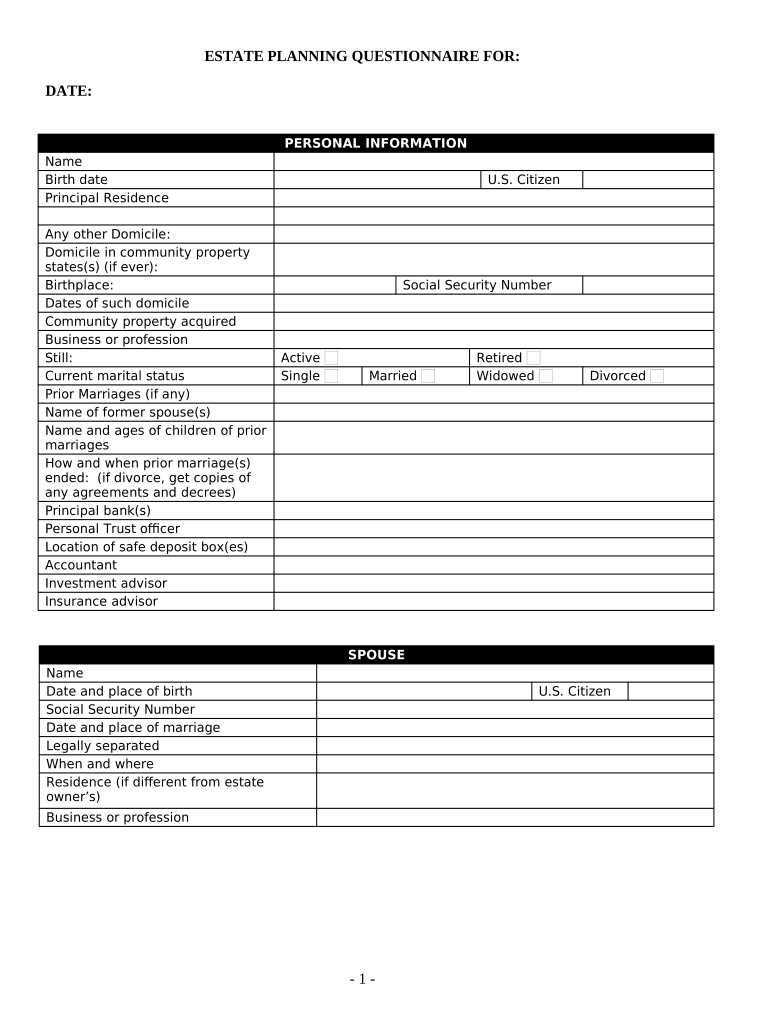
Estate Planning Questionnaire and Worksheets - Arizona 2026

Get Form
estate planning forms Preview on Page 1

Here's how it works

01. Edit your estate planning forms online
Type text, add images, blackout confidential details, add comments, highlights and more.
02. Sign it in a few clicks
Draw your signature, type it, upload its image, or use your mobile device as a signature pad.
03. Share your form with others
Send estate planning questionnaire via email, link, or fax. You can also download it, export it or print it out.

How to use or fill out Estate Planning Questionnaire and Worksheets - Arizona with our platform

Form edit decoration
9.5
Ease of Setup
DocHub User Ratings on G2
9.0
Ease of Use
DocHub User Ratings on G2
  1. Click ‘Get Form’ to open the Estate Planning Questionnaire and Worksheets - Arizona in the editor.
  2. Begin by filling out the Personal Information section. Enter your name, birth date, principal residence, and any other domicile details. Be sure to include your marital status and information about prior marriages if applicable.
  3. Next, move on to the Spouse section. Provide your spouse's name, date of birth, social security number, and marriage details. If legally separated, indicate when and where.
  4. In the Children and Grandchildren section, list each child's name, birth date, relationship to you, and their domicile. Specify if any are adopted or from prior marriages.
  5. Continue with the Who Will Benefit Under Will section by detailing beneficiaries' names, addresses, ages, and their relationship to you.
  6. Fill out the Fiduciaries section by providing names and addresses for executors, trustees, and guardians.
  7. Complete the Financial Information sections by detailing assets such as real estate, stocks, bonds, cash accounts, life insurance policies, and liabilities.
  8. Finally, review all entries for accuracy before saving or sharing your completed questionnaire using our platform’s features.

Start filling out your Estate Planning Questionnaire today for free using our platform!

be ready to get more

Complete this form in 5 minutes or less

Get form

Got questions?

We have answers to the most popular questions from our customers. If you can't find an answer to your question, please contact us.
Contact us

Electronic document signing requires a software solution that complies with data protection and eSignature regulations. DocHub is an excellent tool for that, since it fulfills all the above mentioned requirements. Whatever method you prefer to sign your estate planning questionnaire and worksheets in DocHub, your eSignature will be legally binding and court-admissible.

If you go for analog ways of completing your Estate Planning Questionnaire and Worksheets - Arizona, you can easily download your file for printing. Search DocHub’s Forms & Templates catalog to find the exact file template you require and open it for editing or download it on your gadget in the format of your choice. It is possible to complete your form electronically and place your handwritten signature on it right after printing or eSign your file with DocHub.

8 Questions to Ask Before Hiring an Estate Planning Lawyer What will happen during an initial meeting with your office and how much will it cost? Are all of your fees flat fees? Does my planning fee include a regular review of my legal documents?
Here, our estate planning attorneys lay out the 5 main components of estate planning: Wills and Trusts. Durable Power of Attorney. Medical or Healthcare Power of Attorney. Living Wills and Advance Directives for Medical Decisions. Beneficiary Designations.
How to make a will in 7 steps List all your assets. These might include: Decide who gets your money and belongings when you die. Choose guardians for minor children. Make your own will or work with a professional. Name an executor for your will. Make your will official. Keep it updated.
be ready to get more

Complete this form in 5 minutes or less

Get form

People also ask

Estate Planning Checklist: The 5 Essential Documents Last Will and Testament. This legal document is the foundation for a successful estate plan. Living Trust. Durable Power of Attorney (POA) Healthcare Power of Attorney (POA) Living Will.
What You Should Put in Your Will Your basic personal information. Legal language that declares testamentary intent. Your appointed executor. Your appointed guardian for any pets or minor children. A list of your property and named beneficiaries (with certain exceptions)
The 6 Steps to a Successful Estate Plan Step 1: Define your Estate Planning Goals. What do you want to happen? Step 2: Gather and Organize your Financial Data. Gather your documents. Step 3: Analyze Discuss. Step 4: Develop your Estate Strategies. Step 5: Implement your Estate Plan. Step 6: Track Monitor your Progress.
Here, our estate planning attorneys lay out the 5 main components of estate planning: Wills and Trusts. Durable Power of Attorney. Medical or Healthcare Power of Attorney. Living Wills and Advance Directives for Medical Decisions. Beneficiary Designations.

Related links