Type text, add images, blackout confidential details, add comments, highlights and more.
02. Sign it in a few clicks
Draw your signature, type it, upload its image, or use your mobile device as a signature pad.
03. Share your form with others
Send it via email, link, or fax. You can also download it, export it or print it out.
How to use or fill out wv evidence with our platform
Ease of Setup
DocHub User Ratings on G2
Ease of Use
DocHub User Ratings on G2
Click ‘Get Form’ to open the wv evidence document in the editor.
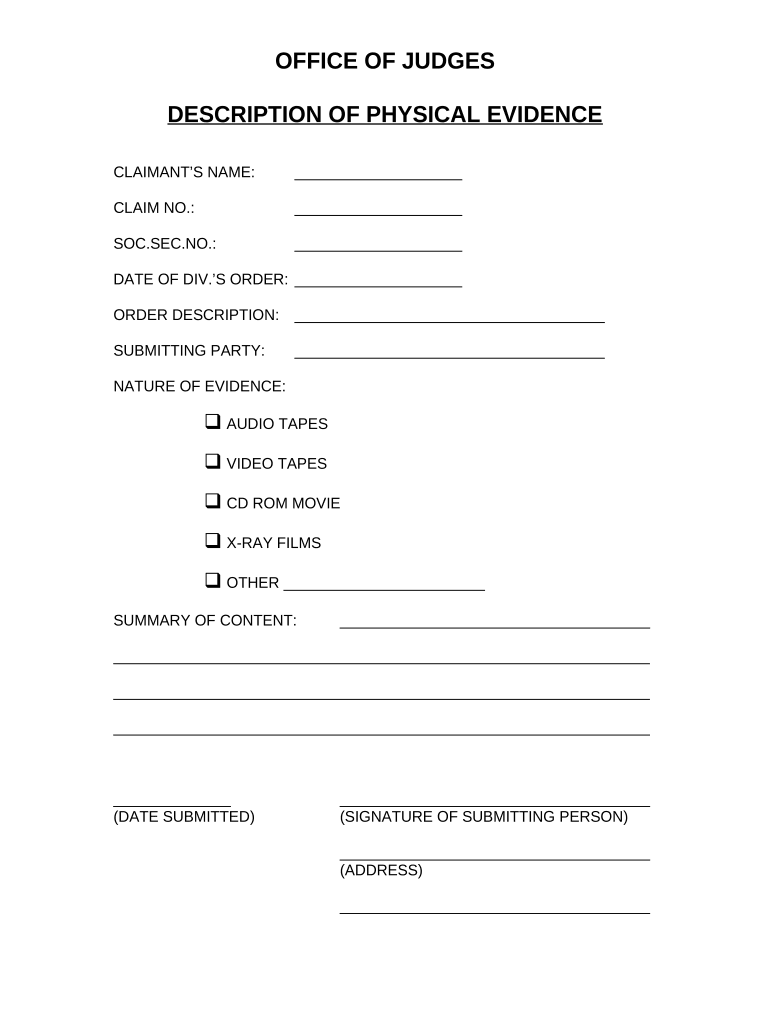
Begin by entering the claimant’s name in the designated field at the top of the form. This is essential for identifying the individual associated with the evidence.
Next, fill in the claim number and social security number. These identifiers help streamline processing and ensure accuracy.
In the section labeled 'DATE OF DIV.’S ORDER', input the relevant date to provide context for your submission.
Describe the order in detail under 'ORDER DESCRIPTION'. This helps clarify what is being submitted.
Indicate who is submitting the evidence by filling out 'SUBMITTING PARTY'.
Select the nature of evidence from options like audio tapes, video tapes, etc., and specify any other type if necessary.
Provide a summary of content in the designated area, ensuring it captures all pertinent details related to your evidence.
Finally, enter today's date in 'DATE SUBMITTED' and sign at the bottom of the form along with your address.
Start using our platform today to easily complete your wv evidence form online for free!
Wv rules of evidence 609WV Rules of Civil ProcedureWV pattern jury instructionsWV Board of Law ExaminersWv Service of processWV State BarNew WV Rules of Civil ProcedureWv ica rules
Security and compliance
At DocHub, your data security is our priority. We follow HIPAA, SOC2, GDPR, and other standards, so you can work on your documents with confidence.
Changes and Updates to the West Virginia Rules of Evidence
Jan 13, 2015 This article will identify and outline these changes to West Virginias Rules of Evidence. It will tackle the changes in numerical order for the sake of ease.Read more
WV cites lack of archaeological evidence and poor integrity as the basis for its negative recommendation. Appalachian State University professor Harvard AyersRead more
Cookie consent notice
This site uses cookies to enhance site navigation and personalize your experience.
By using this site you agree to our use of cookies as described in our Privacy Notice.
You can modify your selections by visiting our Cookie and Advertising Notice.