Type text, add images, blackout confidential details, add comments, highlights and more.
02. Sign it in a few clicks
Draw your signature, type it, upload its image, or use your mobile device as a signature pad.
03. Share your form with others
Send it via email, link, or fax. You can also download it, export it or print it out.
How to use or fill out West Virginia Lease with Our Platform
Ease of Setup
DocHub User Ratings on G2
Ease of Use
DocHub User Ratings on G2
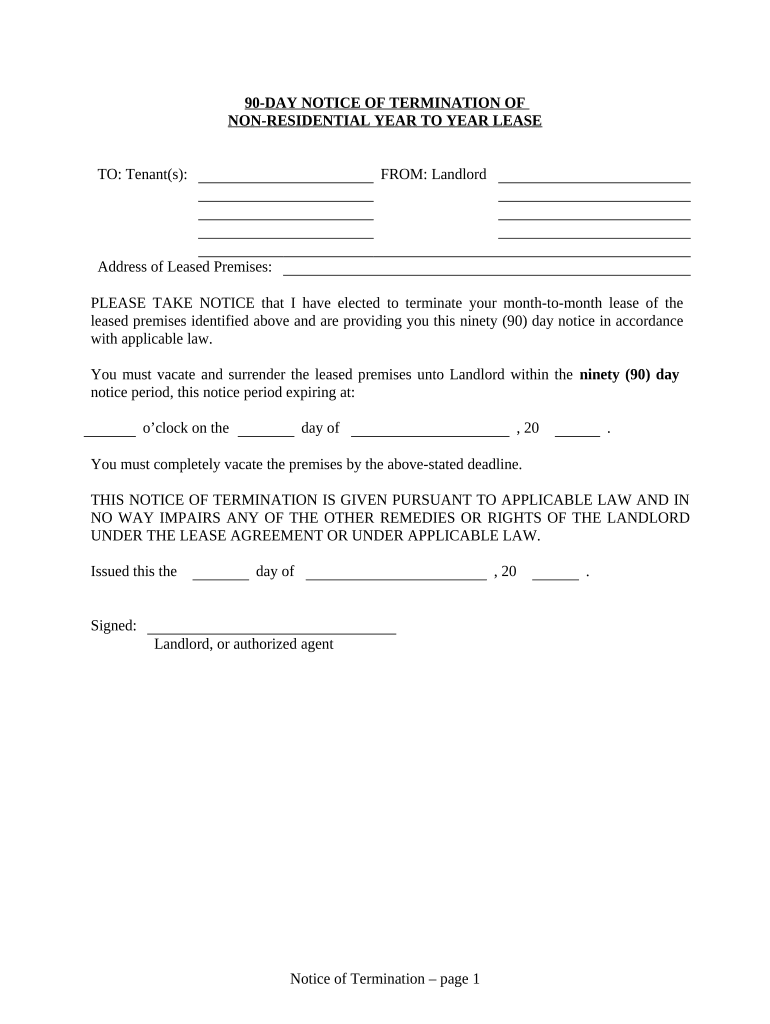
Click ‘Get Form’ to open the West Virginia lease document in the editor.
Begin by entering the Tenant(s) name(s) in the designated field at the top of the form. This ensures that all parties are clearly identified.
Next, fill in the 'Address of Leased Premises' section with the complete address where the tenant resides. Accuracy is crucial for legal purposes.
Indicate the expiration date of the notice period by filling in the date and time when tenants must vacate. This should be done carefully to avoid any misunderstandings.
In the 'Signed' section, ensure that you enter your name as Landlord or authorized agent, along with your signature to validate the notice.
Complete the 'Proof of Delivery' section by selecting how you delivered this notice (by hand, registered mail, etc.) and provide your signature and printed name.
Start using our platform today for free to streamline your lease management process!
West virginia lease agreement pdfWest virginia lease agreement templateWv eviction laws without leaseRenters rights in WVRental agreement formGrounds for immediate eviction in WVWv eviction laws with leaseFree lease agreement template
Security and compliance
At DocHub, your data security is our priority. We follow HIPAA, SOC2, GDPR, and other standards, so you can work on your documents with confidence.
A tenancy from year to year may be terminated by either party giving notice in writing to the other, at least three months prior to the end of any year.Read more
West Virginia and fracking - Global Energy Monitor
Apr 30, 2021 Although Chesapeake Appalachia maintains a lease for the oil and gas underlying the plaintiffs property, plaintiffs lease does not authorizeRead more
W. Va. Code R. 148-19-5 - Lease Terms and Execution
General. A lease shall be prepared by the Executive Director. The term of the lease shall not exceed forty years. Leases for a term of more than six months,Read more
Cookie consent notice
This site uses cookies to enhance site navigation and personalize your experience.
By using this site you agree to our use of cookies as described in our Privacy Notice.
You can modify your selections by visiting our Cookie and Advertising Notice.