Type text, add images, blackout confidential details, add comments, highlights and more.
02. Sign it in a few clicks
Draw your signature, type it, upload its image, or use your mobile device as a signature pad.
03. Share your form with others
Send it via email, link, or fax. You can also download it, export it or print it out.
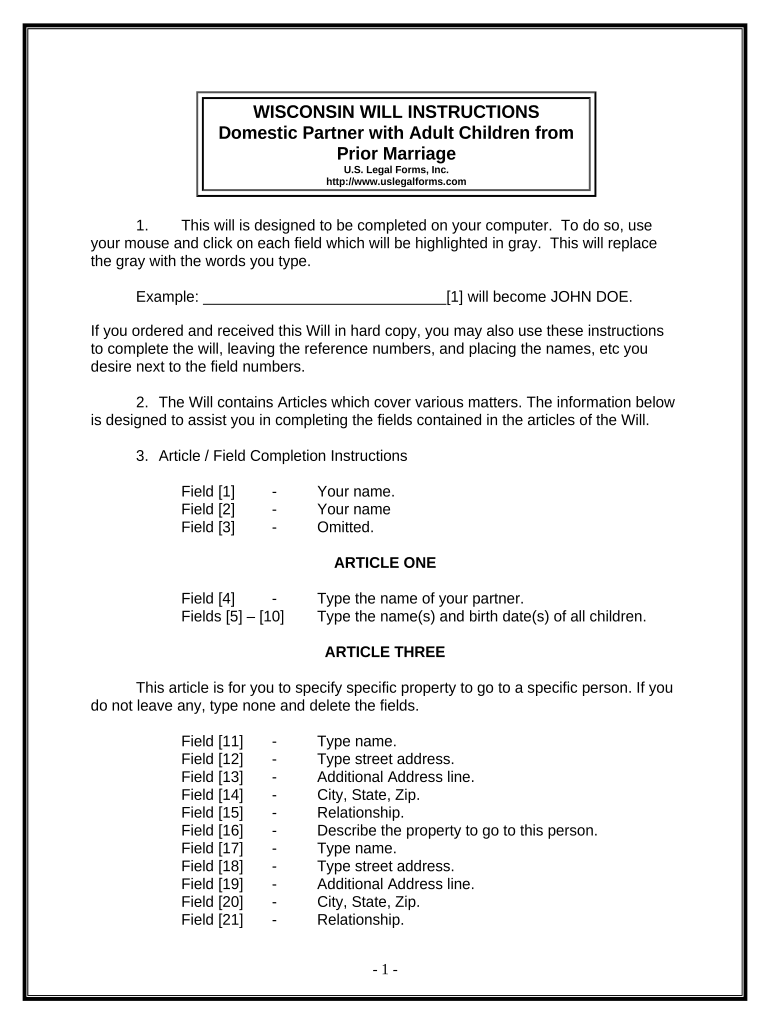
How to use or fill out the Wisconsin Will with our platform
Ease of Setup
DocHub User Ratings on G2
Ease of Use
DocHub User Ratings on G2
Click ‘Get Form’ to open the Wisconsin Will in the editor.
Begin by entering your name in Field [1]. This identifies you as the testator.
In Article One, provide your partner's name in Field [4] and list all children from prior marriages along with their birth dates in Fields [5] to [10].
For Article Three, specify any specific property you wish to bequeath. Fill out Fields [11] to [21] with names, addresses, relationships, and descriptions of the property.
In Article Four, indicate who will inherit your homestead by filling out Field [29] for your partner or Field [30] for your children.
Complete Articles Five through Eleven by following similar instructions for naming beneficiaries and detailing any additional provisions.
Once all fields are filled, review your entries carefully before printing. Ensure that you sign in front of two witnesses as required.
Start using our platform today to easily complete your Wisconsin Will online for free!
Legal Forms Contracts: Wisconsin Electronic Materials
May 13, 2026 The Wisconsin State Bar site maintains a collection of Wisconsin legal forms including real estate forms, lien forms, etc. Most forms areRead more
A filing before the Public Commission of Wisconsin (PSCW) submitted in February 2024, cites WECs plans to convert the coal plants to burn gas. An 8K form filedRead more
Cookie consent notice
This site uses cookies to enhance site navigation and personalize your experience.
By using this site you agree to our use of cookies as described in our Privacy Notice.
You can modify your selections by visiting our Cookie and Advertising Notice.