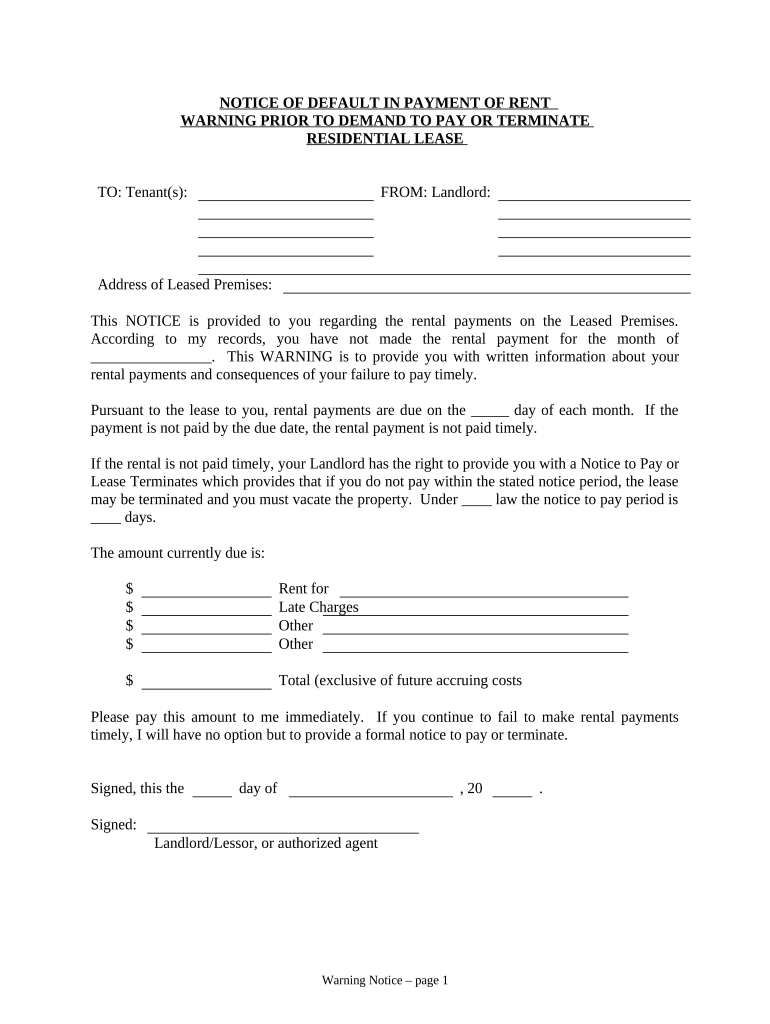
Notice of Default in Payment of Rent as Warning Prior to Demand to Pay or Terminate for Residential Property - Wisconsin 2026

Get Form
Notice of Default in Payment of Rent as Warning Prior to Demand to Pay or Terminate for Residential Property - Wisconsin Preview on Page 1

Here's how it works

01. Edit your form online
Type text, add images, blackout confidential details, add comments, highlights and more.
02. Sign it in a few clicks
Draw your signature, type it, upload its image, or use your mobile device as a signature pad.
03. Share your form with others
Send it via email, link, or fax. You can also download it, export it or print it out.

How to use or fill out Notice of Default in Payment of Rent as Warning Prior to Demand to Pay or Terminate for Residential Property - Wisconsin

Form edit decoration
9.5
Ease of Setup
DocHub User Ratings on G2
9.0
Ease of Use
DocHub User Ratings on G2
  1. Click ‘Get Form’ to open it in the editor.
  2. Begin by entering the tenant's name(s) in the designated 'TO' field. This ensures that the notice is correctly addressed.
  3. In the 'FROM' section, input your name as the landlord along with any authorized agent details if applicable.
  4. Fill in the 'Address of Leased Premises' where the tenant resides. This provides clarity on which property this notice pertains to.
  5. Specify the month for which rent has not been paid in the blank space provided. This is crucial for establishing a timeline.
  6. Indicate the due date for rental payments in the appropriate field, reinforcing when payments are expected according to the lease agreement.
  7. List all amounts due, including rent, late charges, and any other fees. Ensure accuracy to avoid disputes.
  8. Sign and date the notice at the bottom, confirming its authenticity before delivery.
  9. Complete the 'Proof of Delivery' section by selecting how you delivered this notice (hand, mail, or posting) and provide your signature and printed name.

Start using our platform today to efficiently complete your Notice of Default form for free!

be ready to get more

Complete this form in 5 minutes or less

Get form

Got questions?

We have answers to the most popular questions from our customers. If you can't find an answer to your question, please contact us.
Contact us

Sign in to your DocHub account and import your Notice of Default in Payment of Rent as Warning Prior to Demand to Pay or Terminate for Residential Property - Wisconsin to our editor using one of its upload methods - from your device, cloud storage, secure URL, or your DocHub folders if you have already managed your document before. Open our editor, click the Sign key in the upper toolbar, and choose your signing method. You can use a picture of your handwritten signature, draw it, type in your name, or use a QR code as an alternative.

If you want to edit your Notice of Default in Payment of Rent as Warning Prior to Demand to Pay or Terminate for Residential Property - Wisconsin online quickly, it does not matter what web browser you use. DocHub’s simple editing tools are accessible using any internet browser. Just open the appropriate tab within our editor, add your file, and fill it out without stress.

A notice of default can result when a homeowner fails to pay as required under his mortgage or deed of trust. In a lease situation, a notice of default can be sent by either the landlord or tenant, claiming that one of them has violated a condition of the lease.
The landlord can only give this notice at a point when the rent is late. This notice allows a tenant to cure the problem and stop the eviction. By law, the landlord must allow at least 5 days to pay all overdue rent, not counting the day the notice was served, holidays or weekends, according to Wis.
Reasons for submitting a notice to vacate include non-payment of rent and property damage. Notices to vacate can be delivered by hand, certified mail, or property posting, while eviction notices are served by law enforcement officers.

Security and compliance

At DocHub, your data security is our priority. We follow HIPAA, SOC2, GDPR, and other standards, so you can work on your documents with confidence.

Learn more
ccpa2
pci-dss
gdpr-compliance
hipaa
soc-compliance