Type text, add images, blackout confidential details, add comments, highlights and more.
02. Sign it in a few clicks
Draw your signature, type it, upload its image, or use your mobile device as a signature pad.
03. Share your form with others
Send it via email, link, or fax. You can also download it, export it or print it out.
How to use or fill out utah dissolution with our platform
Ease of Setup
DocHub User Ratings on G2
Ease of Use
DocHub User Ratings on G2
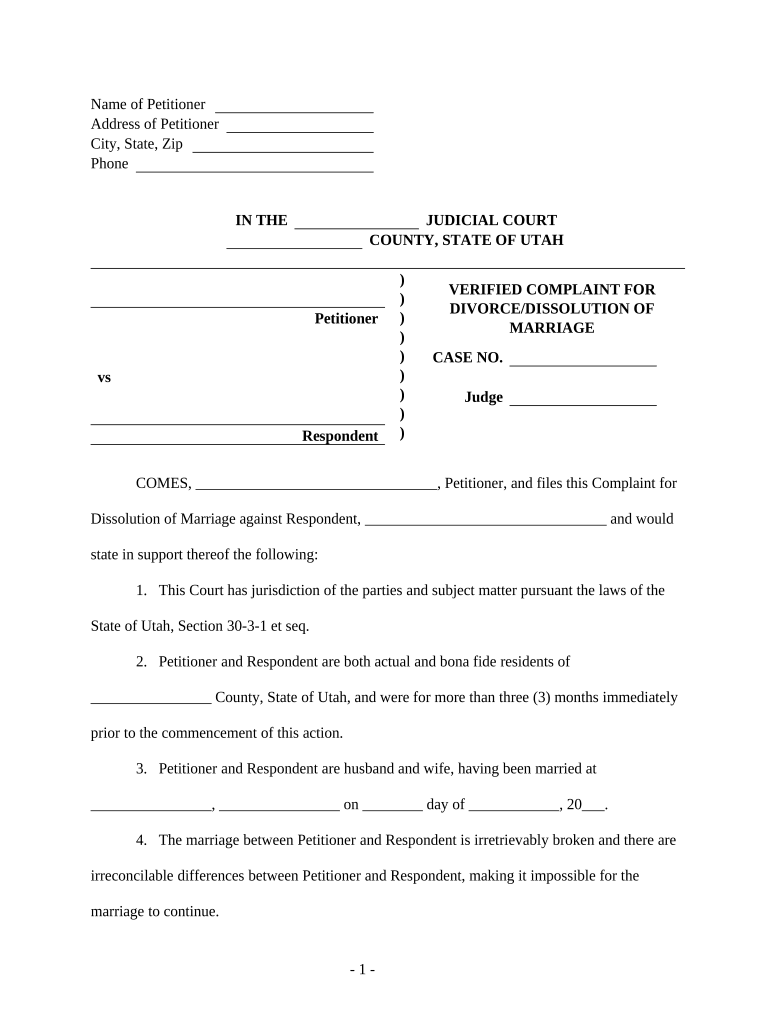
Click ‘Get Form’ to open the Utah Dissolution form in the editor.
Begin by entering the Name and Address of the Petitioner at the top of the form. Ensure that all details are accurate, as this information is crucial for court records.
In the section labeled 'IN THE JUDICIAL COURT', specify the County and State of Utah where you are filing. This establishes jurisdiction.
Fill in the names of both Petitioner and Respondent in their respective fields. Be sure to include any relevant case number if available.
Complete sections detailing marriage information, including date and place of marriage, separation date, and confirmation that there are no children involved.
Review and fill out any additional statements regarding property settlement agreements and requests for name restoration if applicable.
Finally, sign and date the document at the bottom. Ensure that your signature matches your printed name for validation purposes.
Start using our platform today to complete your Utah Dissolution form online for free!
Utah LLC Dissolution formArticles of Dissolution UtahUtah Secretary of stateCertificate of DissolutionUtah business RegistrationStatement of DissolutionArticles of Dissolution with the department of CommerceUtah DBA
Security and compliance
At DocHub, your data security is our priority. We follow HIPAA, SOC2, GDPR, and other standards, so you can work on your documents with confidence.
Title 10 Chapter 02 Part 5-7: Municipal Limits to Dissolution
by UC Annotated 1992 Title 10 Chapter 02 Part 5-7: Municipal Limits to Dissolution - 1992. Authors. Utah Code Annotated. Document Type. Book. Publication Date.Read more
CORP Domestic Limited Liability Company - commerce.utah.gov
File an Amendment, Correction, Dissolution, Termination, Registered Agent Resignation, or Reinstatement. Click the Get Started button below to log in withRead more
Cookie consent notice
This site uses cookies to enhance site navigation and personalize your experience.
By using this site you agree to our use of cookies as described in our Privacy Notice.
You can modify your selections by visiting our Cookie and Advertising Notice.