T480 form judicial review 2026

Get Form
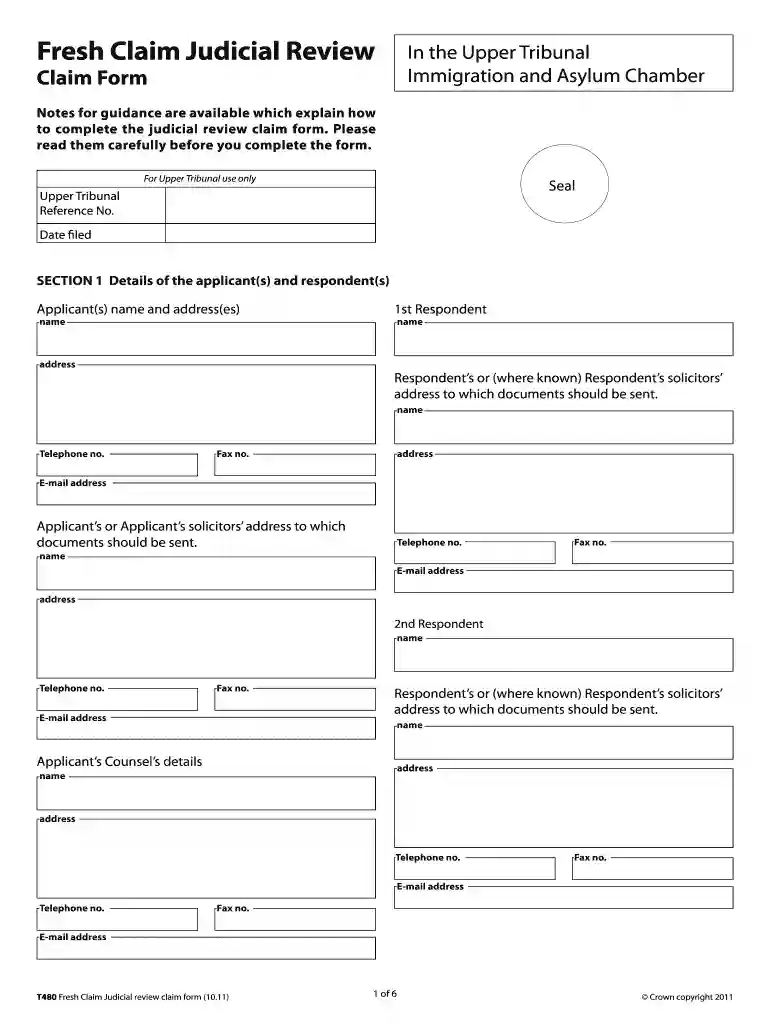
t480 form Preview on Page 1

Here's how it works

01. Edit your t480 form online
Type text, add images, blackout confidential details, add comments, highlights and more.

02. Sign it in a few clicks
Draw your signature, type it, upload its image, or use your mobile device as a signature pad.

03. Share your form with others
Send it via email, link, or fax. You can also download it, export it or print it out.

How to use or fill out t480 form judicial review with our platform

Form edit decoration
9.5
Ease of Setup
DocHub User Ratings on G2
9.0
Ease of Use
DocHub User Ratings on G2
  1. Click ‘Get Form’ to open the t480 form in the editor.
  2. Begin with SECTION 1, where you will enter the details of the applicant(s) and respondent(s). Fill in names, addresses, and contact information accurately to ensure proper communication.
  3. Move to SECTION 2 to provide details of any other interested parties. Include their names, addresses, and contact numbers as necessary.
  4. In SECTION 3, specify the decision being reviewed along with its date and the name of the decision-maker. This is crucial for clarity in your application.
  5. Proceed to SECTION 4 to indicate if you are seeking permission for judicial review. Answer all questions regarding urgency and compliance with pre-action protocols.
  6. In SECTION 5, provide a detailed statement of grounds for your claim. Be thorough and clear in your explanations.
  7. Complete SECTION 9 by ticking off supporting documents you are filing with your claim. Ensure all necessary paperwork is included for a comprehensive submission.

Start using our platform today to fill out your t480 form judicial review easily and for free!

be ready to get more

Complete this form in 5 minutes or less

Get form

Got questions?

We have answers to the most popular questions from our customers. If you can't find an answer to your question, please contact us.
Contact us

Sure, a typed name is accepted as a valid electronic signature when you add it to your form using a compliant solution like DocHub. Simply upload your t480 form judicial review to our editor, click Sign in the top tool pane → Create your signature → Type your name in the appropriate tab, and decide how it will look on your document.

When you edit your t480 form judicial review with DocHub, you only require a steady web connection and virtually any browser installed on your device. No need to set up any third-party software or research tutorials. Simply open a tab with DocHub, drag and drop your file, and edit it on the spot.

There are three main grounds of judicial review: illegality, procedural unfairness, and irrationality. A decision can be overturned on the ground of illegality if the decision-maker did not have the legal power to make that decision, for instance because Parliament gave them less discretion than they thought.
Judicial Review (JR) If you believe that the Home Office has made an unlawful or incorrect decision regarding your immigration matter, you may have the option to challenge this decision through Judicial Review (JR).
Judicial review is a type of court proceeding in which a judge reviews the lawfulness of a decision or action made by a public body. In other words, judicial reviews are a challenge to the way in which a decision has been made, rather than the rights and wrongs of the conclusion docHubed.

Security and compliance

At DocHub, your data security is our priority. We follow HIPAA, SOC2, GDPR, and other standards, so you can work on your documents with confidence.

Learn more
ccpa2
pci-dss
gdpr-compliance
hipaa
soc-compliance
be ready to get more

Complete this form in 5 minutes or less

Get form

People also ask

In other words, immigration judicial review involves a challenge to the process followed by the Home Office or Immigration Tribunal when docHubing an immigration decision, rather than the conclusion actually docHubed.
Apply for a judicial review of a decision: Form N461. Use this form to ask the Administrative Court for permission to proceed with a claim for a judicial review, and to give details of the claim.
At the end of a judicial review case, if the persons case has been successful, the judge will usually quash or nullify the original decision. This means the decision needs to be made again. However, the judge does not replace the original decision with what they think is a better decision.
The process can take over a year, depending on the stage docHubed and whether the Home Office defends its decision. Expedited reviews are possible for urgent cases, potentially resolving matters within weeks or months.
Judicial Reviews for immigration applications It may apply when the Home Office has failed to follow the correct process, acted outside its legal authority or made an unreasonable decision. Grounds for Judicial Review can include procedural unfairness, errors in applying the law or a decision that is irrational.

Related links