Type text, add images, blackout confidential details, add comments, highlights and more.
02. Sign it in a few clicks
Draw your signature, type it, upload its image, or use your mobile device as a signature pad.
03. Share your form with others
Send it via email, link, or fax. You can also download it, export it or print it out.
How to use or fill out pllc online with our platform
Ease of Setup
DocHub User Ratings on G2
Ease of Use
DocHub User Ratings on G2
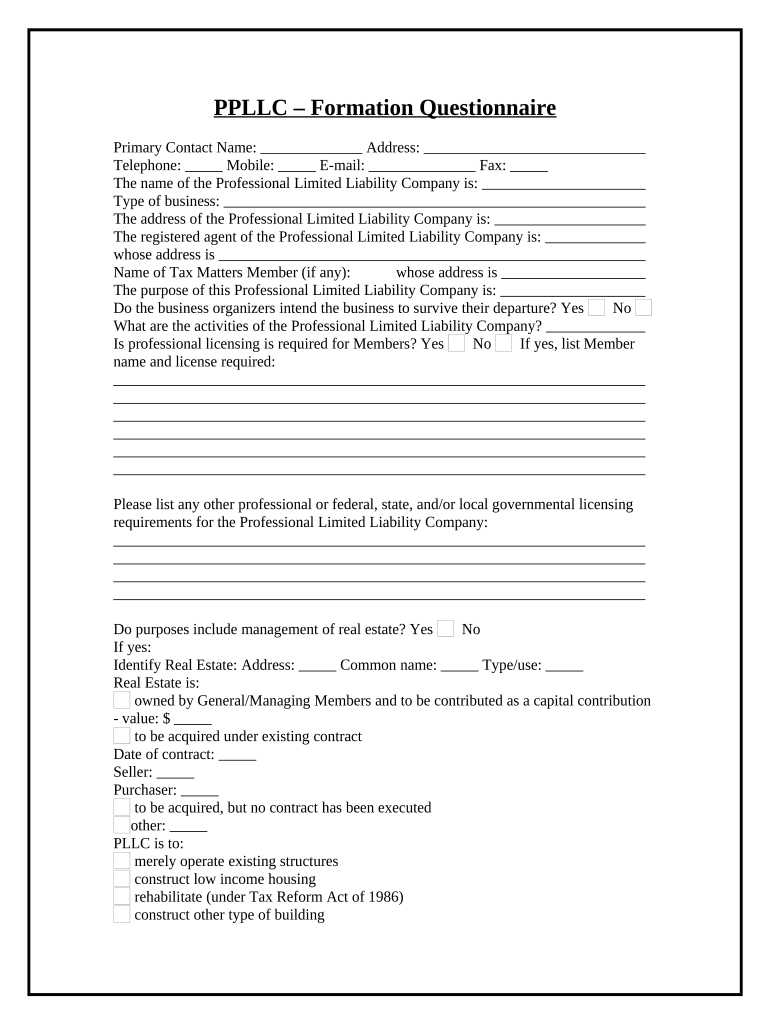
Click ‘Get Form’ to open the PLLC Formation Questionnaire in the editor.
Begin by entering the Primary Contact Name, Address, Telephone, Mobile, E-mail, and Fax. Ensure all contact details are accurate for effective communication.
Fill in the name of your Professional Limited Liability Company and specify the type of business. This section is crucial as it defines your entity's identity.
Provide the address of the PLLC and designate a registered agent along with their address. This information is essential for legal correspondence.
Detail the purpose of your PLLC and indicate whether professional licensing is required for members. If yes, list member names and required licenses.
Complete sections regarding real estate management if applicable, including identifying properties and their intended use.
Finally, review all entries for accuracy before submitting. Utilize our platform’s features to save or share your completed form effortlessly.
Start filling out your PLLC Formation Questionnaire today for free using our platform!
WA State LLC registrationPLLC ApplicationHow to create a PLLC in AZWa Secretary of State LLCPLLC vs LLCArticles of Organization for PLLCLLC WAPLLC formation
Security and compliance
At DocHub, your data security is our priority. We follow HIPAA, SOC2, GDPR, and other standards, so you can work on your documents with confidence.
CORP Domestic Professional Limited Liability Company
A Domestic Professional Limited Liability Company is formed by one or more individuals or entities within Utah through a special written agreement.Read more
Duddy Czarnecki PLLC Jobs - CAS360 Advising Online
Visit the CAS Academic Career Support Center! 275 Mount Carmel Ave. Hamden, CT 06518 casadvising@quinnipiac.edu Privacy Policy | Terms of Service.Read more
Cookie consent notice
This site uses cookies to enhance site navigation and personalize your experience.
By using this site you agree to our use of cookies as described in our Privacy Notice.
You can modify your selections by visiting our Cookie and Advertising Notice.