01. Edit your michigan department of treasury discovery and tax enforcement online
Type text, add images, blackout confidential details, add comments, highlights and more.
02. Sign it in a few clicks
Draw your signature, type it, upload its image, or use your mobile device as a signature pad.
03. Share your form with others
Send michigan department of treasury discovery and tax enforcement division via email, link, or fax. You can also download it, export it or print it out.
How to use or fill out Michigan Form 163 with DocHub
Ease of Setup
DocHub User Ratings on G2
Ease of Use
DocHub User Ratings on G2
Click ‘Get Form’ to open it in the editor.
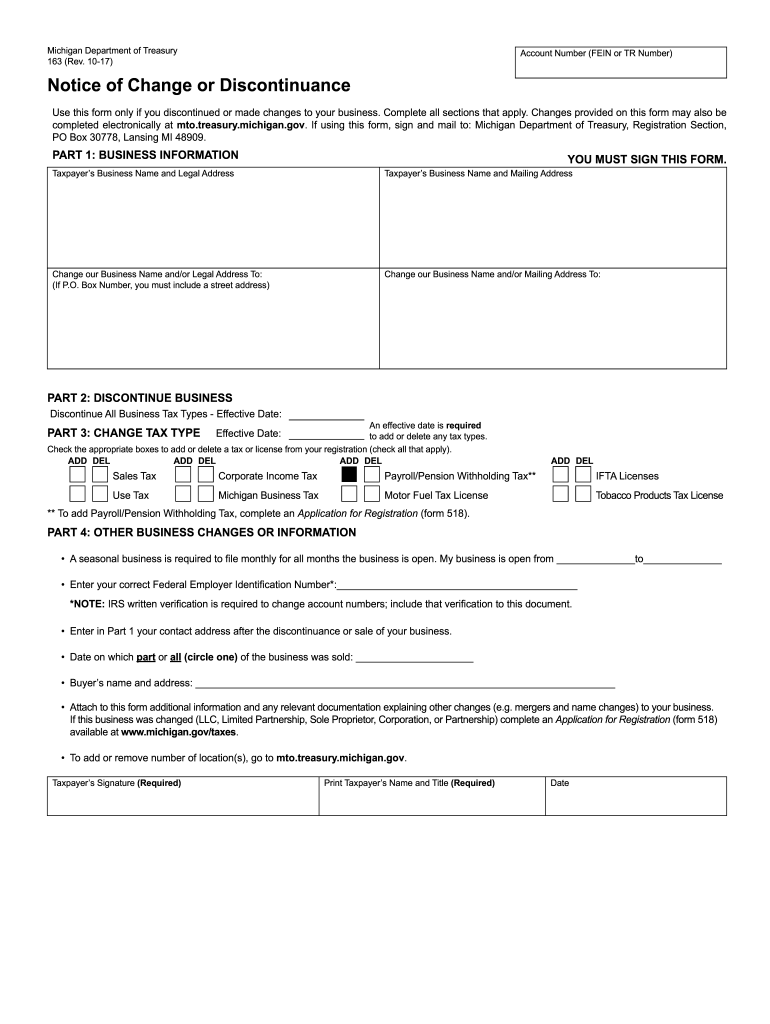
Begin by filling out Part 1, which requires your business name and legal address. Ensure you provide both the mailing address and any changes to these details.
In Part 2, indicate if you are discontinuing your business. Specify the effective date and check the appropriate boxes for any tax types you wish to add or delete.
Move to Part 3 to change your tax type. Again, enter the effective date and select any applicable taxes from the list provided.
Complete Part 4 by providing additional information about your business changes, including seasonal operation dates and buyer details if applicable. Remember to attach any necessary documentation.
Finally, ensure you sign the form, print your name and title, and include the date before submitting it as instructed.
Start using our platform today for free to streamline your form completion process!
michigan department of treasury discovery and tax enforcement division address
Michigan form 163 instructionsMichigan form 163 pdfPrintable Form 163 MichiganHow to fill out michigan form 163Michigan form 163 onlineMichigan Form 5156Michigan Form 151Tax Clearance Certificate Michigan
Security and compliance
At DocHub, your data security is our priority. We follow HIPAA, SOC2, GDPR, and other standards, so you can work on your documents with confidence.
michigan department of treasury discovery and tax enforcement sfpu
Forms - Office of the Registrar - SVSU
Diploma/Cover Replacement Form (163KB); Academic Forgiveness Form (MFA required); Grade Exclusion Form (MFA required). Registration. Enrollment CertificationRead more
Technical Protocol for Evaluating Natural Attenuation of
The information in this document was developed through a collaboration between the U.S.. EPA (Subsurface Protection and Remediation Division, National RiskRead more
Cookie consent notice
This site uses cookies to enhance site navigation and personalize your experience.
By using this site you agree to our use of cookies as described in our Privacy Notice.
You can modify your selections by visiting our Cookie and Advertising Notice.