Type text, add images, blackout confidential details, add comments, highlights and more.
02. Sign it in a few clicks
Draw your signature, type it, upload its image, or use your mobile device as a signature pad.
03. Share your form with others
Send it via email, link, or fax. You can also download it, export it or print it out.
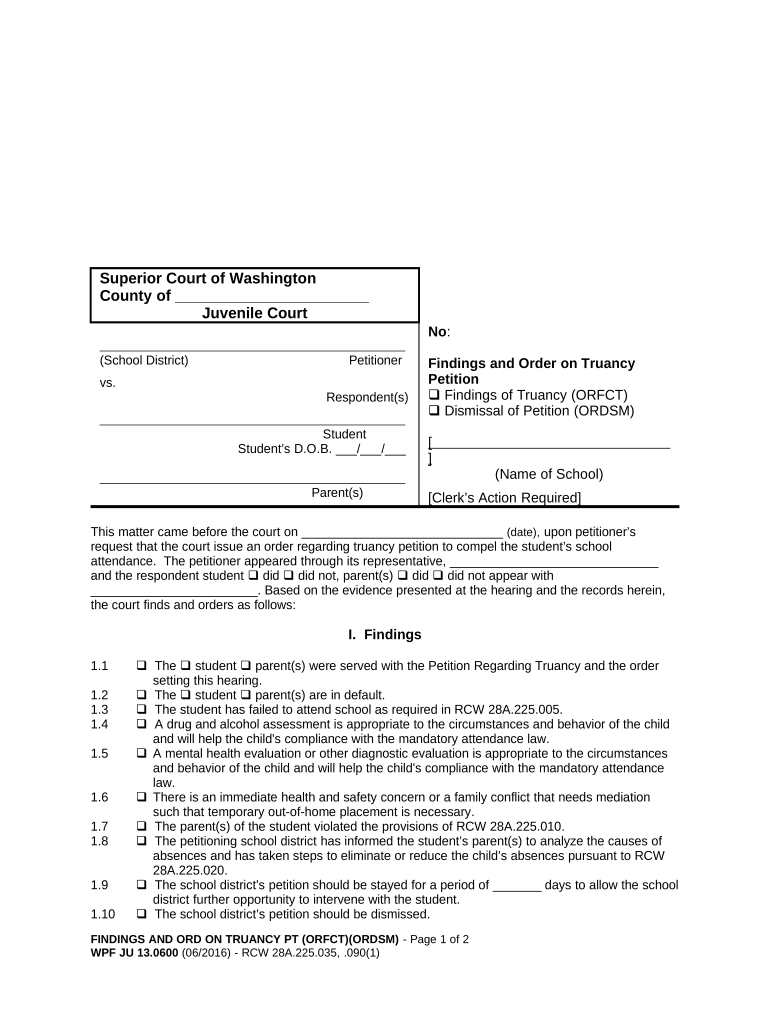
How to use or fill out JU 13.0600 - Request of Community Truancy Board for Further Action - Washington
Ease of Setup
DocHub User Ratings on G2
Ease of Use
DocHub User Ratings on G2
Click ‘Get Form’ to open it in the editor.
Begin by entering the County and Juvenile Court number at the top of the form. This information is essential for identifying your case.
Fill in the Petitioner and Respondent sections with the relevant names, including the student’s name and date of birth.
In the Findings section, check all applicable boxes that reflect the court's findings regarding truancy. Be thorough to ensure accurate representation of circumstances.
Proceed to the Order section where you will indicate any orders made by the court, such as attendance requirements or assessments needed for compliance.
Finally, ensure all signatures are collected at the bottom of the form from both student and parent before submitting.
Start using our platform today to easily complete your JU 13.0600 form online for free!
Fill out JU 13.0600 - Request of Community Truancy Board for Further Action - Washington online It's free
JU 13.0600, Findings and Order on Truancy Petition [] Findings of Truancy [] Dismissal of Petition (ORFCT)(ORDSM), 01/2023. JU 13.0610, Progress Report andRead more
Cookie consent notice
This site uses cookies to enhance site navigation and personalize your experience.
By using this site you agree to our use of cookies as described in our Privacy Notice.
You can modify your selections by visiting our Cookie and Advertising Notice.