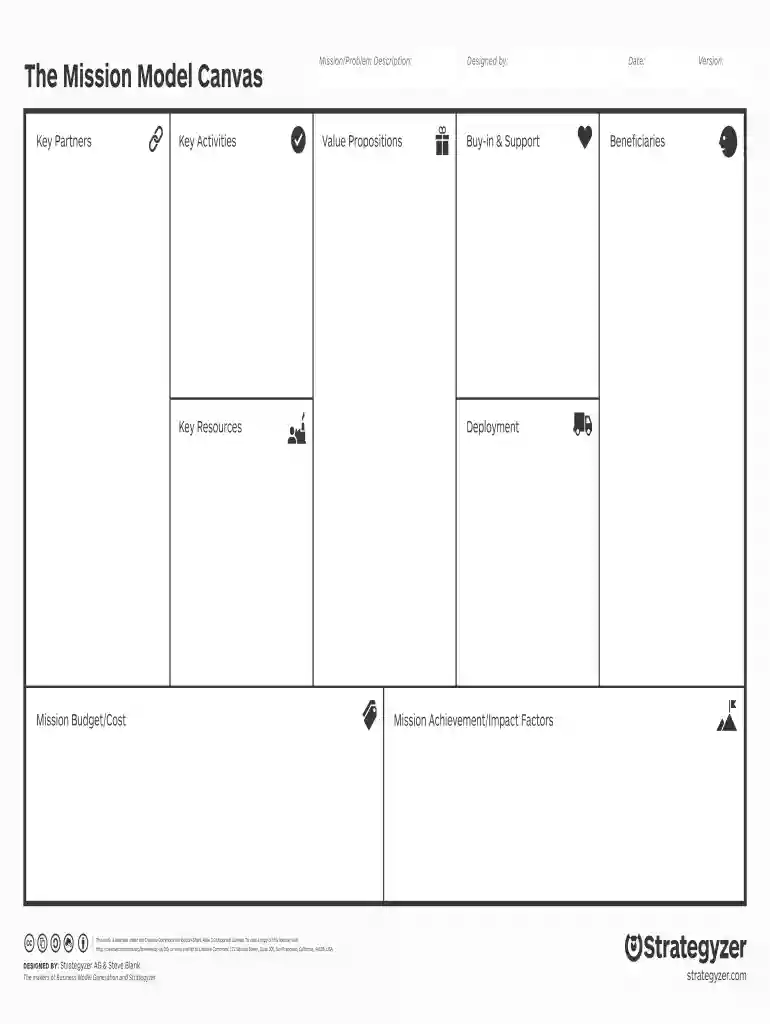
Mission model canvas 2026

Get Form
mission model canvas template word Preview on Page 1

Here's how it works

01. Edit your mission model canvas template word online
Type text, add images, blackout confidential details, add comments, highlights and more.

02. Sign it in a few clicks
Draw your signature, type it, upload its image, or use your mobile device as a signature pad.

03. Share your form with others
Send mission model canvas via email, link, or fax. You can also download it, export it or print it out.

How to use or fill out the Mission Model Canvas with our platform

Form edit decoration
9.5
Ease of Setup
DocHub User Ratings on G2
9.0
Ease of Use
DocHub User Ratings on G2
  1. Click ‘Get Form’ to open the Mission Model Canvas in the editor.
  2. Begin by filling out the 'Key Partners' section. Identify and list your essential collaborators who will help you achieve your mission.
  3. Next, move to 'Key Activities.' Outline the critical actions your organization must take to deliver value and fulfill its mission.
  4. In the 'Mission/Problem Description' field, clearly articulate the core issue your mission addresses. This sets the foundation for your canvas.
  5. Proceed to 'Value Propositions.' Describe what makes your offering unique and how it meets the needs of your beneficiaries.
  6. Fill in 'Key Resources' by listing all assets required to execute your activities effectively.
  7. 'Mission Budget/Cost' is where you estimate financial resources needed. Be as detailed as possible for clarity.
  8. 'Buy-in & Support' allows you to note stakeholders who endorse your mission, which is crucial for gaining traction.
  9. 'Date' and 'Version' fields should be updated accordingly to keep track of changes over time.
  10. 'Beneficiaries,' 'Deployment,' and 'Mission Achievement/Impact Factors' sections should be filled last, summarizing who benefits from your mission and how success will be measured.

Start using our platform today for free to create a comprehensive Mission Model Canvas effortlessly!

be ready to get more

Complete this form in 5 minutes or less

Get form

Security and compliance

At DocHub, your data security is our priority. We follow HIPAA, SOC2, GDPR, and other standards, so you can work on your documents with confidence.

Learn more
ccpa2
pci-dss
gdpr-compliance
hipaa
soc-compliance
be ready to get more

Complete this form in 5 minutes or less

Get form