




01. Edit your 1040ez 2014 online
Type text, add images, blackout confidential details, add comments, highlights and more.

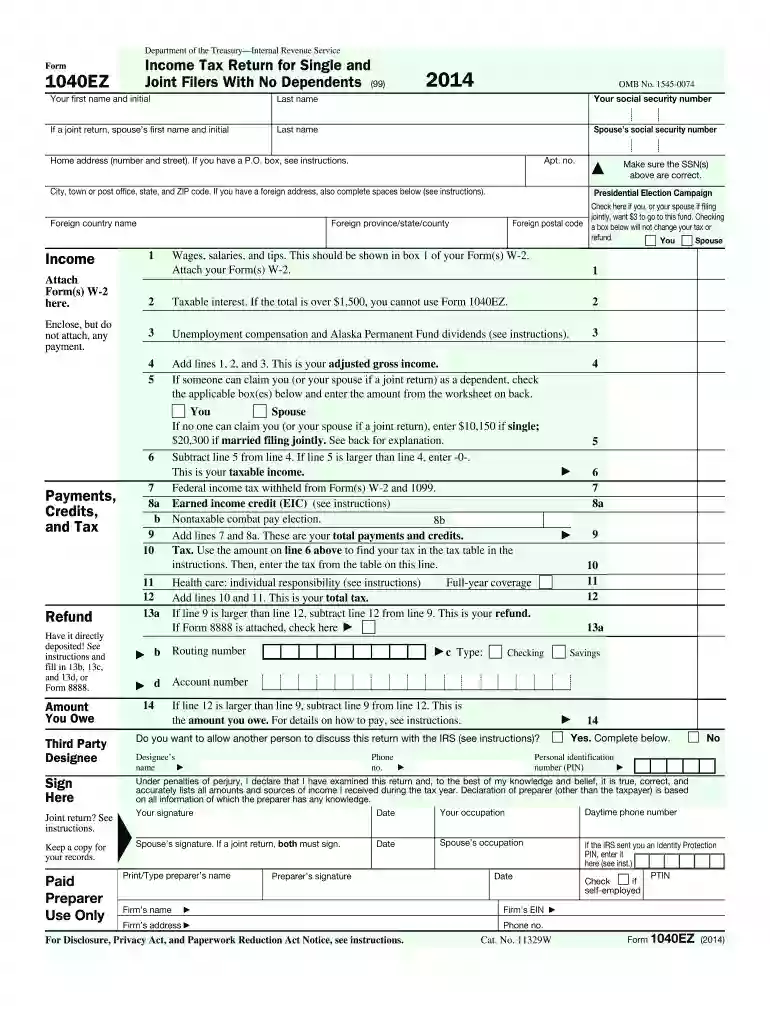
Type text, add images, blackout confidential details, add comments, highlights and more.

Draw your signature, type it, upload its image, or use your mobile device as a signature pad.

Send 2014 1040ez via email, link, or fax. You can also download it, export it or print it out.
The 2014 Form 1040EZ was developed by the IRS as a simplified income tax return form for single and joint filers without dependents. It was specifically designed for individuals under the age of 65 who had a taxable income of less than $100,000. This form offered an easier solution to filing taxes by eliminating more complex components such as deductions and additional tax credits. By restricting its use to those with basic tax situations, the form reduced the complexity of tax filing and expedited the process for eligible taxpayers.
To qualify for the 2014 Form 1040EZ, taxpayers must meet specific criteria:
These criteria aim to simplify tax filing for individuals with straightforward financial situations, focusing on wage income rather than more complex financial matters.


The 1040EZ form is composed of various key sections that taxpayers need to complete accurately:
Each section contributes to a comprehensive overview of a taxpayer's financial activity for the year.
Obtaining a copy of the 2014 Form 1040EZ can be done through several avenues:
These sources assure that taxpayers have access to the necessary forms adequately and at no cost.
Completing the form requires careful entry of information in specific areas:
Each of these steps addresses a critical aspect of the tax filling process, ensuring accuracy and compliance.
The 1040EZ differs significantly from other IRS forms such as the 1040 and 1040A in several ways:
These differences highlight the streamlined nature of the 1040EZ, designed for rapid and uncomplicated filing.
In 2014, taxpayers had the option to submit their 1040EZ form digitally or via paper. Digital submission, or e-filing, offered:
However, paper filing was still commonly used by individuals preferring manual submissions or lacking reliable internet access.
The IRS provided ample guidance on the correct use of the 1040EZ form via their publication 17:
These guidelines ensured that taxpayers could confidently and accurately complete their filings, reducing potential errors and the likelihood of tax disputes.
We've got more versions of the 1040ez 2014 form. Select the right 1040ez 2014 version from the list and start editing it straight away!
| Versions | Form popularity | Fillable & printable |
|---|---|---|
| 2017 | 4.8 Satisfied (305 Votes) | |
| 2016 | 4.3 Satisfied (166 Votes) | |
| 2015 | 4.2 Satisfied (45 Votes) | |
| 2014 | 3.8 Satisfied (57 Votes) | |
| 2013 | 4 Satisfied (53 Votes) | |
| 2012 | 3.8 Satisfied (29 Votes) | |
| 2011 | 4 Satisfied (30 Votes) | |
| 2010 | 4 Satisfied (46 Votes) | |
| 2009 | 4.1 Satisfied (27 Votes) | |
| 2008 | 3.9 Satisfied (42 Votes) | |
| 2006 | 4.3 Satisfied (55 Votes) | |
| 2004 | 4 Satisfied (45 Votes) | |
| 2003 | 4.1 Satisfied (76 Votes) | |
| 2002 | 3.9 Satisfied (40 Votes) | |
| 1997 | 4.4 Satisfied (59 Votes) |
At DocHub, your data security is our priority. We follow HIPAA, SOC2, GDPR, and other standards, so you can work on your documents with confidence.



Apr 15, 2015 Whats New. Premium tax credit. You may be eligible to claim the premium tax credit if you, your spouse, or a dependent.Read more
Dec 17, 2014 Instructions for Form 1040EZ. Page 14. 2014 Form 1040EZLines 8a and 8b. 1. Complete the following worksheet to figure your earned incomeRead more


