




Here's how it works

01. Edit your missouri hipaa authorization form online
Type text, add images, blackout confidential details, add comments, highlights and more.

02. Sign it in a few clicks
Draw your signature, type it, upload its image, or use your mobile device as a signature pad.

03. Share your form with others
Send hipaa release form missouri via email, link, or fax. You can also download it, export it or print it out.
How to use or fill out hipaa release form missouri with DocHub

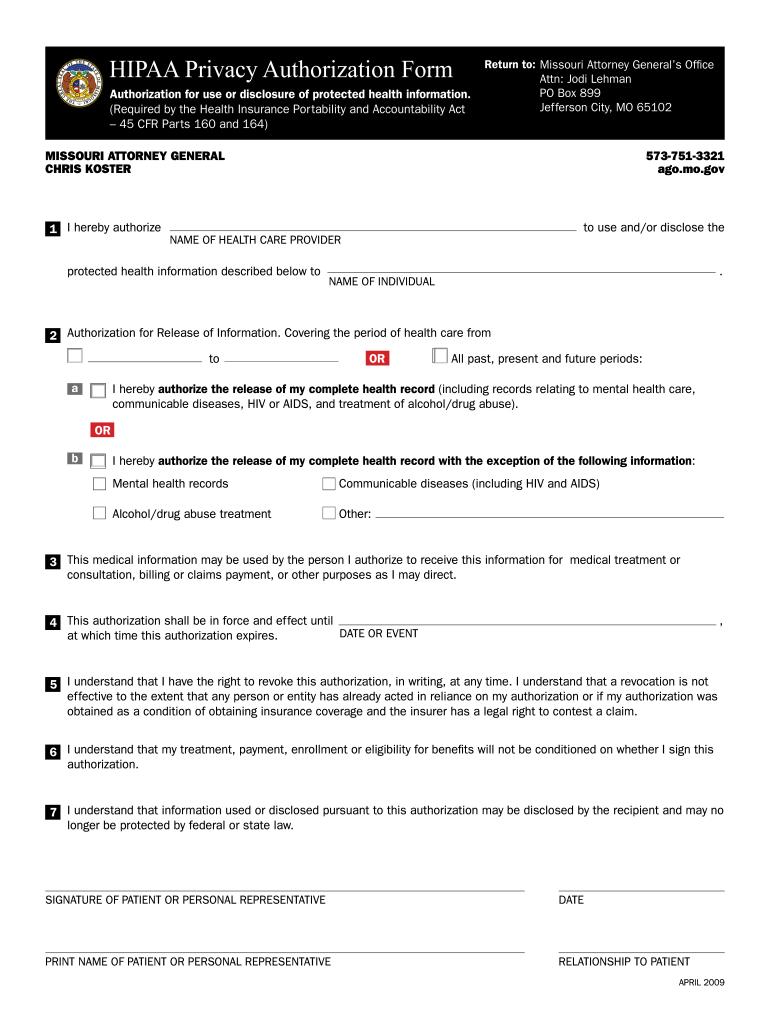
- Click ‘Get Form’ to open the HIPAA release form in our editor.
- Begin by entering the name of the health care provider in the designated field. This identifies who is authorized to use or disclose your protected health information.
- Next, specify the period for which you are authorizing the release of information. You can choose a specific date range or select 'All past, present and future periods' for broader access.
- Indicate whether you authorize the release of your complete health record or if there are exceptions (e.g., mental health records). Make sure to check all applicable boxes.
- Fill in how this medical information may be used by the recipient, such as for treatment or billing purposes.
- Set an expiration date for this authorization. This could be a specific date or an event that signifies when the authorization will no longer be valid.
- Finally, sign and date the form, providing your printed name and relationship to the patient if applicable.
Start using our platform today to fill out your HIPAA release form Missouri quickly and efficiently!
Fill out hipaa release form missouri online
It's free
See more hipaa release form missouri versions
We've got more versions of the hipaa release form missouri form. Select the right hipaa release form missouri version from the list and start editing it straight away!
| Versions | Form popularity | Fillable & printable |
|---|---|---|
| 2009 | 4.8 Satisfied (85 Votes) |
Security and compliance
At DocHub, your data security is our priority. We follow HIPAA, SOC2, GDPR, and other standards, so you can work on your documents with confidence.
Learn more


Related forms

DR 0104X 2024 Amended Individual Income Return Instructions
The document provides instructions for filing the 2024 Amended Colorado Individual Income Tax Return (Form DR 0104X). It ...

Library Research Guides: Driving Traffic Laws Vehicles: Forms
The document is a form from the Minnesota Department of Public Safety for notifying the assignment, release, or grant of ...

Application for Federal Firearms License
The document is an application form for obtaining a Federal Firearms License (FFL) from the U.S. Department of Justice's ...

MO-5090 New Operating Loss Addition Modofication Sheet
The document is a form (MO-5090) used by corporations in Missouri to compute the net operating loss (NOL) addition modif ...

Form MO-SCC - Shared Care Tax Credit
The document outlines the Shared Care Tax Credit application process for caregivers in Missouri who provide care for eld ...

Form MO-1040ES - Estimated Tax Declaration for Individuals
The document provides detailed instructions for completing the Form MO-1040ES, which is the Declaration of Estimated Tax ...

IN THE MATTER OF THE COMPLAINT FILED BY LINDA LAPOINTE, ABERDEEN, SD, AGAINST NORTHWESTERN PUBLIC SE
IN THE MATTER OF THE COMPLAINT FILED BY LINDA LAPOINTE, ABERDEEN, SD, AGAINST NORTHWESTERN PUBLIC SE
The document is an order from the South Dakota Public Utilities Commission regarding a complaint filed by Linda LaPointe ...

Army Corps of Engineers Kansas City District
The document outlines the agency consultation and coordination processes related to environmental and regulatory complia ...