Type text, add images, blackout confidential details, add comments, highlights and more.
02. Sign it in a few clicks
Draw your signature, type it, upload its image, or use your mobile device as a signature pad.
03. Share your form with others
Send it via email, link, or fax. You can also download it, export it or print it out.
How to use or fill out essential document locator with our platform
Ease of Setup
DocHub User Ratings on G2
Ease of Use
DocHub User Ratings on G2
Click ‘Get Form’ to open the essential document locator in the editor.
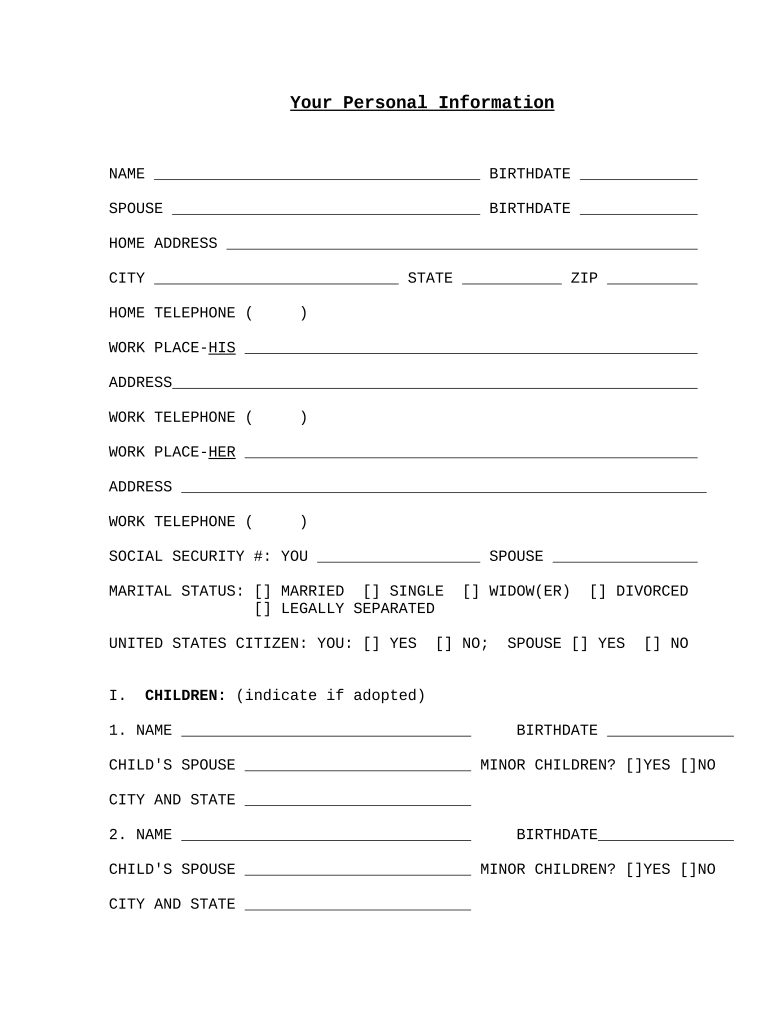
Begin by entering your personal information. Fill in your name and birthdate, followed by your spouse's details if applicable.
Complete your home address, including city, state, and ZIP code. Ensure that all fields are accurately filled for effective communication.
Provide contact numbers for both home and work. Include the workplace addresses for both you and your spouse.
Indicate your social security numbers and marital status by selecting the appropriate options provided in the form.
List your children’s names and birthdates, specifying if they are minors or adopted. Repeat this for each child as necessary.
Fill out background information regarding previous marriages, divorce obligations, military service, and any significant health problems.
Identify key people in your estate plan such as executors, trustees, and guardians for minor children.
Finally, complete the inventory of assets section by detailing real estate, businesses, stocks, bonds, cash accounts, mortgages, life insurance policies, and annuities.
Start using our platform today to streamline your document completion process for free!
Fill out essential document locator online It's free
Basic Troubleshooting For Document Locator Launch the Document Locator program by double-clicking the icon on your Desktop If the repository is offline,Read more
Cookie consent notice
This site uses cookies to enhance site navigation and personalize your experience.
By using this site you agree to our use of cookies as described in our Privacy Notice.
You can modify your selections by visiting our Cookie and Advertising Notice.