Type text, add images, blackout confidential details, add comments, highlights and more.
02. Sign it in a few clicks
Draw your signature, type it, upload its image, or use your mobile device as a signature pad.
03. Share your form with others
Send colorado vehicle traffic via email, link, or fax. You can also download it, export it or print it out.
How to use or fill out co dor with our platform
Ease of Setup
DocHub User Ratings on G2
Ease of Use
DocHub User Ratings on G2
Click ‘Get Form’ to open the co dor in the editor.
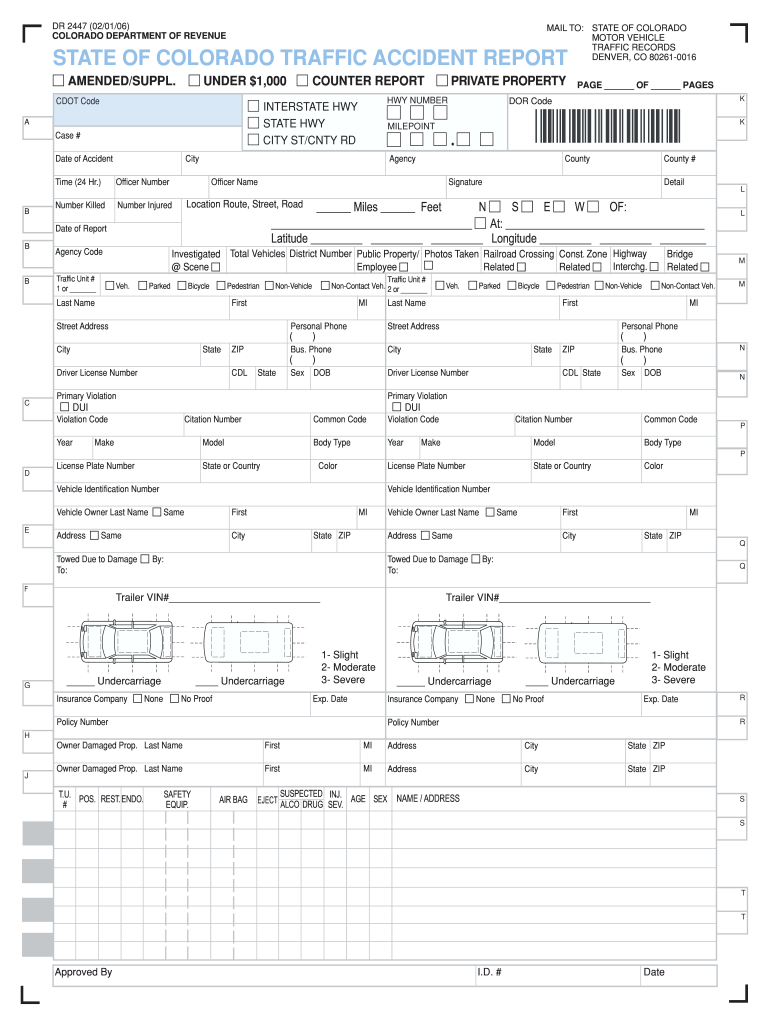
Begin by entering the Case # and Date of Accident at the top of the form. Ensure these details are accurate as they are crucial for record-keeping.
Fill in the Officer Number, Agency Code, and Traffic Unit #. These fields help identify the reporting officer and agency involved in the accident.
In the 'Location' section, specify details such as County #, Latitude, and Longitude. This information is vital for pinpointing where the incident occurred.
Complete sections regarding vehicles involved, including Make, Model, License Plate Number, and Vehicle Identification Number (VIN). This ensures all vehicles are properly documented.
Finally, review all entries for accuracy before submitting. Use our platform’s features to save your progress or share it directly with relevant parties.
Start filling out your co dor today for free using our intuitive editor!
Dec 2, 2025 The Colorado Department of Revenues Denver Regional Service Center is tentatively set to open a new front office inside the 5th StreetRead more
Cookie consent notice
This site uses cookies to enhance site navigation and personalize your experience.
By using this site you agree to our use of cookies as described in our Privacy Notice.
You can modify your selections by visiting our Cookie and Advertising Notice.