Type text, add images, blackout confidential details, add comments, highlights and more.
02. Sign it in a few clicks
Draw your signature, type it, upload its image, or use your mobile device as a signature pad.
03. Share your form with others
Send it via email, link, or fax. You can also download it, export it or print it out.
How to use or fill out self employed contract with our platform
Ease of Setup
DocHub User Ratings on G2
Ease of Use
DocHub User Ratings on G2
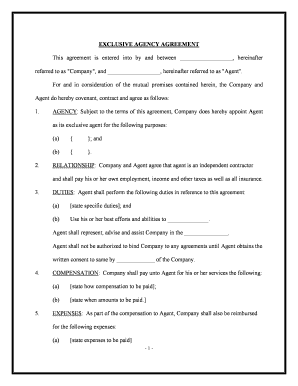
Click ‘Get Form’ to open the self employed contract in the editor.
Begin by filling in the date and names of both the Employer and Contractor at the top of the document. Ensure accuracy as this establishes the parties involved.
In Section 1, outline the specific work to be performed. Clearly describe the duties and location of the project, ensuring all details are precise to avoid misunderstandings.
Specify the completion date in Section 1.3, allowing for any necessary extensions if agreed upon by both parties.
In Section 2, detail the compensation terms. Indicate how much will be paid and when (e.g., upon completion, weekly).
Review Sections 3 through 6 carefully, ensuring that all representations, warranties, and insurance requirements are understood and filled out correctly.
Finally, sign and date at the bottom of the document. Both parties should retain a copy for their records.
Start using our platform today to streamline your self employed contract process for free!
Considering an Opportunity to Work as an Independent
Jan 14, 2021 Answer: The independent contractor generally assumes all responsibility for tax obligations, acquire their own benefits, manage billing andRead more
May 12, 2012 COFESA, Contractors, and contracts of employment. Determining the existence of a contract of employment has always been difficult.Read more
Independent contractor (self-employed) or employee?
If you are a business owner or contractor who provides services to other businesses, then you are generally considered self-employed. For more information onRead more
Cookie consent notice
This site uses cookies to enhance site navigation and personalize your experience.
By using this site you agree to our use of cookies as described in our Privacy Notice.
You can modify your selections by visiting our Cookie and Advertising Notice.