Type text, add images, blackout confidential details, add comments, highlights and more.
02. Sign it in a few clicks
Draw your signature, type it, upload its image, or use your mobile device as a signature pad.
03. Share your form with others
Send it via email, link, or fax. You can also download it, export it or print it out.
How to use or fill out recapitalization agreement with our platform
Ease of Setup
DocHub User Ratings on G2
Ease of Use
DocHub User Ratings on G2
Click ‘Get Form’ to open the recapitalization agreement in the editor.
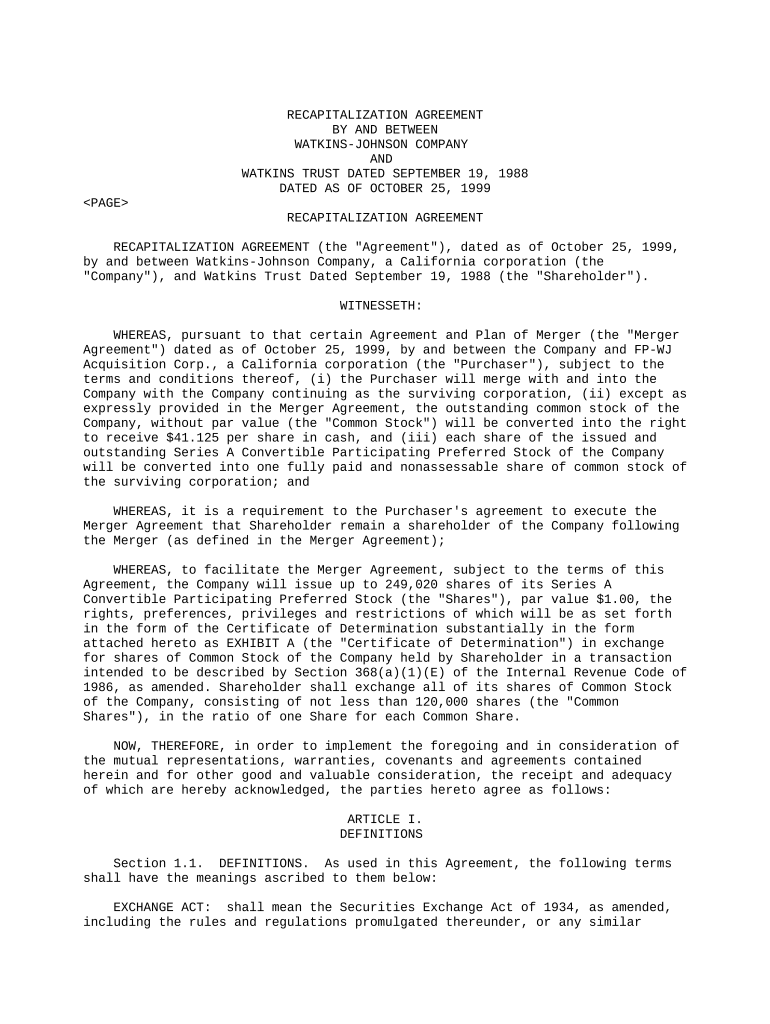
Begin by reviewing the introductory section, which outlines the parties involved and the purpose of the agreement. Ensure that all names and dates are accurate.
Move to Article I, where you will find definitions. Familiarize yourself with key terms such as 'Common Stock' and 'Shares' to understand their implications in the agreement.
In Article II, focus on Section 2.1 regarding the issuance of shares. Fill in any required details about share exchanges, ensuring you specify the number of Common Shares being exchanged.
Proceed to Article III, where you will confirm your investment intentions. Make sure to check any boxes or provide signatures as required.
Finally, review Articles IV through VIII for conditions and miscellaneous provisions. Ensure all necessary signatures are added at the end of the document before finalizing.
Start editing your recapitalization agreement online for free today!
Fill out recapitalization agreement online It's free
Recapitalizations Under Section 3 (a) (9) of the Securities
by JW Hicks 1975 Cited by 26 The Senate agreed that the mere exchange with its security holders of one form of security for another by an issuer where no commission or other remuner- ationRead more
Massey is also is examining a recapitalization of the company to pay investors a dividend or buy back shares. Some of the incidents cited for scrutinyRead more
Cookie consent notice
This site uses cookies to enhance site navigation and personalize your experience.
By using this site you agree to our use of cookies as described in our Privacy Notice.
You can modify your selections by visiting our Cookie and Advertising Notice.