Type text, add images, blackout confidential details, add comments, highlights and more.
02. Sign it in a few clicks
Draw your signature, type it, upload its image, or use your mobile device as a signature pad.
03. Share your form with others
Send it via email, link, or fax. You can also download it, export it or print it out.
How to use or fill out purchase contract with our platform
Ease of Setup
DocHub User Ratings on G2
Ease of Use
DocHub User Ratings on G2
Click ‘Get Form’ to open the purchase contract in the editor.
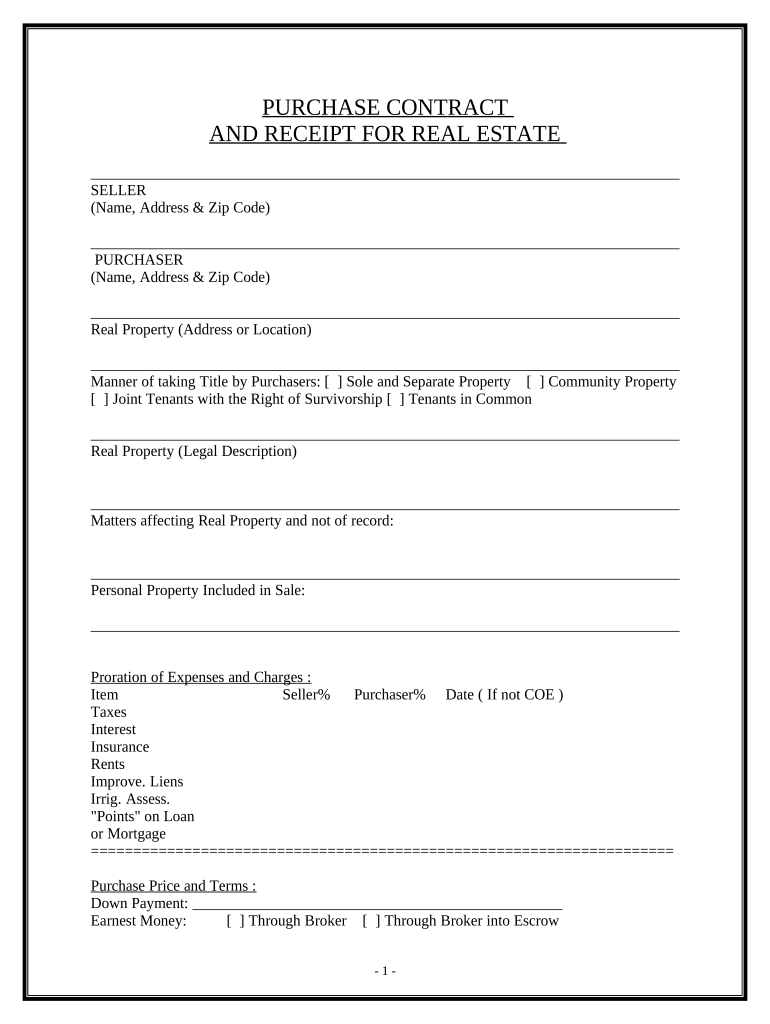
Begin by filling in the Seller and Purchaser sections with the respective names, addresses, and zip codes. Ensure accuracy as this information is crucial for legal purposes.
Next, specify the Real Property's address or location. This identifies the property involved in the transaction.
Indicate how the title will be taken by selecting one of the options: Sole and Separate Property, Community Property, Joint Tenants with Right of Survivorship, or Tenants in Common.
Provide a detailed legal description of the real property. This may require consulting public records or a legal professional.
List any personal property included in the sale and detail proration of expenses such as taxes and insurance. Fill out each item with percentages for both Seller and Purchaser.
Complete the Purchase Price and Terms section, including down payment details and earnest money options. Be clear about how funds will be handled at closing.
Fill in critical dates for acceptance of proposal, close of escrow, and possession date to ensure all parties are aligned on timelines.
Review additional provisions carefully to understand your rights and obligations before finalizing your entries.
Start using our platform today to streamline your purchase contract process for free!
Purchaser reserves the right to obtain alternative financing as long as there are no increased costs to Seller. □ Assumption. See attached Addendum. □ ContractRead more
A buyer under an executory contract for sale who is not in default is entitled to rescind the contract and recover all purchase money paid with interest, alongRead more
Cookie consent notice
This site uses cookies to enhance site navigation and personalize your experience.
By using this site you agree to our use of cookies as described in our Privacy Notice.
You can modify your selections by visiting our Cookie and Advertising Notice.