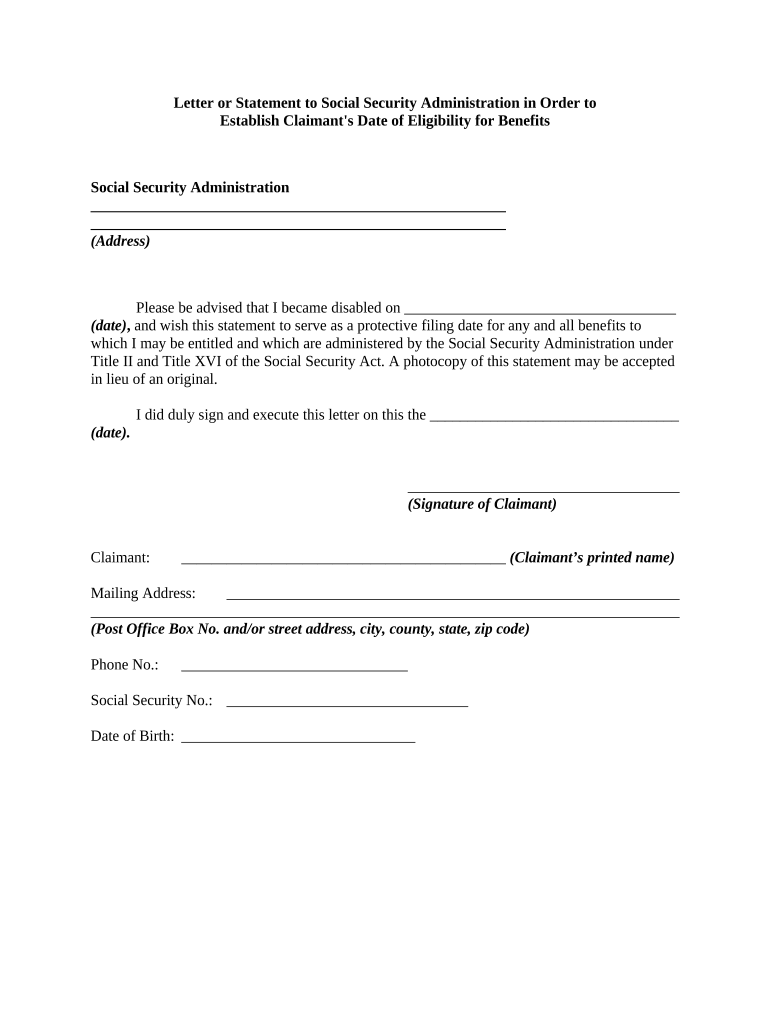
Statement social security 2026

Get Form
social security statement sample Preview on Page 1

Here's how it works

01. Edit your social security statement sample online
Type text, add images, blackout confidential details, add comments, highlights and more.
02. Sign it in a few clicks
Draw your signature, type it, upload its image, or use your mobile device as a signature pad.
03. Share your form with others
Send sample social security statement via email, link, or fax. You can also download it, export it or print it out.

How to use or fill out statement social security with our platform

Form edit decoration
9.5
Ease of Setup
DocHub User Ratings on G2
9.0
Ease of Use
DocHub User Ratings on G2
  1. Click ‘Get Form’ to open the statement social security in the editor.
  2. Begin by entering the date you became disabled in the designated field. This is crucial as it establishes your protective filing date for benefits.
  3. Next, provide your mailing address in the specified section. Ensure that all details are accurate, including your Post Office Box number or street address, city, county, state, and zip code.
  4. Fill in your phone number and Social Security number in their respective fields. This information is essential for processing your claim.
  5. Enter your date of birth to verify your identity and eligibility for benefits.
  6. Finally, sign and date the document at the bottom. Your signature confirms that you have executed this statement accurately.

Start using our platform today to easily complete your statement social security form online for free!

be ready to get more

Complete this form in 5 minutes or less

Get form

Got questions?

We have answers to the most popular questions from our customers. If you can't find an answer to your question, please contact us.
Contact us

Electronic document signing demands a software solution that works in compliance with data security and eSignature regulations. DocHub is a great tool for that, as it meets all the previously mentioned requirements. Whatever method you like to sign your benefit statement letter in DocHub, your eSignature will be legally binding and court-admissible.

If you are searching for a state-specific what is a social security statement sample, you will find it in our DocHub Forms & Templates catalog. Use the search field, enter your form’s name, and search through the results for your state. You can also filter out irrelevant results while searching our catalog by categories.

It is mailed out each January to people who receive benefits and tells you how much Social Security income to report to the IRS on your tax return. Noncitizens who live outside of the United States receive the SSA-1042S instead of the SSA-1099.
A Statement is available to any adult worker who does not receive benefits. Your unique Statement gives estimates of future Social Security benefits that you and your family may receive each month along with a basic overview of the Social Security program.
If you have questions or need help, call our toll-free number at 1-800-772-1213 or visit your local Social Security office. If you are deaf or hard of hearing, call our toll-free TTY number, 1-800-325-0778, between 8:00 a.m. and 5:30 p.m. Monday through Friday.

Security and compliance

At DocHub, your data security is our priority. We follow HIPAA, SOC2, GDPR, and other standards, so you can work on your documents with confidence.

Learn more
ccpa2
pci-dss
gdpr-compliance
hipaa
soc-compliance

People also ask

You can get your Social Security Statement (Statement) online by using your personal my Social Security account. If you dont yet have an account, you can easily create one.
How can I get a form SSA-1099/1042S, Social Security Benefit Statement? Using your personal my Social Security account, and if you dont already have an account, you can create one online. Calling us at 1-800-772-1213 (TTY 1-800-325-0778), Monday through Friday, 8:00 am 7:00 pm.
For workers age 60 and older who do not have a my Social Security account, we currently mail Social Security Statements three months prior to your birthday.
Tax season is approaching, and we have made replacing your annual Benefit Statement even easier. The Benefit Statement, also known as the SSA-1099 or the SSA-1042S, is a tax form we mail each year in January to people who receive Social Security benefits.
Your Social Security Statement shows how much you have paid in Social Security and Medicare taxes. It explains about how much you would get in Social Security benefits when you docHub full retirement age. If you become disabled and unable to work, you may be eligible for disability benefits.