Type text, add images, blackout confidential details, add comments, highlights and more.

02. Sign it in a few clicks
Draw your signature, type it, upload its image, or use your mobile device as a signature pad.

03. Share your form with others
Send it via email, link, or fax. You can also download it, export it or print it out.

How to Use or Fill Out Child Custody with Our Platform
Ease of Setup
DocHub User Ratings on G2
Ease of Use
DocHub User Ratings on G2
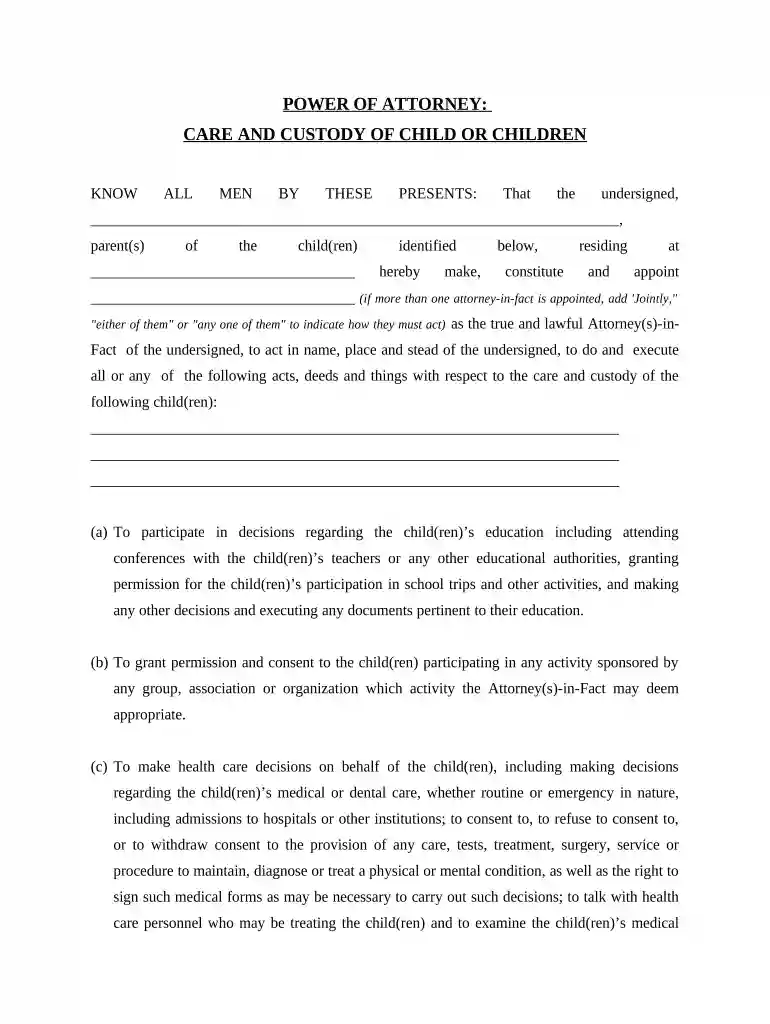
Click ‘Get Form’ to open the child custody document in the editor.
Begin by entering your name and the names of the child(ren) in the designated fields. This establishes who is granting custody and identifies the children involved.
In the section for appointing an Attorney-in-Fact, specify the individual(s) you wish to designate. If multiple attorneys are appointed, clarify how they will act (jointly or individually).
Proceed to fill out each authority granted to the Attorney-in-Fact regarding education, health care decisions, and other responsibilities. Ensure all relevant permissions are clearly marked.
Review any exclusions of authority carefully, particularly regarding marriage or adoption consent for the child(ren).
Complete the signature section at the end of the document. Both parents must sign and date it, confirming their understanding and agreement.
If required, have witnesses sign in accordance with local laws, followed by a notary public acknowledgment if necessary.
Start using our platform today to easily complete your child custody form online for free!
child custody | Wex | US Law | LII / Legal Information Institute
The parent granted custody controls major decisions regarding the childs upbringing, including education, health care, and religious instruction. Courts mayRead more
Cookie consent notice
This site uses cookies to enhance site navigation and personalize your experience.
By using this site you agree to our use of cookies as described in our Privacy Notice.
You can modify your selections by visiting our Cookie and Advertising Notice.