Sale goods form 2026

Get Form
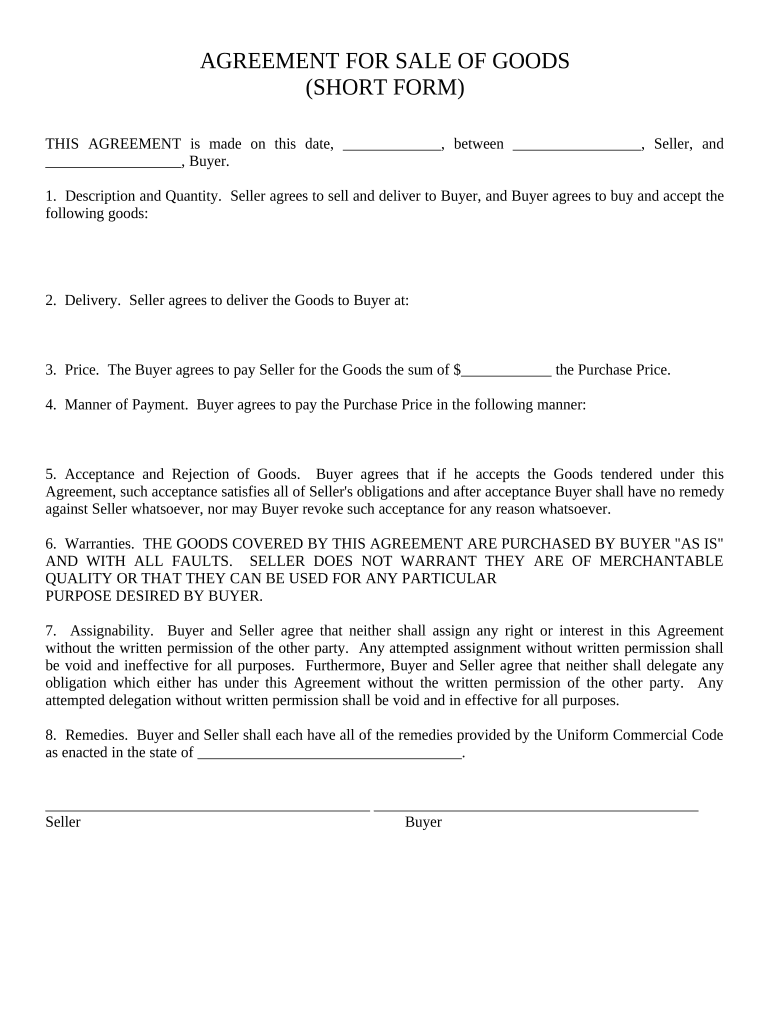
sale goods form Preview on Page 1

Here's how it works

01. Edit your form online
Type text, add images, blackout confidential details, add comments, highlights and more.
02. Sign it in a few clicks
Draw your signature, type it, upload its image, or use your mobile device as a signature pad.
03. Share your form with others
Send it via email, link, or fax. You can also download it, export it or print it out.

How to use or fill out sale goods form with our platform

Form edit decoration
9.5
Ease of Setup
DocHub User Ratings on G2
9.0
Ease of Use
DocHub User Ratings on G2
  1. Click ‘Get Form’ to open the sale goods form in the editor.
  2. In the 'Description and Quantity' section, clearly specify the goods being sold along with their quantities. This ensures both parties have a mutual understanding of what is being transacted.
  3. Next, fill in the 'Delivery' section with the address where the goods will be delivered. Accurate details here are crucial for smooth logistics.
  4. In the 'Price' field, enter the total amount that the Buyer agrees to pay for the goods. Make sure this matches any prior agreements made between Seller and Buyer.
  5. Complete the 'Manner of Payment' section by detailing how payment will be made, whether it’s cash, check, or another method.
  6. Review sections on acceptance and rejection of goods, warranties, assignability, and remedies to ensure both parties understand their rights and obligations under this agreement.

Start using our platform today to streamline your document editing and signing process for free!

be ready to get more

Complete this form in 5 minutes or less

Get form

Got questions?

We have answers to the most popular questions from our customers. If you can't find an answer to your question, please contact us.
Contact us

Electronic document approval demands a software solution that works in compliance with data security and eSignature standards. DocHub is a perfect tool for that, since it fulfills all the above mentioned requirements. Whatever method you like to sign your sale goods form in DocHub, your eSignature will be legally binding and court-admissible.

When you choose analog methods of completing your sale goods form, it is simple to download your file for printing. Search DocHub’s Forms & Templates catalog to get the exact file template you require and open it for editing or download it on your gadget in the format of your liking. It is easy to complete your form electronically and place your handwritten signature on it right after printing or eSign your file with DocHub.

There isnt a statewide requirement for you to have a bill of sale in Alabama. Some counties will require a document showing that the vehicle is sold. Those counties may offer a bill of sale online, such as Baldwin County. In other countries, you may need to create a generic bill of sale document.
That might get you to wonder if a handwritten bill of sale is legally binding. Handwritten bills of sale are indeed contractual agreements so long as they have the right elements.
Yes, you can absolutely write your own purchase agreement! But starting from scratch can be time-consuming and can get complicated quickly with legal language, required clauses, regional regulations, etc. The good news is that you dont have to start from ground zero.

Security and compliance

At DocHub, your data security is our priority. We follow HIPAA, SOC2, GDPR, and other standards, so you can work on your documents with confidence.

Learn more
ccpa2
pci-dss
gdpr-compliance
hipaa
soc-compliance

People also ask

At its core, a contract for the sale of goods is an agreement between a buyer and a seller, outlining the sale and purchase of goods. This legal document clearly defines what goods are being sold, the quantity, the price, and when and where the goods should be delivered.
How do I write a Bill of Sale? Describe the item. Provide the propertys details. Provide each partys information. List the name and address of both the seller and the buyer. Outline payment details. State the items sale price and specify if sales tax will apply to the sale. Note any loans or liens.

Related links