Type text, add images, blackout confidential details, add comments, highlights and more.

02. Sign it in a few clicks
Draw your signature, type it, upload its image, or use your mobile device as a signature pad.

03. Share your form with others
Send it via email, link, or fax. You can also download it, export it or print it out.

How to use or fill out contract change order with our platform
Ease of Setup
DocHub User Ratings on G2
Ease of Use
DocHub User Ratings on G2
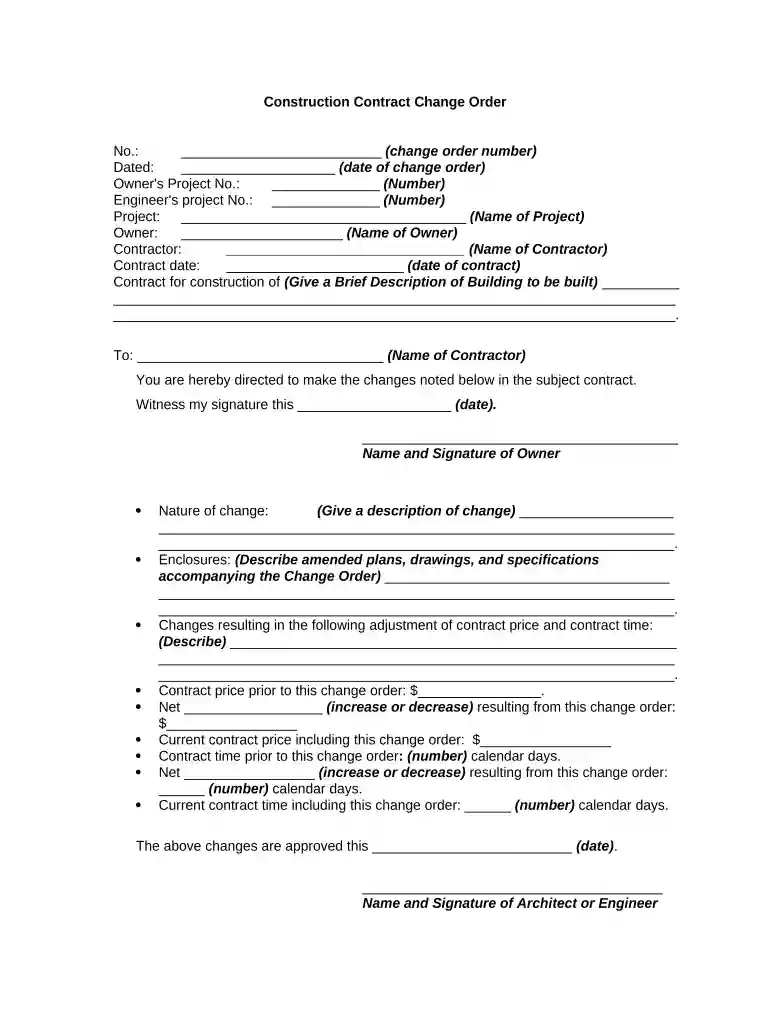
Click ‘Get Form’ to open the contract change order in the editor.
Begin by entering the change order number and date at the top of the form. This helps in tracking and referencing the specific change order.
Fill in the Owner's Project Number and Engineer's Project Number, ensuring accurate identification of the projects involved.
Provide the name of the project, along with details about the owner and contractor. This section is crucial for establishing accountability.
In the 'Nature of change' section, describe the changes being made clearly and concisely. Include any relevant enclosures such as amended plans or specifications.
Detail any adjustments to both contract price and time. Specify if there is an increase or decrease resulting from this change order.
Finally, ensure all signatures are obtained from the owner, architect/engineer, and contractor to validate the changes before finalizing.
Start using our platform today to streamline your contract change orders for free!
Modification means any change. It encompasses two commonly used terms: A revision is a change in something that exists, such as increasing the number of participants. An amendment adds something new, such as a person who will obtain informed consent.
What is the purpose of a change order?
Change orders in construction are formal documents that modify the original contract, detailing changes to scope, cost, or schedule. They ensure that all parties agree to the adjustments, helping maintain project clarity and legal compliance.
What is the difference between an addendum and a change order?
As with a change order, a Construction Change Directive (CCD) amends the construction contract. The difference is that a CCD is enforceable without the contractors agreement. Change orders are agreements between the owner and prime contractor that modify the original construction contract.
What is the purpose of an addendum?
An addendum clarifies and adds things not initially part of the original contract or agreement. Think of addendums as additions to the original agreement (for example, adding a deadline where none existed in the original version).
What is the difference between a CCD and a change order?
Change orders are formal documents used in project management, particularly in construction and engineering, to record modifications to the original contract terms.
Related Searches
Contract change order templateChange order construction exampleChange order exampleChange order clause in construction contractChange Order clause exampleConstruction change orderWhat is a change orderFAR change order
Security and compliance
At DocHub, your data security is our priority. We follow HIPAA, SOC2, GDPR, and other standards, so you can work on your documents with confidence.
An addendum is used to add new information or terms to an existing document without altering its original content. It is supplementary in nature and does not change the fundamental terms of the agreement. In contrast, an amendment is used to modify, delete, or update specific terms within the original document.
Related links
Subpart 43.2 - Change Orders
Dec 6, 2024 Change orders shall be issued by the contracting officer except when authority is delegated to an administrative contracting officer (see 42.202
(a) If it becomes necessary to alter the construction contracts post-execution, the Recipient and contractor shall agree to a formal contract change order.
Cookie consent notice
This site uses cookies to enhance site navigation and personalize your experience.
By using this site you agree to our use of cookies as described in our Privacy Notice.
You can modify your selections by visiting our Cookie and Advertising Notice.