Stopped payment 2026

Get Form
stopped payment Preview on Page 1

Here's how it works

01. Edit your form online
Type text, add images, blackout confidential details, add comments, highlights and more.
02. Sign it in a few clicks
Draw your signature, type it, upload its image, or use your mobile device as a signature pad.
03. Share your form with others
Send it via email, link, or fax. You can also download it, export it or print it out.

How to use or fill out stopped payment with our platform

Form edit decoration
9.5
Ease of Setup
DocHub User Ratings on G2
9.0
Ease of Use
DocHub User Ratings on G2
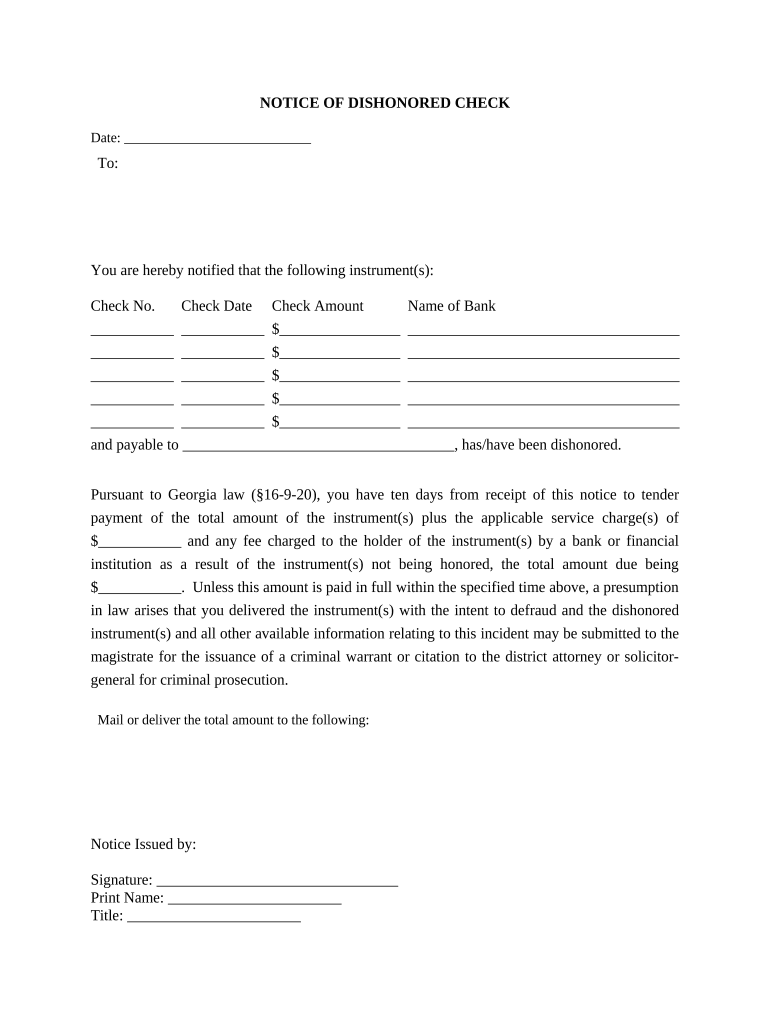
  1. Click ‘Get Form’ to open the stopped payment document in the editor.
  2. Fill in the 'Date' field at the top of the form with the current date.
  3. In the 'To' section, enter the name of the individual or entity being notified.
  4. List each dishonored check by filling in 'Check No.', 'Check Date', and 'Check Amount' for each instrument. Include the 'Name of Bank' associated with each check.
  5. Specify who the checks were payable to in the designated field.
  6. Calculate and enter any applicable service charges and total amount due based on Georgia law requirements.
  7. Complete the notice by signing and printing your name, along with your title, at the bottom of the form.

Start using our platform today to easily complete your stopped payment form online for free!

be ready to get more

Complete this form in 5 minutes or less

Get form

Got questions?

We have answers to the most popular questions from our customers. If you can't find an answer to your question, please contact us.
Contact us
If an individual gives their bank reasonable notice to stop the payment of a check they wrote, their bank is required to honor those instructions. If, despite providing reasonable notice, an individuals bank pays a check, that bank is responsible for any damages which the individual may have suffered.
Stop payments are charged a fee by the customers financial institution, usually the same as a fee for a bounced check. The customer can usually call their financial institution to ask for an immediate stop payment to be issued, with the requirement they come in within a few days and sign a written order.
A stop payment order typically allows you to cancel a check or automatic online payment before its processed. This can help you get your money back in some situations like theft, fraud, a dispute or an error.
When the bank executes a stop payment request, it prevents the check from clearing when the check recipient attempts to cash it at the receiving bank. However, unlike a bounced check, a stop payment is not permanent, and the request could remain in place for at up to six months, depending on the financial institution.
Reasons to stop payment The check was lost or stolen: In these cases, you may want to stop payment on the original check and send the payee a new one. The check contains an error: You may want to stop payment on the original check so that you may issue a new one that has accurate information.

Security and compliance

At DocHub, your data security is our priority. We follow HIPAA, SOC2, GDPR, and other standards, so you can work on your documents with confidence.

Learn more
ccpa2
pci-dss
gdpr-compliance
hipaa
soc-compliance

People also ask

If someone attempts to cash a check that has a stop payment order in place, their request may be denied. In that case, they wouldnt be able to cash the check. Its an extra reassurance if you lose a check and someone finds it. Once a check has been cashed, however, a stop payment order would have no effect whatsoever. How to Make a Stop Payment on a Check - SmartAsset.com smartasset.com checking-account how-to-mak smartasset.com checking-account how-to-mak
You must act quickly banks cannot stop payment on checks that have already been processed or cleared. Stop payment fees typically range from $25 to $35, though some premium accounts waive these charges. Oral stop payment requests last only 14 days, while written requests are honored for six months.

Related links