Type text, add images, blackout confidential details, add comments, highlights and more.
02. Sign it in a few clicks
Draw your signature, type it, upload its image, or use your mobile device as a signature pad.
03. Share your form with others
Send it via email, link, or fax. You can also download it, export it or print it out.
How to use or fill out married homestead get with our platform
Ease of Setup
DocHub User Ratings on G2
Ease of Use
DocHub User Ratings on G2
Click ‘Get Form’ to open the married homestead get in the editor.
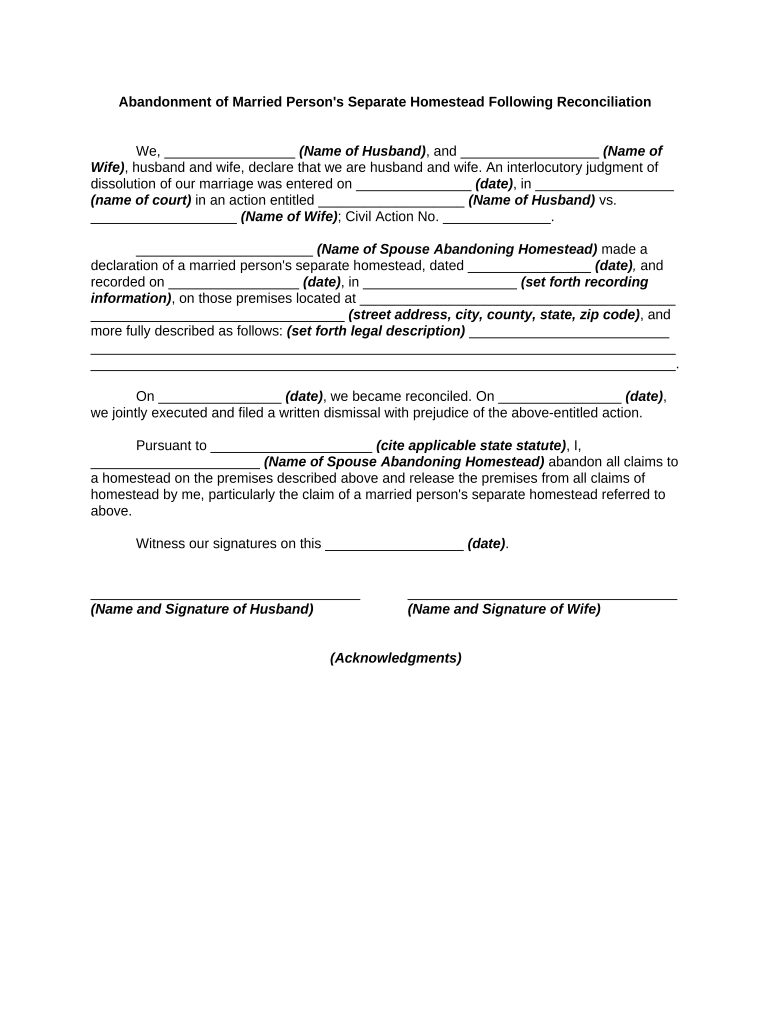
Begin by entering the names of both spouses in the designated fields at the top of the form. Ensure accuracy as this information is crucial for legal purposes.
Fill in the date of the interlocutory judgment of dissolution and specify the name of the court where it was filed. This establishes the context for your declaration.
Provide details about the spouse abandoning the homestead, including their name and any relevant dates regarding previous declarations of separate homestead.
Clearly describe the premises involved, including street address and legal description. This section is vital for identifying the property in question.
Indicate reconciliation dates and ensure that both spouses sign and date at the bottom of the form to validate your agreement.
Start using our platform today to complete your married homestead get online for free!
How to check homestead exemption status onlineHomestead exemption Gwinnett CountyFulton County homestead exemptionHomestead exemption DeKalb CountyHow to apply for homestead exemption in GeorgiaHomestead exemption Savannah GAChatham County homestead exemptionCobb County homestead exemption
Security and compliance
At DocHub, your data security is our priority. We follow HIPAA, SOC2, GDPR, and other standards, so you can work on your documents with confidence.
If a married couple qualifies their property for residence homestead exemption, the spouses are treated as community property owners with 100 percentRead more
Sep 8, 2025 Going off the grid isnt just about solar power and gardensits about slowing down, prioritizing what matters, and creating a life rootedRead more
Property Tax Homestead Exemptions - Department of Revenue
A homeowner is entitled to a homestead exemption on their home and land underneath provided the home was owned by the homeowner and was their legal residence.Read more
Cookie consent notice
This site uses cookies to enhance site navigation and personalize your experience.
By using this site you agree to our use of cookies as described in our Privacy Notice.
You can modify your selections by visiting our Cookie and Advertising Notice.