




01. Edit your 941 online
Type text, add images, blackout confidential details, add comments, highlights and more.

Type text, add images, blackout confidential details, add comments, highlights and more.

Draw your signature, type it, upload its image, or use your mobile device as a signature pad.

Send 941 2022 via email, link, or fax. You can also download it, export it or print it out.
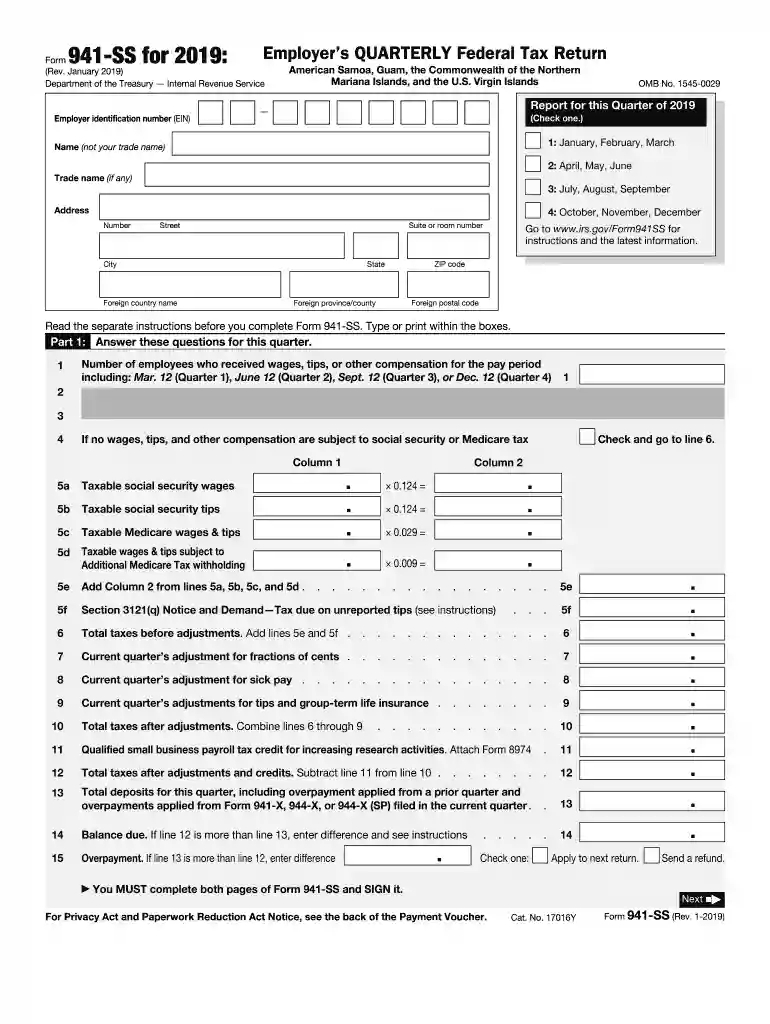
Form 941, officially known as the Employer's Quarterly Federal Tax Return, is utilized by employers to report employment taxes, including social security, Medicare, and federal income tax withheld from employees' paychecks. This form is crucial for maintaining compliance with federal tax obligations and ensuring accurate reporting of employment taxes. Employers must file it quarterly with the Internal Revenue Service (IRS) to detail the wages, tips, and other compensation delivered to employees.
Employers use Form 941 to systematically document and report all required payroll tax details for each quarter. This process involves summarizing the total taxable wages and taxes withheld, then calculating the employer's share of social security and Medicare taxes.
Employers can obtain Form 941 directly from the IRS website, where it is available as a downloadable PDF. Alternatively, businesses may access the form through authorized tax preparation software or via mail upon request from the IRS.
Completing Form 941 involves several detailed steps to ensure compliance and accuracy:
Primarily, employers, including corporations, partnerships, and sole proprietorships that pay wages subject to federal withholding, are required to use Form 941. This ensures proper reporting of employment tax liabilities to the IRS.
Form 941 must be filed in a timely manner every quarter. Filing deadlines are normally the last day of the month following the end of a quarter:
Failing to file Form 941, or filing it late, can result in penalties from the IRS. Penalties typically start at a percentage of the unpaid taxes and increase with continued non-compliance. It is imperative to file by the established deadlines and ensure all taxes are accurately reported and paid.
Form 941 can be filed either electronically or via paper submission. Electronic filing is generally encouraged as it is faster, reduces errors, and offers immediate confirmation of receipt.
Many popular tax software platforms, such as TurboTax and QuickBooks, offer support for completing and filing Form 941. These tools simplify the filing process by automating calculations and flagging potential errors before submission.
Through understanding and adherence to these guidelines, employers can efficiently and accurately complete Form 941, ensuring compliance with federal tax regulations. This not only protects from legal penalties but also fosters a reputable business standing.
We've got more versions of the 941 form. Select the right 941 version from the list and start editing it straight away!
| Versions | Form popularity | Fillable & printable |
|---|---|---|
| 2023 | 4.3 Satisfied (32 Votes) | |
| 2022 | 4.9 Satisfied (55 Votes) | |
| 2022 | 4.8 Satisfied (116 Votes) | |
| 2021 | 4.3 Satisfied (126 Votes) | |
| 2021 | 4.3 Satisfied (100 Votes) | |
| 2020 | 4.3 Satisfied (210 Votes) | |
| 2020 | 4.4 Satisfied (169 Votes) | |
| 2019 | 4.4 Satisfied (89 Votes) | |
| 2018 | 4.4 Satisfied (93 Votes) | |
| 2017 | 4.4 Satisfied (32 Votes) | |
| 2016 | 4.3 Satisfied (121 Votes) | |
| 2015 | 3.9 Satisfied (35 Votes) | |
| 2014 | 4 Satisfied (55 Votes) | |
| 2013 | 4 Satisfied (26 Votes) | |
| 2012 | 4 Satisfied (48 Votes) |
At DocHub, your data security is our priority. We follow HIPAA, SOC2, GDPR, and other standards, so you can work on your documents with confidence.
The Form 941, Employers Quarterly Federal Tax Return, is used to perform a reconciliation (e.g. true-up) of the total federal tax payments made by an employerRead more
Apr 1, 2025 Enter your name and address as shown on Form 941. Enclose your check or money order made payable to. United States Treasury. Be sure toRead more
Oct 6, 2017 Taxes on wages paid to nonfarm workers are reported on. Form 941/941-SS, Employers QUARTERLY Federal Tax Return, or. Form 944, EmployersRead more


