Type text, add images, blackout confidential details, add comments, highlights and more.
02. Sign it in a few clicks
Draw your signature, type it, upload its image, or use your mobile device as a signature pad.
03. Share your form with others
Send it via email, link, or fax. You can also download it, export it or print it out.
How to use or fill out contract terms and conditions with our platform
Ease of Setup
DocHub User Ratings on G2
Ease of Use
DocHub User Ratings on G2
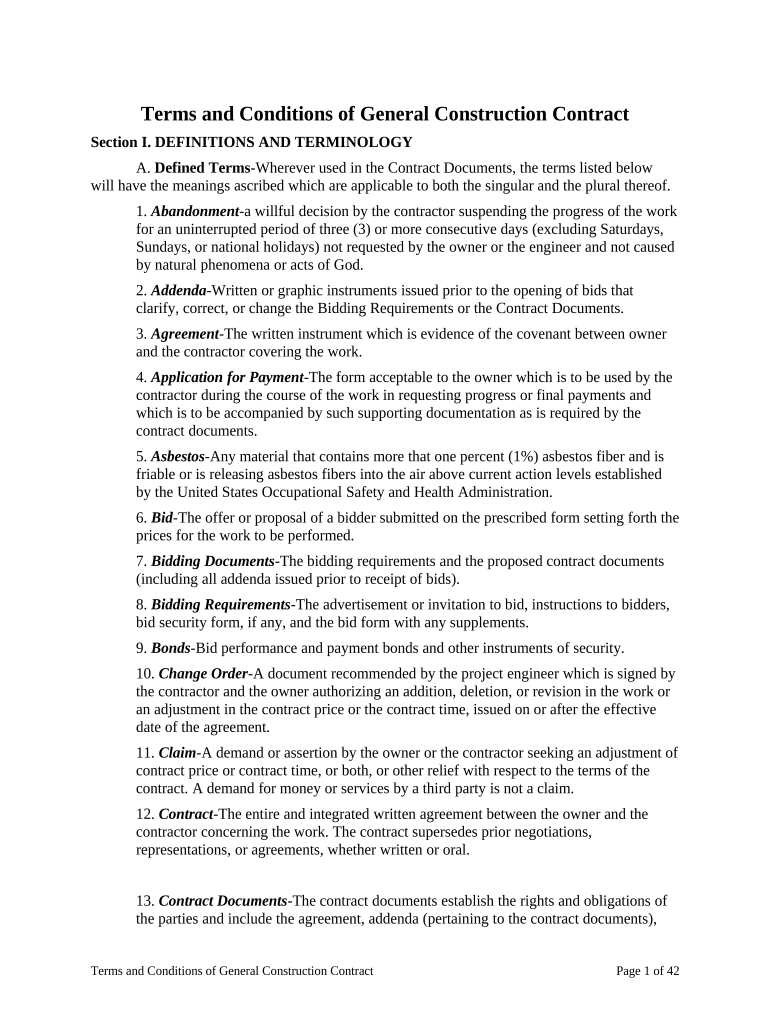
Click ‘Get Form’ to open the contract terms and conditions document in the editor.
Begin by reviewing Section I, which outlines definitions and terminology. Familiarize yourself with key terms such as 'Contractor', 'Owner', and 'Work' to ensure clarity in your understanding.
Proceed to fill out any required fields in Section II regarding preliminary matters. This may include providing necessary documentation like bonds or insurance certificates.
In Section III, ensure that you acknowledge the intent of the contract documents. Confirm that all components are understood and agree upon any amendments if necessary.
Continue through each section, filling out relevant information as prompted. Pay special attention to Sections IV through VIII, which detail responsibilities and obligations of both parties.
Once all sections are completed, review your entries for accuracy. Utilize our platform's features to make edits or adjustments as needed before finalizing the document.
Start using our platform today for free to streamline your contract management process!
Fill out contract terms and conditions online It's free
Contract terms and conditions templateContract terms and conditions pdfTerms and Conditions examplesTerms and conditions differenceTerms and conditions in contract lawTerms and conditions sample for businessTerms and conditions sample PDFTerms and conditions website
Security and compliance
At DocHub, your data security is our priority. We follow HIPAA, SOC2, GDPR, and other standards, so you can work on your documents with confidence.
Customers use or misuse of the Site; Customers bDocHub of the Terms of Conditions; or Customers violation of any law or the rights of a third party.Read more
Standard Purchase Order Terms and Conditions | Procurement
Formation of Contract. By performing under this Purchase Order (in full or in part), Supplier agrees to and accepts all the provisions in this Purchase OrderRead more
Cookie consent notice
This site uses cookies to enhance site navigation and personalize your experience.
By using this site you agree to our use of cookies as described in our Privacy Notice.
You can modify your selections by visiting our Cookie and Advertising Notice.