Rf1209 2026

Get Form
rf 1401 Preview on Page 1

Here's how it works

01. Edit your rf 1401 online
Type text, add images, blackout confidential details, add comments, highlights and more.

02. Sign it in a few clicks
Draw your signature, type it, upload its image, or use your mobile device as a signature pad.

03. Share your form with others
Send rf 1401 po polsku via email, link, or fax. You can also download it, export it or print it out.

How to use or fill out rf1209 with our platform

Form edit decoration
9.5
Ease of Setup
DocHub User Ratings on G2
9.0
Ease of Use
DocHub User Ratings on G2
  1. Click ‘Get Form’ to open rf1209 in the editor.
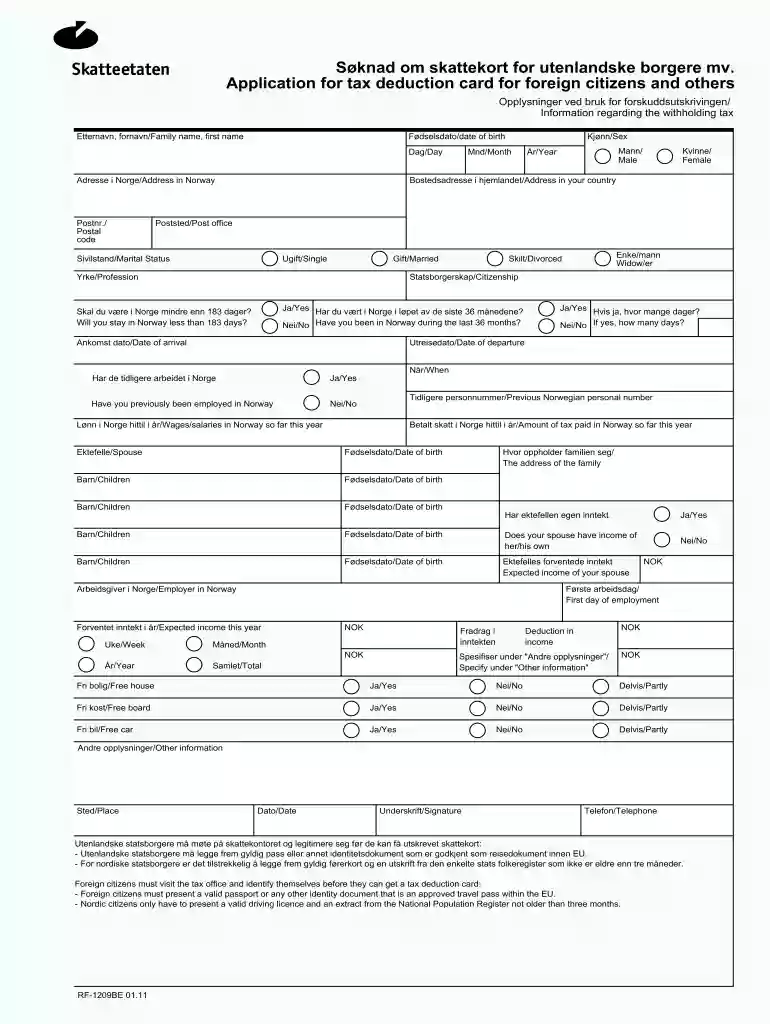
  2. Begin by entering your family name and first name in the designated fields. Ensure that your date of birth is accurately filled out, including day, month, and year.
  3. Provide your address in Norway along with the postal code. Next, indicate your gender by selecting either 'Male' or 'Female'.
  4. Fill in your home country address and postal office details. Specify your marital status by choosing from options like 'Single', 'Married', or 'Divorced'.
  5. Answer questions regarding your stay in Norway, including whether you have been in the country during the last 36 months and if you will stay for less than 183 days.
  6. Complete sections related to previous employment in Norway, wages earned this year, and tax paid so far. Don’t forget to include information about your spouse and children if applicable.
  7. Finally, review all entries for accuracy before signing and submitting the form through our platform.

Start filling out rf1209 today for free using our editor!

See more rf1209 versions

We've got more versions of the rf1209 form. Select the right rf1209 version from the list and start editing it straight away!
Versions Form popularity Fillable & printable
2013 4.8 Satisfied (143 Votes)
2011 4.4 Satisfied (32 Votes)
be ready to get more

Complete this form in 5 minutes or less

Get form

Got questions?

We have answers to the most popular questions from our customers. If you can't find an answer to your question, please contact us.
Contact us
Tax deduction card and advance tax Up to 10 days Applications for the tax deduction cards for foreign workers often take more time. This is partly due to the worker needing to undergo an ID check.
The tax deduction card is an electronic document that shows how much tax you as the employer must deduct before the workers are paid for the work they carried out in Norway. The amount you deduct is called withholding tax and is a prepayment of the tax that the tax authorities estimate your worker must pay.
In order to obtain a tax deduction card, one must report to a tax office and do the following: Produce valid identification (passport) Submit an application for a tax deduction card using form RF1209. Document ones income by presenting an employment contract or a written offer of employment.
An exemption card is a tax deduction card that shows that your employer should not deduct tax if you earn NOK 65,000 or less during the year (2022). If you at one point have received an exemption card, you do not have to apply for a new one. If you earn more than NOK 65,000, you must order a tax deduction card instead.
From 2020 onwards, you can fill in your taxes directly on Skatteetaten.no. Step 1: Access Your Tax Return. Step 2: Locate the Cryptocurrency Section. Step 3: Choose How to Declare Your Crypto. Step 4: Upload Your Divly Tax Report. Step 5: Fill in the Required Information. Step 6: Final Submission.

Security and compliance

At DocHub, your data security is our priority. We follow HIPAA, SOC2, GDPR, and other standards, so you can work on your documents with confidence.

Learn more
ccpa2
pci-dss
gdpr-compliance
hipaa
soc-compliance

People also ask

To apply for recognition by the IRS of exempt status under section 501(c)(3) of the Code, use a Form 1023-series application. The application must be submitted electronically on Pay.gov and must, including the appropriate user fee.

rf 1209 english