Type text, add images, blackout confidential details, add comments, highlights and more.
02. Sign it in a few clicks
Draw your signature, type it, upload its image, or use your mobile device as a signature pad.
03. Share your form with others
Send it via email, link, or fax. You can also download it, export it or print it out.
How to use or fill out Written Warning/Discharge Notice with our platform
Ease of Setup
DocHub User Ratings on G2
Ease of Use
DocHub User Ratings on G2
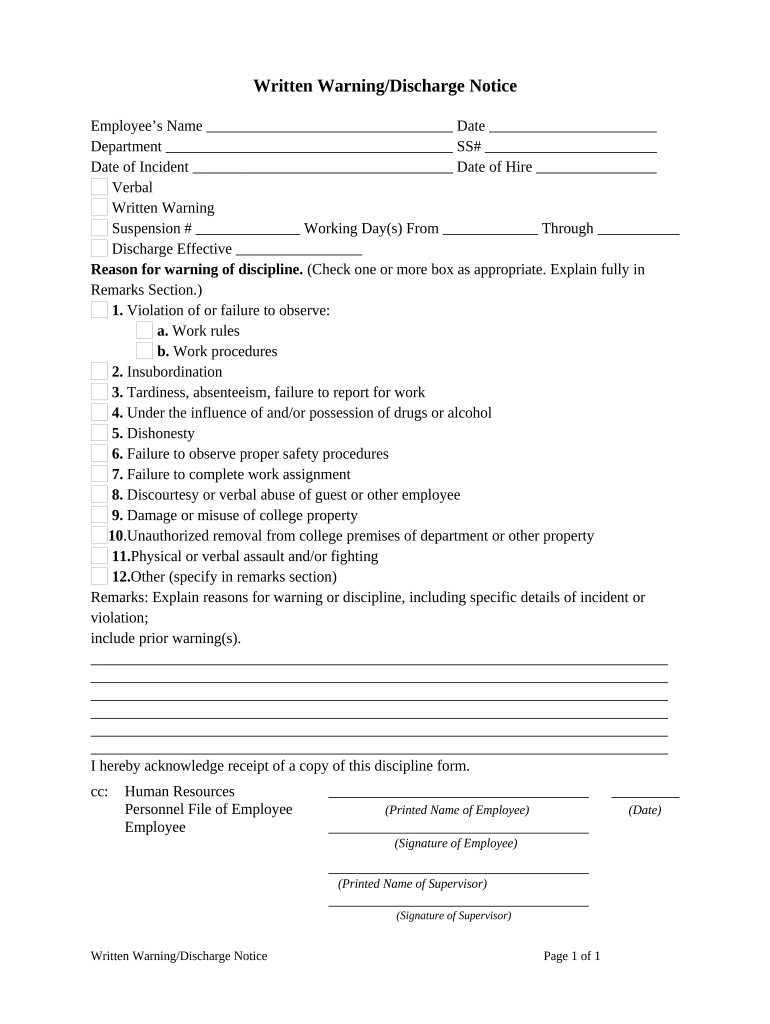
Click ‘Get Form’ to open the Written Warning/Discharge Notice in the editor.
Begin by entering the Employee’s Name, Date, Department, and SS# in the designated fields. This information is crucial for identifying the employee involved.
Fill in the Date of Incident and Date of Hire to provide context for the warning. These dates help establish a timeline of events.
Select whether this is a Verbal or Written Warning and indicate any Suspension # if applicable. Specify the Working Day(s) From and Through for clarity on the duration of any disciplinary action.
In the Reason for warning of discipline section, check one or more boxes that apply to the incident. Use the Remarks Section to explain fully, including specific details about prior warnings if necessary.
Ensure both the Employee and Supervisor sign and date at the bottom of the form to acknowledge receipt and agreement.
Start using our platform today to streamline your document editing process for free!
Fill out Written Warning/Discharge Notice online It's free
Written warning templateWarning letter to employee for unprofessional behavior1st warning letter to employeeWhat is a written warning from policeWritten warning template WordWritten warning for employee sampleWritten warning examplesWarning letter for carelessness in work
Security and compliance
At DocHub, your data security is our priority. We follow HIPAA, SOC2, GDPR, and other standards, so you can work on your documents with confidence.
05.033 Staff Employee Discipline and Discharge | UNTs Policy
The written warning places the employee on notice that more severe disciplinary action will be taken, including termination, if sustained improvement in.Read more
DEC Regulations 18 AAC 75, Oil and Other Hazardous
May 14, 1992 (3) require written notice to the department of any proposal to use the site in a manner that is inconsistent with a restrictive covenant orRead more
Cookie consent notice
This site uses cookies to enhance site navigation and personalize your experience.
By using this site you agree to our use of cookies as described in our Privacy Notice.
You can modify your selections by visiting our Cookie and Advertising Notice.