Type text, add images, blackout confidential details, add comments, highlights and more.
02. Sign it in a few clicks
Draw your signature, type it, upload its image, or use your mobile device as a signature pad.
03. Share your form with others
Send it via email, link, or fax. You can also download it, export it or print it out.
How to use or fill out ls 223 unpaid wages 2013 form with our platform
Ease of Setup
DocHub User Ratings on G2
Ease of Use
DocHub User Ratings on G2
Click ‘Get Form’ to open the ls 223 unpaid wages 2013 form in the editor.
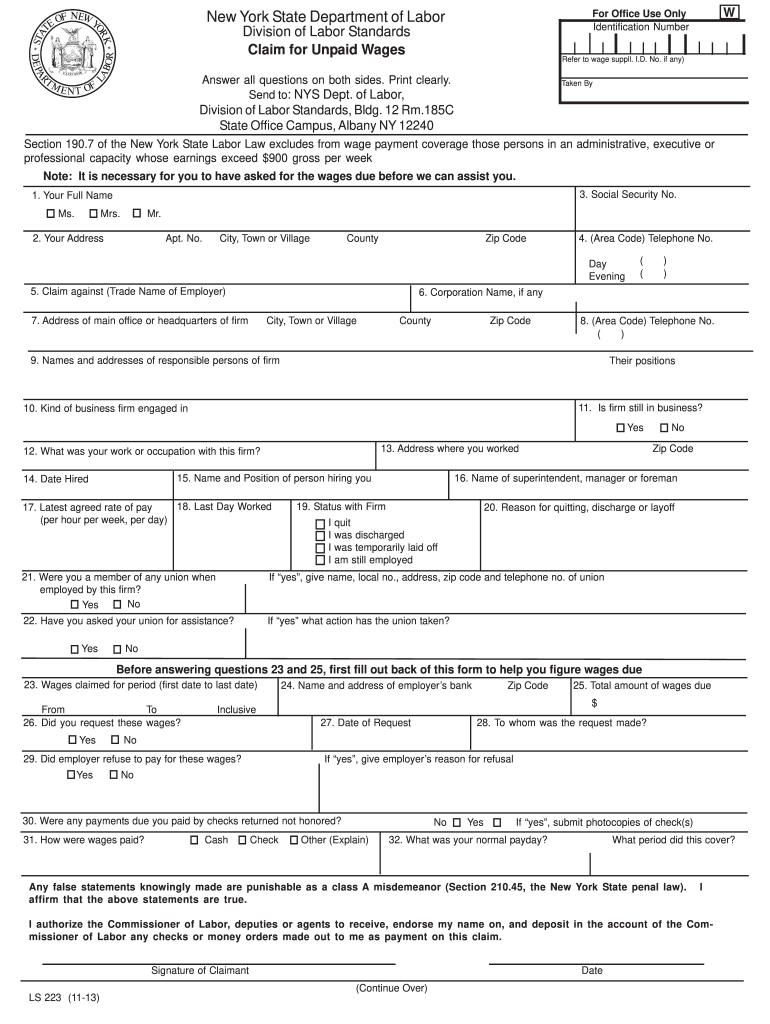
Begin by entering your full name in the designated field. Ensure that you select the correct title (Ms., Mrs., Mr.) for clarity.
Fill in your address, including apartment number, city, county, and zip code. This information is crucial for correspondence regarding your claim.
Provide your Social Security Number and telephone numbers for both day and evening contacts to facilitate communication.
Identify the employer by filling in their trade name and corporation name if applicable. Include their main office address and contact number.
Detail your employment history by specifying your job title, date hired, last day worked, and rate of pay. This information helps establish the basis of your claim.
Complete the wage claim section by indicating the period for which you are claiming unpaid wages and total amount due. Be sure to calculate accurately based on hours worked.
Finally, review all entries for accuracy before signing and dating the form at the bottom. This ensures that your claim is processed without delays.
Start using our platform today to fill out your ls 223 unpaid wages form online for free!
Fill out ls 223 unpaid wages 2013 form online It's free
We've got more versions of the ls 223 unpaid wages 2013 form form. Select the right ls 223 unpaid wages 2013 form version from the list and start editing it straight away!
Further the labour laws also focus on employment standards, including general holidays, annual leave, working hours, unfair dismissals, minimum wage, layoff
As required by Financial Regulation 13.3, the External Auditors opinion and his report on the 2011 financial statements are also submitted to the Council and
Establishing Paid Sick Leave for Federal Contractors
Sep 29, 2016 Locate the nearest office by calling the WHDs toll free help line at (866) 4USWAGE ((866) 487-9243) between 8 a.m. and 5 p.m. in your local
Cookie consent notice
This site uses cookies to enhance site navigation and personalize your experience.
By using this site you agree to our use of cookies as described in our Privacy Notice.
You can modify your selections by visiting our Cookie and Advertising Notice.