Type text, add images, blackout confidential details, add comments, highlights and more.
02. Sign it in a few clicks
Draw your signature, type it, upload its image, or use your mobile device as a signature pad.
03. Share your form with others
Send it via email, link, or fax. You can also download it, export it or print it out.
How to use or fill out wi deed with our platform
Ease of Setup
DocHub User Ratings on G2
Ease of Use
DocHub User Ratings on G2
Click ‘Get Form’ to open the wi deed in the editor.
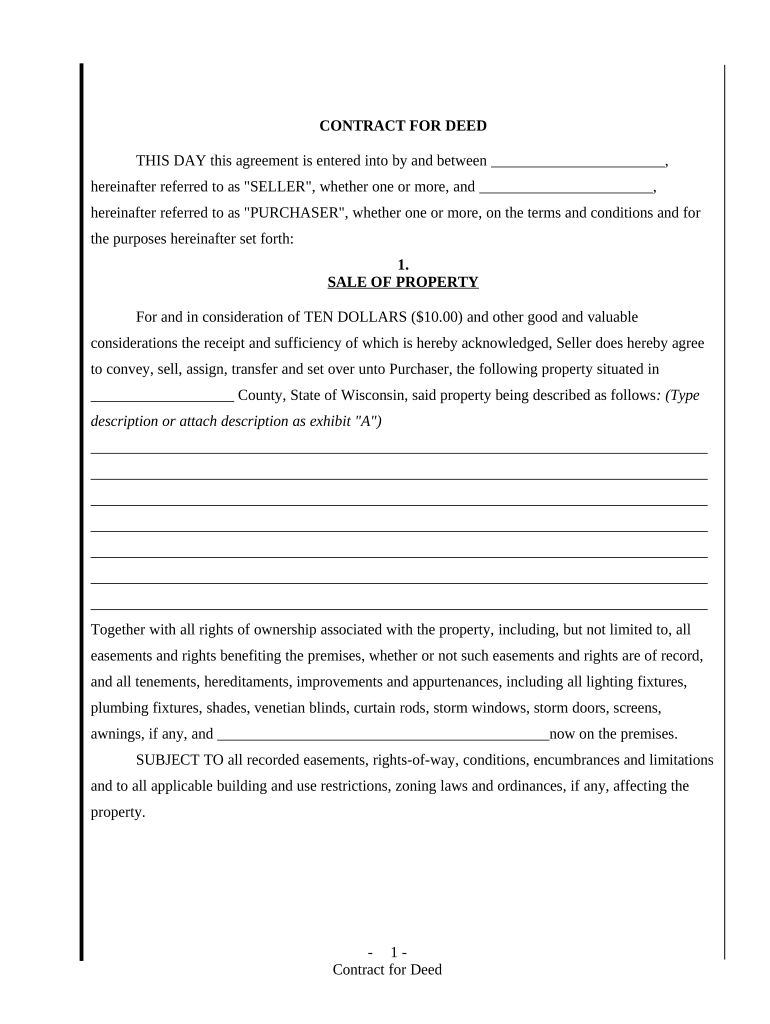
Begin by entering the names of the Seller and Purchaser in the designated fields at the top of the document.
In the 'SALE OF PROPERTY' section, provide a detailed description of the property being sold, including any relevant attachments as needed.
Next, specify the purchase price and payment terms in the 'PURCHASE PRICE AND TERMS' section. Choose one of the payment options provided and fill in all required amounts.
Review sections on maintenance, taxes, insurance, and default conditions to ensure you understand your obligations. Fill out any applicable fields based on your agreement.
Finally, complete the signature lines for both Seller and Purchaser at the end of the document. Ensure all parties sign and date appropriately.
Start using our platform today to easily fill out your wi deed for free!
Here are the 5 steps to finding and obtaining the deed to your house: Check Online. Contact the County Recorders Office. Request the Deed by Mail. Pay any associated Fees. Wait to receive the deed by mail.
How do I get a copy of a deed in Wisconsin?
Copies of recorded real estate documents may be acquired in one of the following ways: Online Using Our Tapestry Application. Use the Tapestry application to search our archive and print your document from the convenience of your home or office computer. VIA US Mail. By Appointment or Walk-in.
How do I get a copy of the deed to my house in Wisconsin?
Copies of Recorded Documents Order Recent Documents with Tapestry. If you know the party names, you can get the copy online through TAPESTRY. You must also have docHub on your computer and a major credit card. Order Documents at the Register of Deeds Office. You can come into our office and request a copy.
What are the disadvantages of a quit claim deed?
A deed is a legal document that transfers property ownership from one party to another. In California, as in other states, a deed must be signed by the seller in order to be legally binding.
Does having a deed mean ownership?
Contact the county recorders office This is especially true if your county doesnt provide electronic records, or if the deed is older and has been archived. If you werent able to find your deed online, then your next step is to contact your County Recorders Office.
Related Searches
Wi deed templateWi deed searchWi deed formWi deed onlineWisconsin Quit Claim DeedRegister of Deeds MilwaukeeRegister of Deeds Columbia County WIRegister of Deeds Price County
Security and compliance
At DocHub, your data security is our priority. We follow HIPAA, SOC2, GDPR, and other standards, so you can work on your documents with confidence.
DANE COUNTY REGISTER OF DEEDS PO Box 1438. Madison, WI 53701-1438. The recording fee is $30.00 per document - cash or check made payable to Register of Deeds.Read more
List of nouns ending with -wI - Klingon Language Wiki
List of nouns ending with -wI ; ya DewI, tactical computer, other ; yachwI, brush, inferred ; yer ghajwI chaw, title deed, patent, other ; yoHwI, brave oneRead more
Cookie consent notice
This site uses cookies to enhance site navigation and personalize your experience.
By using this site you agree to our use of cookies as described in our Privacy Notice.
You can modify your selections by visiting our Cookie and Advertising Notice.