Type text, add images, blackout confidential details, add comments, highlights and more.
02. Sign it in a few clicks
Draw your signature, type it, upload its image, or use your mobile device as a signature pad.
03. Share your form with others
Send it via email, link, or fax. You can also download it, export it or print it out.
How to use or fill out form tpt tax 2015 with our platform
Ease of Setup
DocHub User Ratings on G2
Ease of Use
DocHub User Ratings on G2
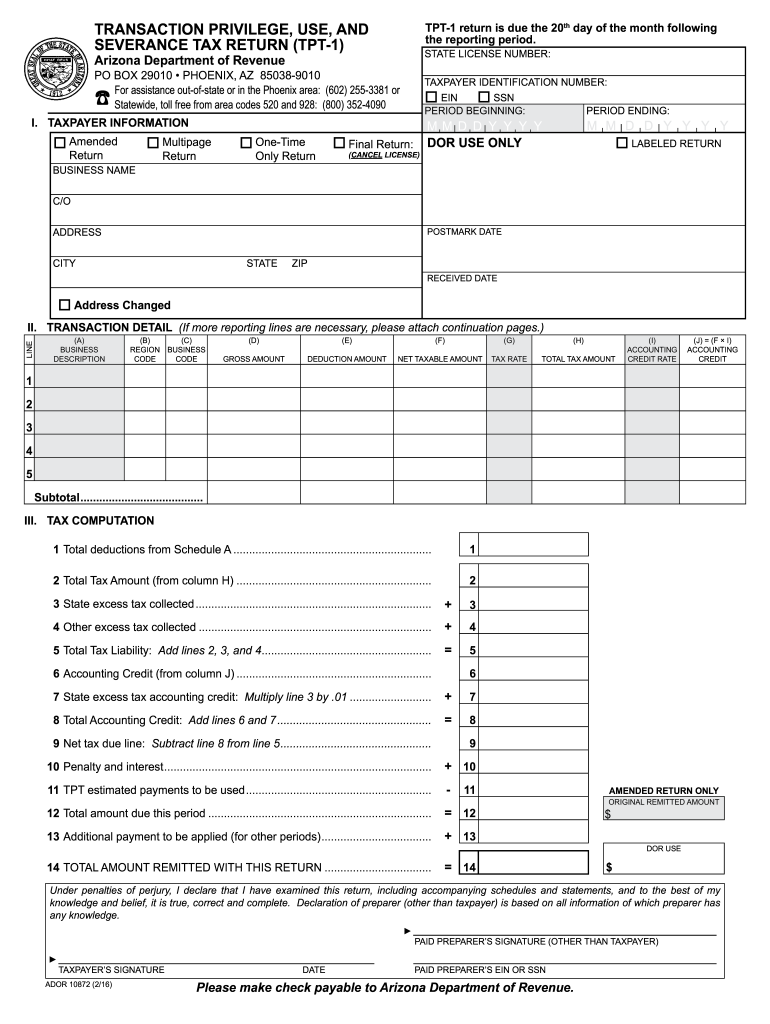
Click ‘Get Form’ to open the TPT-1 return in the editor.
Begin by entering your State License Number and Taxpayer Identification Number (EIN or SSN) at the top of the form.
Fill in the reporting period dates, including the period beginning and ending. Indicate if this is an amended, one-time only, or final return.
In Section I, provide your business name and address details. Ensure all information is accurate for proper processing.
Proceed to Section II for Transaction Detail. Enter each business description along with corresponding region and business codes, gross amounts, deduction amounts, and calculate net taxable amounts.
Complete Section III for Tax Computation by adding total deductions and tax amounts as instructed. Ensure you accurately calculate any accounting credits.
Finally, review all entries for accuracy before signing at the bottom of the form. Use our platform’s features to save or print your completed document.
Start using our platform today to fill out your TPT tax return easily and efficiently!
ARIZONA DEPARTMENT OF REVENUE 2015 ANNUAL REPORT. Page 39. TRANSACTION PRIVILEGE, USE AND SEVERANCE TAX. MAJOR FEATURES. Arizonas transaction privilege, useRead more
Jan 19, 1997 Award-WinninK Products. In rhe past two years, leading industry publications have applauded Micron. PCs wirh more rhan 170 awards forRead more
Cookie consent notice
This site uses cookies to enhance site navigation and personalize your experience.
By using this site you agree to our use of cookies as described in our Privacy Notice.
You can modify your selections by visiting our Cookie and Advertising Notice.