Tenant over 2026

Get Form
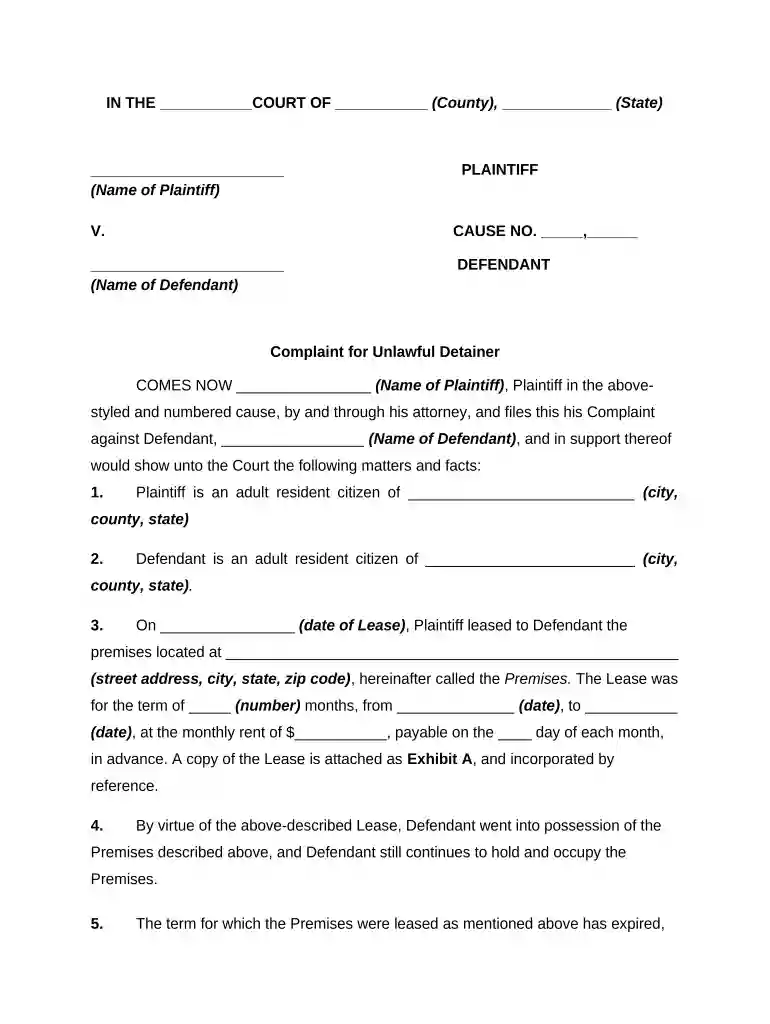
tenant over Preview on Page 1

Here's how it works

01. Edit your form online
Type text, add images, blackout confidential details, add comments, highlights and more.

02. Sign it in a few clicks
Draw your signature, type it, upload its image, or use your mobile device as a signature pad.

03. Share your form with others
Send it via email, link, or fax. You can also download it, export it or print it out.

How to use or fill out tenant over with our platform

Form edit decoration
9.5
Ease of Setup
DocHub User Ratings on G2
9.0
Ease of Use
DocHub User Ratings on G2
  1. Click ‘Get Form’ to open the tenant over document in the editor.
  2. Begin by filling in the court name, county, and state at the top of the form. This information is crucial for identifying the jurisdiction.
  3. Enter the names of both the plaintiff and defendant in their respective sections. Ensure accuracy as this identifies the parties involved.
  4. In section three, provide details about the lease agreement including dates, address of the premises, and monthly rent. This establishes the basis for your complaint.
  5. Complete sections four through seven by detailing possession status, demand for possession, and any elapsed time since demand was made. This supports your claim.
  6. Finally, specify your requests for judgment at the end of the form. Include restitution and any damages sought to clearly outline your expectations from the court.

Start using our platform today to easily complete your tenant over form online for free!

be ready to get more

Complete this form in 5 minutes or less

Get form

Got questions?

We have answers to the most popular questions from our customers. If you can't find an answer to your question, please contact us.
Contact us
What is holding over? Holding over is simply a tenant remaining in occupation of premises once the original term of their letting has come to an end. Holding over the risks. Holding over principally presents risks as a result of the lack of clarity on the legal position of the parties that it creates.
Court procedure: Judicial Eviction Procedure When a landlord gives a tenant proper written notice to leave the property, and the tenant does not leave, the landlord may file a written complaint (a lawsuit) with the District Court of the county where the property is located.
California. In California, if the landlord accepts rent from you after the end of your term, you will automatically become a holdover tenant and your new tenancy will be a periodic tenancy. [1] Under California law, a 30 Day Notice to Quit is required to evict a periodic tenant.
When you get a notice of termination it will have a date where you have to be out of the property by. If you stay in the property after that date you are overholding. This is considered a bdocHub of the tenancy agreement.
Holdover can occur either with the landlords consent or without it, and it may lead to renegotiation of the lease terms or even eviction. For example, if a tenants lease ends, but they remain in the apartment and continue to pay rent, they are considered to be in a holdover situation.

Security and compliance

At DocHub, your data security is our priority. We follow HIPAA, SOC2, GDPR, and other standards, so you can work on your documents with confidence.
Learn more
ccpa2
pci-dss
gdpr-compliance
hipaa
soc-compliance

People also ask

In California, if the landlord accepts rent from you after the end of your term, you will automatically become a holdover tenant and your new tenancy will be a periodic tenancy. [1] Under California law, a 30 Day Notice to Quit is required to evict a periodic tenant.
Overholding is when you stay in your rented accommodation after the tenancy termination date given on a valid notice of termination. Overholding is a bdocHub of your tenancy agreement and the landlords rights. It sometimes happens when tenants cant find somewhere else to rent when their tenancy ends.

Related links