



Gift real estate 2026

Get Form
gift real estate price Preview on Page 1

Here's how it works

01. Edit your gift real estate price online
Type text, add images, blackout confidential details, add comments, highlights and more.

02. Sign it in a few clicks
Draw your signature, type it, upload its image, or use your mobile device as a signature pad.

03. Share your form with others
Send it via email, link, or fax. You can also download it, export it or print it out.

How to use or fill out gift real estate with our platform

Form edit decoration
9.5
Ease of Setup
DocHub User Ratings on G2
9.0
Ease of Use
DocHub User Ratings on G2
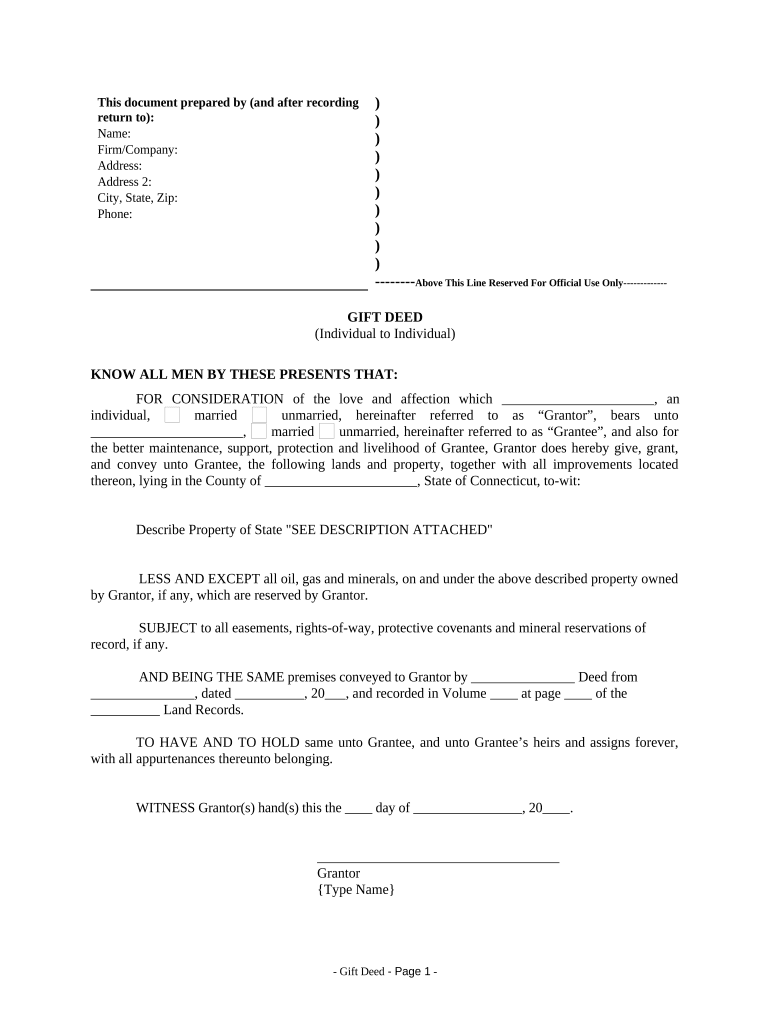
  1. Click ‘Get Form’ to open the gift real estate document in the editor.
  2. Begin by filling in the 'Prepared by' section. Enter your name, firm/company, address, city, state, zip code, and phone number.
  3. In the 'KNOW ALL MEN BY THESE PRESENTS THAT' section, specify the names of both the Grantor and Grantee. Indicate their marital status as either married or unmarried.
  4. Describe the property being gifted in detail. If there is a separate description attached, note that accordingly.
  5. Complete the section regarding easements and mineral reservations if applicable. This ensures clarity on any rights associated with the property.
  6. Fill in the date and sign as Grantor. Ensure you type your name where indicated for clarity.
  7. If notarization is required, complete the notary section with all necessary details including date and signature of the notary public.

Start using our platform today to easily fill out your gift real estate documents for free!

be ready to get more

Complete this form in 5 minutes or less

Get form

Got questions?

We have answers to the most popular questions from our customers. If you can't find an answer to your question, please contact us.
Contact us
Inherited properties can come with financial responsibilities such as existing mortgages, unpaid property taxes, maintenance costs, and insurance requirements. Be aware of hidden costs, including emergency repairs, property management fees, and legal expenses.
The Internal Revenue Service (IRS) does not classify a gift received as income, so when you receive the house, you will not pay taxes on it. Only when you sell the gifted property is it subject to taxation.
Its considered a gift by the IRS anytime something is sold for less than fair market value. This is important because if you sell a property at a discount to someone, its considered a gift of equity. The difference between the purchase price and the appraised value would be taxable.
Answer: To figure out the basis of property received as a gift, you must know three amounts: The donors adjusted basis just before the donor made the gift. The fair market value (FMV) of the property at the time the donor made the gift.
It is usually better for your heirs to inherit real estate at your death rather than to receive it as a gift from you during your life. This is because it is tax efficient for the property to pass at death due to the stepped up basis for capital gains tax purposes.

Security and compliance

At DocHub, your data security is our priority. We follow HIPAA, SOC2, GDPR, and other standards, so you can work on your documents with confidence.

Learn more
ccpa2
pci-dss
gdpr-compliance
hipaa
soc-compliance

People also ask

Generally, from a tax perspective, it is more advantageous to inherit a home rather than receive it as a gift before the owners death. This article will delve into the tax aspects of gifting a home, including gift tax implications, basis considerations for the recipient, and potential capital gains tax implications.
Gifted houses adjusted cost basis equals the price the gifter paid for the house plus the value of any improvements made to it. Inherited houses adjusted cost basis equals the FMV on the day of the donors death.
The big difference is cost basis. Inheritance uses a ``stepped up basis where the recipient gets to take the Fair Market Value as the basis (much more preferable). A gift is kept at the original owners basis, which can result in large tax consequences for the recipient.

Related links

