Quitclaim trust 2026

Get Form
quitclaim trust Preview on Page 1

Here's how it works

01. Edit your form online
Type text, add images, blackout confidential details, add comments, highlights and more.
02. Sign it in a few clicks
Draw your signature, type it, upload its image, or use your mobile device as a signature pad.
03. Share your form with others
Send it via email, link, or fax. You can also download it, export it or print it out.

How to use or fill out quitclaim trust with our platform

Form edit decoration
9.5
Ease of Setup
DocHub User Ratings on G2
9.0
Ease of Use
DocHub User Ratings on G2
  1. Click ‘Get Form’ to open the quitclaim trust document in the editor.
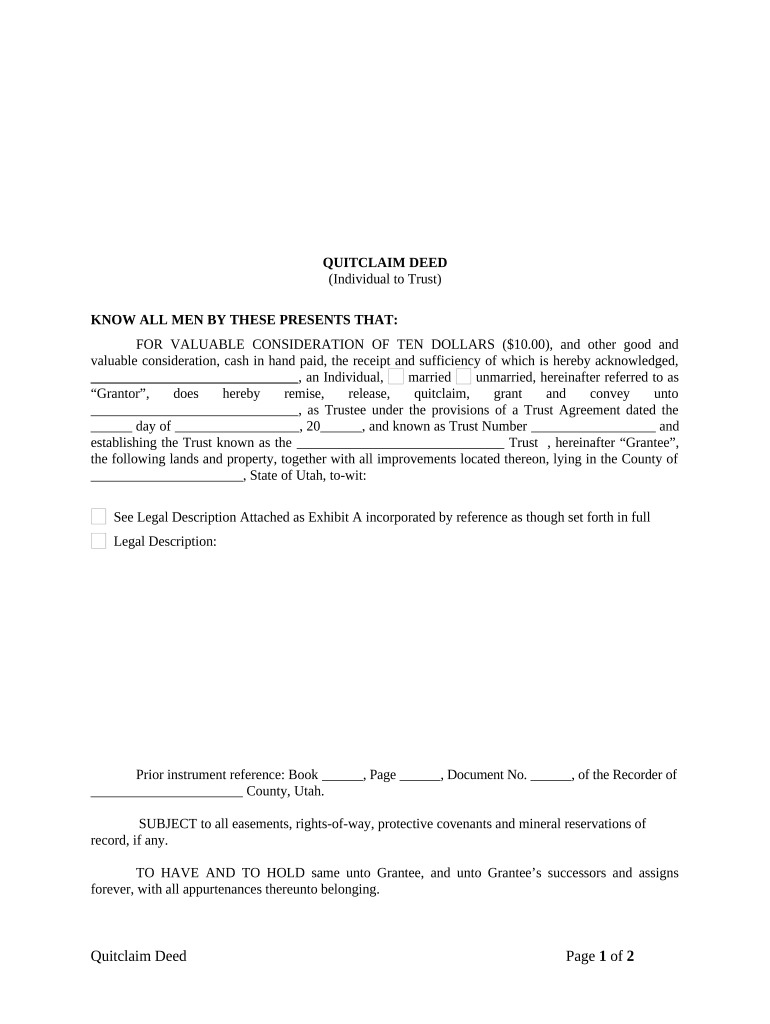
  2. Begin by filling in the Grantor's name and marital status. This identifies the individual transferring property rights.
  3. Next, enter the Grantee's name as Trustee along with the Trust Agreement date and Trust Number. This section specifies who will receive the property.
  4. Provide a detailed legal description of the property being transferred. If necessary, attach Exhibit A for clarity.
  5. Complete the notary section by entering the date of acknowledgment and having a notary public sign and seal the document.
  6. Finally, ensure all names, addresses, and contact information for both Grantor(s) and Grantee(s) are accurately filled out before saving your changes.

Start using our platform today to easily complete your quitclaim trust form online for free!

be ready to get more

Complete this form in 5 minutes or less

Get form

Got questions?

We have answers to the most popular questions from our customers. If you can't find an answer to your question, please contact us.
Contact us
The quitclaim deed simply transfers any interest they may have to the other party. Because of the lack of title guarantees, quitclaim deeds are most often used to transfer property between two parties who know and trust each other, such as family members.
One of the main drawbacks of using a quitclaim deed is that you have little to no legal recourse if the grantor didnt actually have a legal interest in the property to give away. This is the risk you take with a quitclaim deed that doesnt offer any warranties.
Home Living Trust Quit Claim Deed with Living Trust. QUIT CLAIM DEED WITH LIVING TRUST. A quit claim deed is a type of deed that transfers an interest in real property, like a house, vacant land to another. Quit claim deeds are often used instead of warranty deeds when transferring property out of the trust.
A quit claim deed, on the other hand, is a legal document that transfers property ownership without warranties or guarantees about the title. While irrevocable trusts focus on asset protection and control, quit claim deeds primarily deal with quick ownership transfers.
A: Among the disadvantages of putting your house in a trust in California is the cost associated with creating the trust. Additionally, if the trust in which you put your house is an irrevocable trust, you lose a certain level of control because the terms of the trust cannot be changed in most cases.

Security and compliance

At DocHub, your data security is our priority. We follow HIPAA, SOC2, GDPR, and other standards, so you can work on your documents with confidence.

Learn more
ccpa2
pci-dss
gdpr-compliance
hipaa
soc-compliance

People also ask

A quitclaim deed is a simple tool for transferring interest in a property without guaranteeing that the grantor has valid ownership. Its most commonly used in non-sale situations, such as transfers between family members, or to update or clarify ownership titles.
Trusts Offer Better Protection: Using a trust instead of a quitclaim deed can help avoid probate, protect your property from creditors and minimize tax liabilities. Consult an Estate Planning Attorney: Professional guidance ensures that your property is transferred securely, avoiding the many pitfalls of DIY deeds.

Related links