Nc corporations 2026

Get Form
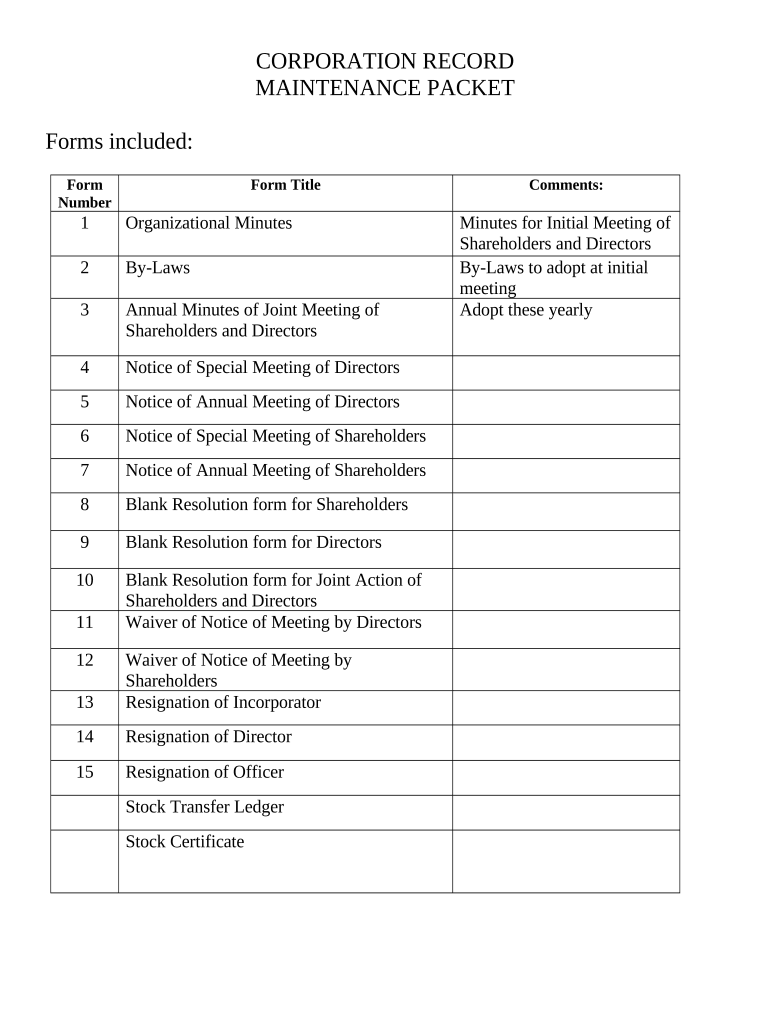
nc corporations Preview on Page 1

Here's how it works

01. Edit your form online
Type text, add images, blackout confidential details, add comments, highlights and more.
02. Sign it in a few clicks
Draw your signature, type it, upload its image, or use your mobile device as a signature pad.
03. Share your form with others
Send it via email, link, or fax. You can also download it, export it or print it out.

How to use or fill out nc corporations with our platform

Form edit decoration
9.5
Ease of Setup
DocHub User Ratings on G2
9.0
Ease of Use
DocHub User Ratings on G2
  1. Click ‘Get Form’ to open the nc corporations document in the editor.
  2. Begin by entering the 'Name of Corporation' and 'State of Incorporation' at the top of the form. Ensure accuracy as this information is crucial for legal purposes.
  3. Proceed to fill out Form 1: Minutes for Organizational Meeting. Document the names and addresses of directors, ensuring you have at least one director listed.
  4. In Form 2: By-Laws, specify the name and location of your corporation. Include details about annual meetings and shareholder rights.
  5. For Forms 3 through 7, complete each notice by filling in the date, time, and purpose of meetings. This ensures all shareholders are informed.
  6. Utilize the Blank Resolution forms (Forms 8-10) to document any decisions made during meetings. Clearly describe actions taken for transparency.
  7. Finally, review all entries for accuracy before saving or exporting your completed forms. Our platform allows easy modifications if needed.

Start using our platform today to streamline your nc corporations documentation process for free!

be ready to get more

Complete this form in 5 minutes or less

Get form

Got questions?

We have answers to the most popular questions from our customers. If you can't find an answer to your question, please contact us.
Contact us

Yes, a typed name is recognized as a legitimate electronic signature when you create it on your paperwork using a compliant solution like DocHub. Simply add your nc corporations to our editor, click Sign in the top tool pane → Create your signature → Type your name in the appropriate tab, and choose how it will appear on your document.

You can easily edit fill out your nc corporations on any iOS gadget. Open an internet browser of your choice, go to the DocHub website, authorize or create a new account, add your file for editing, and make your required changes. Our service is mobile-friendly, so utilizing its features on your smartphone will be a no-brainer, even on the first try.

Below, well give you a complete list of North Carolinas 100 largest companies, but first, heres a look at the top 10: Compass Group USA (Jobs) Lowes Companies (Jobs) Banc of America Mortgage Capital Corporation (Jobs) Bank of America (Jobs) Home Credit (Jobs) Delhaize America (Jobs) Total (Jobs) Honeywell (Jobs)
Business Entity Search Go to the North Carolina Business Entity Search Page. Fulfill The Query Requirements. Review The North Carolina Search Results Table. Review The North Carolina Entitys Details.
You will need to file the Application to Reserve a Business Entity Name with the office of the Secretary of State. You can file online or offline and the fee is $30. To register your LLC in North Carolina, you will have to file the Articles of Organization with the Secretary of State. The filing fee is $125.

People also ask

Where Fortune 500 Companies Find Success. A competitive cost of doing business and a low-cost, high quality of living attract and retain top talent in North Carolina. Thats why corporate headquarters like Bank of America, Lowes, Honeywell, and Truist thrive here.

Related links