01. Edit your termination agreement template online
Type text, add images, blackout confidential details, add comments, highlights and more.
02. Sign it in a few clicks
Draw your signature, type it, upload its image, or use your mobile device as a signature pad.
03. Share your form with others
Send termination agreement sample via email, link, or fax. You can also download it, export it or print it out.
How to use or fill out termination agreement with our platform
Ease of Setup
DocHub User Ratings on G2
Ease of Use
DocHub User Ratings on G2
Click ‘Get Form’ to open the termination agreement in the editor.
Begin by filling in the names and details of both parties involved. Ensure that you accurately input the legal names and titles as specified in the document.
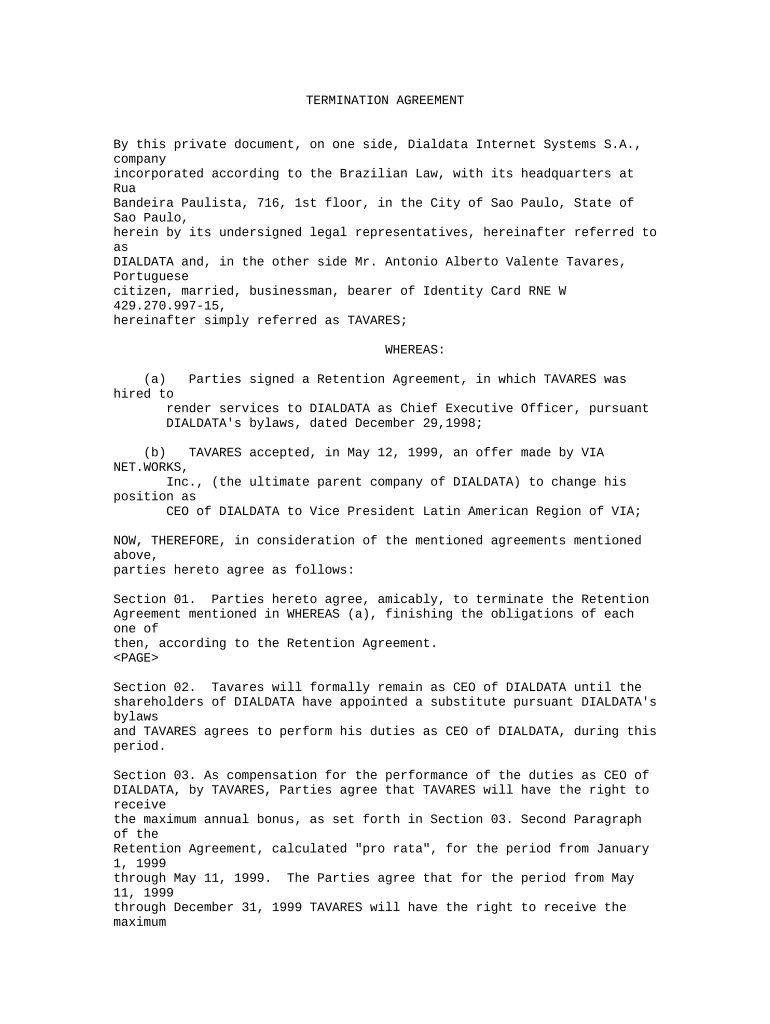
Review Section 01, which outlines the mutual agreement to terminate the Retention Agreement. Confirm that both parties understand and agree to this section.
In Section 02, note that Tavares will continue as CEO until a replacement is appointed. Ensure this section reflects any specific dates or conditions relevant to your situation.
Section 03 discusses compensation. Fill in any necessary calculations for bonuses based on performance metrics, ensuring clarity on payment timelines.
Complete Section 05 by confirming that both parties release each other from past claims. This is crucial for legal protection moving forward.
Finally, ensure all signatures are collected at the end of the document, including those of witnesses if required.
Start using our platform today to streamline your termination agreement process for free!
The marital termination agreement of divorcing spouses DocHubed can include child custody, child visitation, child and spousal support, and division of property.Read more
Cookie consent notice
This site uses cookies to enhance site navigation and personalize your experience.
By using this site you agree to our use of cookies as described in our Privacy Notice.
You can modify your selections by visiting our Cookie and Advertising Notice.