Under trust create 2026

Get Form
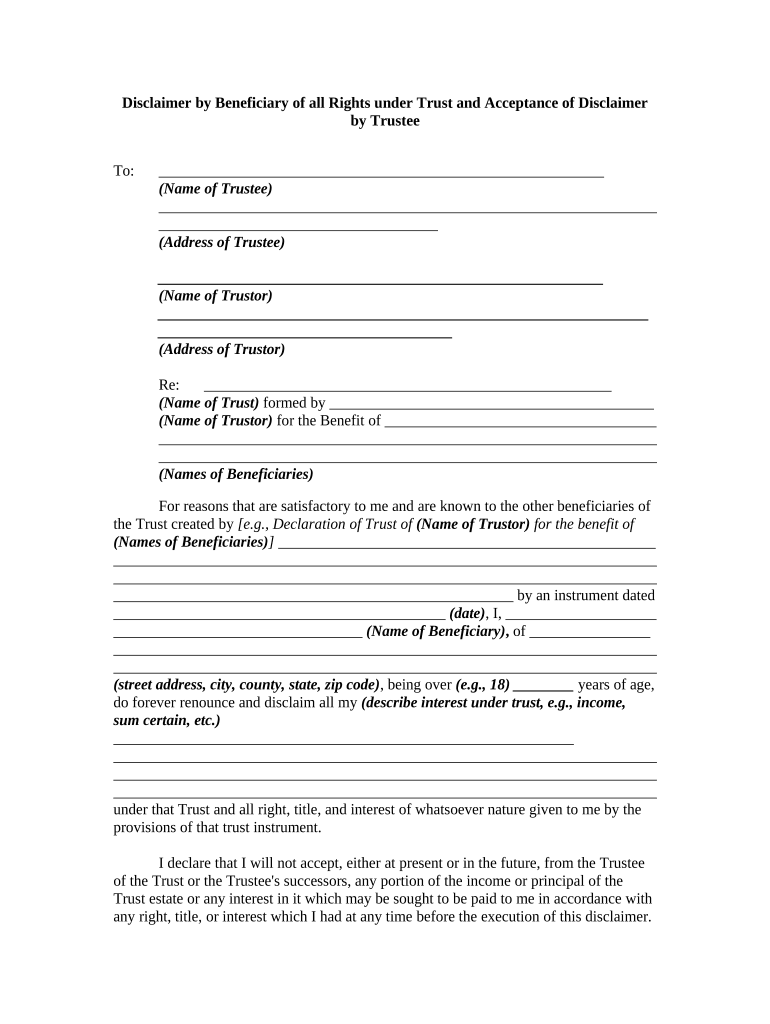
under trust create Preview on Page 1

Here's how it works

01. Edit your form online
Type text, add images, blackout confidential details, add comments, highlights and more.
02. Sign it in a few clicks
Draw your signature, type it, upload its image, or use your mobile device as a signature pad.
03. Share your form with others
Send it via email, link, or fax. You can also download it, export it or print it out.

How to use or fill out under trust create with our platform

Form edit decoration
9.5
Ease of Setup
DocHub User Ratings on G2
9.0
Ease of Use
DocHub User Ratings on G2
  1. Click ‘Get Form’ to open it in the editor.
  2. Begin by entering the name of the Trustee and their address in the designated fields. This information is crucial for identifying who is managing the trust.
  3. Next, input the name of the Trustor along with their address. This identifies who established the trust and ensures clarity in documentation.
  4. Fill in the name of the Trust and provide details about its formation date. This section establishes the context of your disclaimer.
  5. As a Beneficiary, clearly describe your interest under the trust, such as income or specific assets you are renouncing. Be precise to avoid any future disputes.
  6. Sign and date where indicated to finalize your disclaimer. Ensure that your printed name is also included for verification purposes.
  7. The Trustee must acknowledge receipt of your disclaimer by signing and dating at the bottom of the form, confirming acceptance.

Start using our platform today to streamline your document editing and signing process for free!

be ready to get more

Complete this form in 5 minutes or less

Get form

Got questions?

We have answers to the most popular questions from our customers. If you can't find an answer to your question, please contact us.
Contact us
Protection of Assets Assets placed under an irrevocable trust are protected from the reach of a divorcing spouse, creditors, business partners, or any unscrupulous legal intent. Assets like home, jewelry, art collection, and other valuables placed in the trust are guarded against anyone seeking litigation against you.
Irrevocable trusts are generally set up to minimize estate taxes, access government benefits, and protect assets. This is in contrast to a revocable trust. With a revocable trust, the grantor can modify or cancel the trust.
Personal trusts are further divided into either 1) Under Declaration of Trust (U/D/T) meaning the grantor and the trustee are the same person and the grantor controls the trust assets, and 2) Trust Under Agreement (U/A) meaning the grantor and the trustee are different persons and the trustee controls the trust assets.
In general, a trust is a relationship in which one person holds title to property, subject to an obligation to keep or use the property for the benefit of another. A trust is formed under state law. You may wish to consult the law of the state in which the organization is organized.

Security and compliance

At DocHub, your data security is our priority. We follow HIPAA, SOC2, GDPR, and other standards, so you can work on your documents with confidence.

Learn more
ccpa2
pci-dss
gdpr-compliance
hipaa
soc-compliance