01. Edit your adding someone to safety deposit box online
Type text, add images, blackout confidential details, add comments, highlights and more.
02. Sign it in a few clicks
Draw your signature, type it, upload its image, or use your mobile device as a signature pad.
03. Share your form with others
Send it via email, link, or fax. You can also download it, export it or print it out.
How to use or fill out access safe deposit
Ease of Setup
DocHub User Ratings on G2
Ease of Use
DocHub User Ratings on G2
Click ‘Get Form’ to open it in the editor.
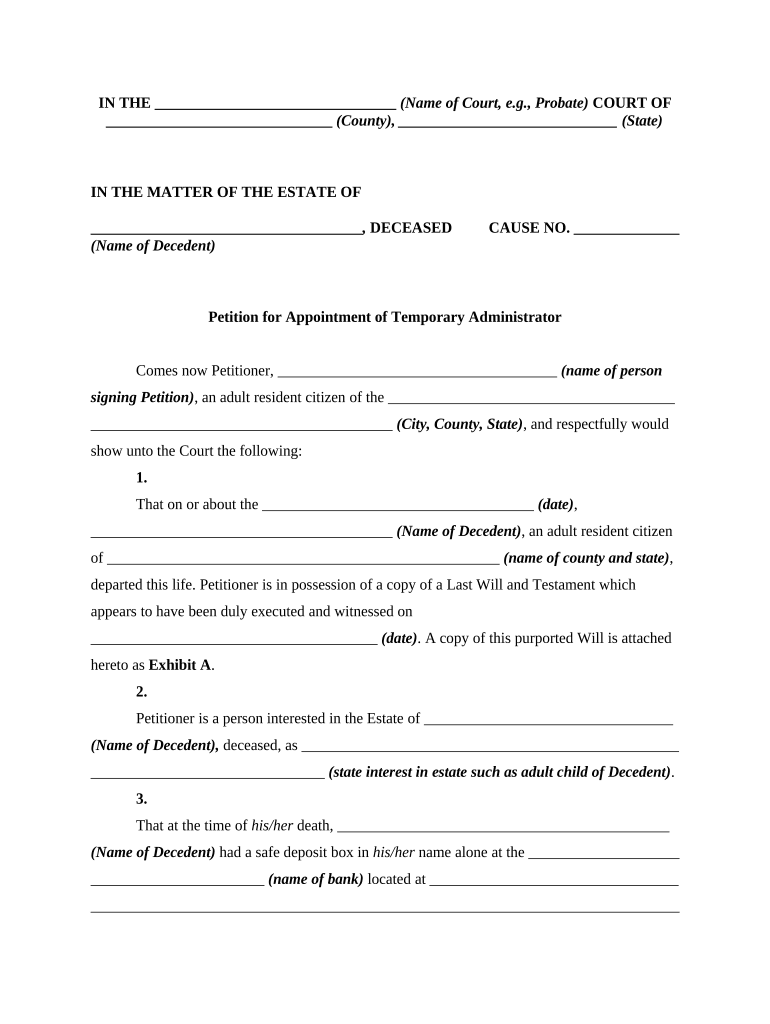
Begin by filling in the name of the court and the relevant county and state at the top of the form. This sets the context for your petition.
In the section regarding the decedent, provide their full name and details about their estate, including any relevant dates and information about their Last Will and Testament.
Clearly state your relationship to the decedent in the designated field, ensuring that you articulate your interest in their estate.
Fill out the bank's name and address where the safe deposit box is located, as well as confirm that you believe important documents are stored there.
Indicate your request for temporary administrator status, citing any applicable state code sections that support your petition.
Finally, review all entries for accuracy before signing and dating at the bottom of the form. Ensure that a notary public is available to witness your signature.
Start using our platform today to streamline your document editing experience for free!
Safe deposit box near meAccess safe deposit wells fargoAccess safe deposit vs safety depositAccess safe deposit boxAccess safe deposit near meSafe deposit box Bank of AmericaWho can access a safe deposit box after deathSafe deposit box Wells Fargo
Security and compliance
At DocHub, your data security is our priority. We follow HIPAA, SOC2, GDPR, and other standards, so you can work on your documents with confidence.
515.408 Access to certain safe deposit boxes prohibited.
Section 515.201 prohibits access to any safe deposit box within the United States in the custody of any designated national or containing any property in whichRead more
I am missing items from my safe deposit box. What can I do?
Authorized signature: When the safe deposit account is opened, all persons authorized to access the box sign a signature card. The bank allows only thoseRead more
Cookie consent notice
This site uses cookies to enhance site navigation and personalize your experience.
By using this site you agree to our use of cookies as described in our Privacy Notice.
You can modify your selections by visiting our Cookie and Advertising Notice.