Type text, add images, blackout confidential details, add comments, highlights and more.
02. Sign it in a few clicks
Draw your signature, type it, upload its image, or use your mobile device as a signature pad.
03. Share your form with others
Send it via email, link, or fax. You can also download it, export it or print it out.
How to use or fill out false arrest with our platform
Ease of Setup
DocHub User Ratings on G2
Ease of Use
DocHub User Ratings on G2
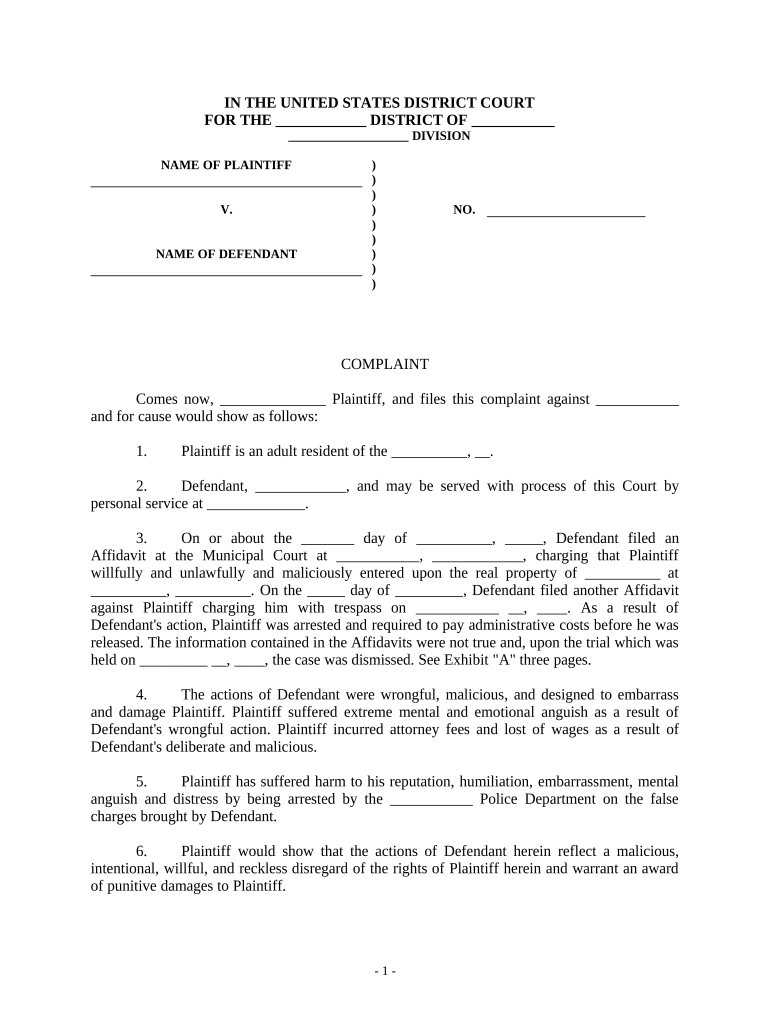
Click ‘Get Form’ to open the false arrest document in the editor.
Begin by filling in the 'NAME OF PLAINTIFF' and 'NAME OF DEFENDANT' sections at the top of the form. Ensure that you provide accurate names as these are crucial for your case.
In section 1, enter your residency details, including your city and state. This establishes your jurisdiction.
For section 2, specify where the defendant can be served. Include a complete address to avoid any delays in legal proceedings.
In section 3, detail the events leading to your false arrest. Be specific about dates and locations mentioned in affidavits filed against you.
Sections 4 through 6 require you to describe the emotional and financial impact of the defendant's actions. Use clear language to convey your experiences.
Finally, complete the demand for judgment section at the end of the form, specifying amounts for compensatory and punitive damages.
Start using our platform today to easily fill out your false arrest form online for free!
Use whichever parenthesized phrase, false imprisonment or false arrest, is more appropriate. Page 3. 3. 4. Omit the last three paragraphs if the defendantRead more
Cookie consent notice
This site uses cookies to enhance site navigation and personalize your experience.
By using this site you agree to our use of cookies as described in our Privacy Notice.
You can modify your selections by visiting our Cookie and Advertising Notice.